> ## Documentation Index
> Fetch the complete documentation index at: https://docs.maximem.ai/llms.txt
> Use this file to discover all available pages before exploring further.
# Agent Topologies
> How memory works across agent topologies: the runtime retrieve-generate-ingest loop, a single agent with its own MACA, and multiple agents that share memory across scopes.
Every memory-enabled agent follows the same runtime loop: it retrieves relevant context, generates a response, and ingests the turn back into memory. What changes between deployments is the *topology*: whether one agent serves your users, or several specialized agents share what they learn about the same people.
This page covers all three together. Start with the runtime loop (it is identical regardless of topology), then read the single-agent and multi-agent sections to decide how many [Instances](/concepts/memory-scopes#clients-and-instances), [scopes](/concepts/memory-scopes), and [Memory Architecture Configurations (MACAs)](/concepts/memory-architecture) your deployment needs.
## Agent interactions
The core pattern for any memory-enabled agent is a three-phase cycle: **Retrieve, Generate, Ingest**. This loop is the same whether you run one agent or many. Only the scope IDs you address change.
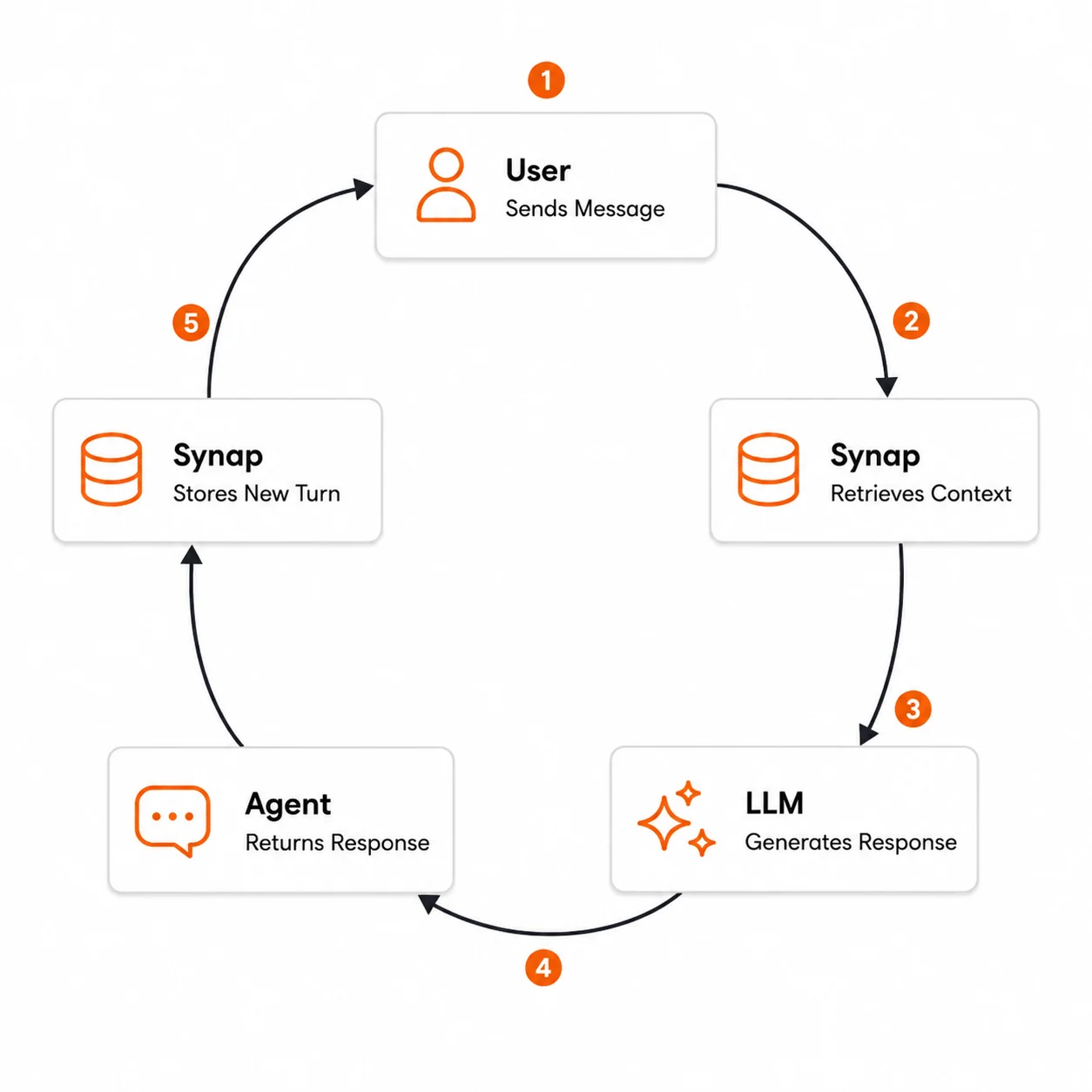 Your application receives a message from the user through whatever channel you support: a chat widget, API endpoint, mobile app, voice interface, or other integration.
Before calling the LLM, the agent queries Synap for memories relevant to the current message. This retrieval considers the user's history, their organization's shared knowledge, and any client-scoped information.
`conversation_id` must be a valid UUID. Generate one with `str(uuid.uuid4())` and reuse the same value for every turn in the conversation.
```python theme={null}
import uuid
conversation_id = str(uuid.uuid4()) # one UUID per conversation, reused across turns
context = await sdk.conversation.context.fetch(
conversation_id=conversation_id,
user_id="user_123",
customer_id="acme_corp",
search_query=[user_message],
mode="fast"
)
```
The agent assembles the full prompt for the LLM: a system prompt, the retrieved memories as context, the recent conversation history, and the current user message. The retrieved context bridges the gap between what the LLM knows (nothing about this user) and what it needs to know.
The agent calls the LLM (Anthropic, OpenAI, or any provider) with the assembled prompt. The LLM generates a response that is informed by the user's history and organizational context.
The generated response is sent back to the user through your application's interface.
After the response is delivered, the agent sends the full conversation turn (user message + agent response) to Synap for ingestion. This is asynchronous and non-blocking: the user does not wait for ingestion to complete.
```python theme={null}
await sdk.memories.create(
document=f"User: {user_message}\nAssistant: {assistant_response}",
document_type="ai-chat-conversation",
user_id="user_123",
customer_id="acme_corp",
mode="fast"
)
```
When the user sends the next message, the cycle begins again. This time, the retrieval step may return memories from the conversation turn that was just ingested, creating a continuously improving feedback loop.
### Injecting retrieved context into the prompt
The most critical part of the integration is how you structure the retrieved context within your LLM prompt. The retrieved memories need to be clearly separated from the system instructions and the conversation history so the LLM can use them effectively.
```
[System instructions]
- Your agent's persona, capabilities, and behavioral guidelines
[Retrieved context from Synap]
- Relevant facts, preferences, and historical context
- Clearly labeled as "context from memory"
[Conversation history]
- Recent messages in the current session
[Current user message]
- The message being responded to
```
```python theme={null}
def build_prompt(system_instructions: str, context, conversation_history: list, user_message: str):
"""Build the full prompt with retrieved memories injected."""
messages = [
{
"role": "system",
"content": (
f"{system_instructions}\n\n"
"## Context from memory\n"
"The following information has been retrieved from previous conversations "
"and documents. Use it to personalize your response and maintain continuity "
"across interactions. If the context is not relevant to the current question, "
"do not force it into your response.\n\n"
f"{context.formatted_context}"
)
}
]
for msg in conversation_history:
messages.append({"role": msg["role"], "content": msg["content"]})
messages.append({"role": "user", "content": user_message})
return messages
```
Include a brief instruction telling the LLM how to use the retrieved context. Phrases like "Use this to personalize your response" and "If the context is not relevant, do not force it" help the LLM apply memories appropriately without hallucinating connections.
### Choosing a retrieval mode
Retrieval is on the critical path of your agent's response time: the user is waiting while your agent fetches context. The mode you pick trades latency for retrieval depth.
| Mode | Search method | Best for |
| ---------- | ------------------------------------------------------- | --------------------------------------------- |
| `fast` | Vector + graph, no LLM query decomposition | Real-time conversations, single-topic queries |
| `accurate` | Vector + graph + LLM subquery decomposition + reranking | Complex queries, relationship-aware context |
For most real-time conversational agents, use `fast` mode: it returns quickly and adds minimal overhead. Reserve `accurate` mode for cases where retrieval quality matters more than speed, such as end-of-day summaries or complex analytical questions. See [Retrieval Modes](/concepts/retrieval-modes) for the full comparison.
```python theme={null}
# Fast retrieval for real-time chat (recommended default)
context = await sdk.conversation.context.fetch(
conversation_id=conversation_id,
user_id=user_id,
customer_id=customer_id,
search_query=[user_message],
mode="fast"
)
# Accurate retrieval for complex queries
context = await sdk.conversation.context.fetch(
conversation_id=conversation_id,
user_id=user_id,
customer_id=customer_id,
search_query=["Summarize everything we know about Project Atlas, including all team members and key decisions"],
mode="accurate"
)
```
### When to ingest
There are three common strategies for when to ingest conversation data, each with different tradeoffs:
Ingest each conversation turn (user message + agent response) immediately after the response is delivered. This is the most common pattern.
**Pros:**
* Memories are available for retrieval within the same conversation session
* No risk of data loss if the session ends unexpectedly
* Fine-grained temporal resolution
**Cons:**
* Higher API call volume
* Each turn is ingested independently, without full conversation context
```python theme={null}
await sdk.memories.create(
document=f"User: {user_message}\nAssistant: {response}",
document_type="ai-chat-conversation",
user_id=user_id,
customer_id=customer_id,
mode="fast"
)
```
Accumulate the full conversation and ingest it as a single document when the session ends.
**Pros:**
* Fewer API calls
* Full conversation context available for extraction: better entity resolution and relationship mapping
* More efficient for long-range mode processing
**Cons:**
* Memories from this session are not available during the session itself
* Risk of data loss if the session terminates unexpectedly (crash, timeout)
* Requires session lifecycle management
```python theme={null}
full_transcript = "\n".join(
f"{'User' if msg['role'] == 'user' else 'Assistant'}: {msg['content']}"
for msg in conversation_history
)
await sdk.memories.create(
document=full_transcript,
document_type="ai-chat-conversation",
user_id=user_id,
customer_id=customer_id,
mode="long-range"
)
```
Ingest each turn in fast mode for immediate availability, then ingest the full conversation in long-range mode at session end for deeper extraction.
**Pros:**
* Immediate availability of basic memories
* Deep extraction from the full conversation context
* Resilient to unexpected session termination
**Cons:**
* Higher API call volume and processing cost
* Requires deduplication logic (use `document_id` to handle overlapping content)
```python theme={null}
# During conversation: fast mode per turn
await sdk.memories.create(
document=f"User: {user_message}\nAssistant: {response}",
document_type="ai-chat-conversation",
document_id=f"turn_{session_id}_{turn_number}",
user_id=user_id,
customer_id=customer_id,
mode="fast"
)
# At conversation end: long-range mode for the full transcript
await sdk.memories.create(
document=full_transcript,
document_type="ai-chat-conversation",
document_id=f"session_{session_id}_full",
user_id=user_id,
customer_id=customer_id,
mode="long-range"
)
```
If your agent streams responses, ingest the conversation turn only after the full response has been assembled. Never ingest a partial or streaming response: the ingestion pipeline expects complete content to perform accurate entity extraction and relationship mapping, and partial content produces fragmented, low-quality memories.
### Best practices
Even if you think the current query does not need historical context, always call retrieval. Synap's ranking ensures that irrelevant context is not returned, so the overhead is minimal. Skipping retrieval means your agent cannot benefit from accumulated memory.
The LLM does not need to know how Synap works internally. Simply tell it to use the retrieved context naturally and to not fabricate memories. Over-engineering the memory instructions can cause the LLM to behave unnaturally.
Log retrieval and generation latencies independently. If your agent feels slow, retrieval in fast mode is rarely the bottleneck. LLM generation is usually the dominant factor. Measuring both independently helps you optimize the right layer.
When your application supports multi-turn conversations, pass a consistent `conversation_id` (a valid UUID) alongside the `user_id`. This helps Synap group related turns for better contextual understanding during retrieval.
Your agent should still function if Synap is temporarily unreachable. Skip the retrieval step and generate a response without memory context. The user experience degrades (no personalization) but does not break entirely.
```python theme={null}
try:
context = await sdk.conversation.context.fetch(...)
except Exception:
context = None # Proceed without memory context
```
## Single-agent memory
Most Synap deployments are **single-agent**: one AI agent, backed by one [Instance](/concepts/memory-scopes#clients-and-instances) running one [MACA](/concepts/memory-architecture). All memory flows through that single Instance, and the people your agent serves are kept separate by [scopes](/concepts/memory-scopes), not by running additional Instances.
If you have one agent with a single, coherent purpose, you want a single-agent architecture. You do not create a new Instance per user or per customer: scopes handle that isolation for you.
A single-agent architecture has three fixed pieces:
* **One Instance**: the deployed unit that owns the memory store and credentials.
* **One MACA**: generated automatically from the [Use-Case Markdown](/concepts/memory-architecture#the-use-case-file) file you upload at creation. It governs what gets extracted, how it is stored, and how retrieval ranks results for *this* agent.
* **Scopes for isolation**: every memory is written and read at a scope in the chain **User → Customer → Client**. Two different end-users on the same Instance never see each other's memories, because their memories live at different `user_id` scopes.
The Instance is infrastructure; the scope chain is what isolates memory. You scale the number of people your agent serves by passing more `user_id` values (and `customer_id` values in B2B deployments), never by provisioning more Instances.
```python theme={null}
from maximem_synap import MaximemSynapSDK
sdk = MaximemSynapSDK(api_key="synap_api_key")
# Same Instance, different people: isolated by scope, not by Instance
await sdk.memories.create(
document="User: I prefer concise answers and dark mode.",
document_type="ai-chat-conversation",
user_id="user_alice",
customer_id="acme_corp",
)
await sdk.memories.create(
document="User: Always include code examples in responses.",
document_type="ai-chat-conversation",
user_id="user_bob",
customer_id="acme_corp",
)
# Alice's retrieval never surfaces Bob's preferences
context = await sdk.user.context.fetch(
user_id="user_alice",
customer_id="acme_corp",
)
```
### How you map your world onto scopes
The right way to map *your* world onto Synap's scopes depends on who your agent serves. Describe these roles in the [Role Descriptions](/concepts/memory-architecture#the-use-case-file) section of your use-case file, and Synap tunes the MACA's primary scope accordingly.
One person is the Client, Customer, and User at once. The scope hierarchy collapses: effectively everything is User-scoped. Best for consumer (B2C) apps where each account is a single individual.
One organization (Customer) with many individual Users. Shared organizational knowledge lives at Customer scope; personal context lives at User scope.
Many Customers, each with many Users, all served by the same agent on one Instance. The most common SaaS shape. Customer scope isolates tenants; User scope isolates individuals within a tenant.
All three are **single-agent**: they differ only in how you populate the scope chain, not in how many Instances or MACAs you run.
### Scaling a single agent
A single-agent architecture scales to many users and customers without any change to its topology:
* **More users or customers** never require more Instances. Pass new scope IDs and the chain isolates them automatically.
* **Staging vs. production** is a separate concern. Use a distinct Instance per environment so test data never mixes with production memory, each is still a single-agent deployment.
* **Behavior changes** (new task categories, new compliance rules) are made by re-uploading the use-case file, which regenerates the MACA. The topology stays the same.
Separate Instances for staging and production is an *environment* split, not a multi-agent architecture. You still have one agent per Instance, each with its own MACA.
Stay single-agent as long as your deployment is one agent with one purpose. Graduate to multi-agent when you run **specialized agents** that should share what they learn about the same users, when different agents need **materially different extraction behavior**, or when you are modeling a **team of agents** under one organizational umbrella.
## Multi-agent memory
A **multi-agent** architecture runs more than one agent against Synap: for example a sales agent, a support agent, and an onboarding agent that together serve the same users. The central question is always the same: **which agents should share what they remember, and which should stay isolated?**
### The key rule: sharing is by scope, not by Instance
An [Instance](/concepts/memory-scopes#clients-and-instances) is infrastructure: it is **not** a memory scope. What two agents share is decided entirely by the scope IDs they address: if they ingest and retrieve with the same `user_id` (and `customer_id` in B2B), they share that user's and customer's memories. The [scope chain](/concepts/memory-scopes) (**User → Customer → Client**) is the sharing boundary; the Instance boundary is the isolation boundary.
Every pattern below is just a different combination of *which Instance* agents run on and *which scopes* they address.
### Three architecture patterns
| Pattern | MACA | Memory sharing | Use when |
| ---------------------------------------- | ------------------------------------------- | ------------------------------------------------------------------------------ | -------------------------------------------------------------------------------- |
| **Shared Instance + shared scopes** | One MACA for all agents | Full, automatic sharing via the same scope IDs | Agents serve the same users and should each benefit from what the others learn |
| **Separate Instance per agent** | A tailored MACA per agent role | Isolated by Instance; overlap only at Client scope if you write there | Agents have very different extraction needs, or must not see each other's memory |
| **Hierarchical Instances (agent teams)** | Per-Instance MACA, organized under a parent | Organizational grouping via `parent_instance_id`; isolation still per-Instance | You are modeling a team of agents under one umbrella |
#### Shared Instance + shared scopes
All agents run on one Instance and address the same scopes. Because memory is keyed by scope, every agent automatically sees what the others have stored for that user or customer. This is how handoffs work: the receiving agent inherits the context the previous one built. This is the simplest and most common multi-agent setup.
```python theme={null}
# Sales agent stores context for a user
await sdk.memories.create(
document="User: We're evaluating the enterprise plan for 500 seats.",
document_type="ai-chat-conversation",
user_id="user_123",
customer_id="acme_corp",
)
# Support agent (same Instance, same scopes) sees it automatically
context = await sdk.user.context.fetch(
user_id="user_123",
customer_id="acme_corp",
search_query=["enterprise plan and SSO"],
)
# context surfaces the sales conversation without the user repeating it
```
One MACA governs all the agents here, so they share both memory **and** extraction behavior.
#### Separate Instance per agent
Give each agent its own Instance, and therefore its own MACA generated from its own [Use-Case Markdown](/concepts/memory-architecture#the-use-case-file). A support agent can prioritize extracting error details and resolutions, while a sales agent prioritizes buying signals and account context. Memory is isolated per Instance: the agents do **not** automatically see each other's memories. Use this when agents have genuinely different jobs, or when policy requires their memories to stay separate.
If two such agents still need a shared baseline (e.g. product knowledge), write that knowledge at **Client scope** in each Instance, or keep a dedicated knowledge Instance, but per-user context will not cross the Instance boundary.
#### Hierarchical Instances (agent teams)
When you have a team of specialized agents that belong together, model them as [hierarchical Instances](/concepts/memory-scopes#clients-and-instances): create a parent Instance and point each child's `parent_instance_id` at it. This is an **organizational** tool for grouping related deployments and sharing configuration patterns. Memory isolation is still enforced per-Instance. Hierarchy organizes your agents, it does not merge their memory.
### Per-agent vs. shared knowledge
Once you have picked a pattern, decide deliberately what to share:
* **To share across agents**, have them address the same scope IDs. User- and Customer-scoped memories then flow between them automatically.
* **To isolate agents**, give them separate Instances: the Instance boundary prevents per-user memory from leaking between agents even if they happen to use the same IDs.
* **For knowledge every agent should see**, write it at **Client scope** (no `user_id` / `customer_id`); it is visible to all retrievals within an Instance.
There is exactly **one MACA per Instance**, and that single fact drives the build-vs-split decision: agents that should share memory **and** behave the same way belong on one Instance (one MACA); agents that need different extraction priorities, retention, or compliance handling need separate Instances (separate MACAs), and you accept that per-user memory will not automatically cross between them.
## Next steps
Follow a single turn through retrieval, generation, and ingestion across the full system.
Fast vs. accurate retrieval and when to use each.
The Client, Customer, and User scopes that isolate and share memory.
The MACA that Synap generates for each Instance.
Your application receives a message from the user through whatever channel you support: a chat widget, API endpoint, mobile app, voice interface, or other integration.
Before calling the LLM, the agent queries Synap for memories relevant to the current message. This retrieval considers the user's history, their organization's shared knowledge, and any client-scoped information.
`conversation_id` must be a valid UUID. Generate one with `str(uuid.uuid4())` and reuse the same value for every turn in the conversation.
```python theme={null}
import uuid
conversation_id = str(uuid.uuid4()) # one UUID per conversation, reused across turns
context = await sdk.conversation.context.fetch(
conversation_id=conversation_id,
user_id="user_123",
customer_id="acme_corp",
search_query=[user_message],
mode="fast"
)
```
The agent assembles the full prompt for the LLM: a system prompt, the retrieved memories as context, the recent conversation history, and the current user message. The retrieved context bridges the gap between what the LLM knows (nothing about this user) and what it needs to know.
The agent calls the LLM (Anthropic, OpenAI, or any provider) with the assembled prompt. The LLM generates a response that is informed by the user's history and organizational context.
The generated response is sent back to the user through your application's interface.
After the response is delivered, the agent sends the full conversation turn (user message + agent response) to Synap for ingestion. This is asynchronous and non-blocking: the user does not wait for ingestion to complete.
```python theme={null}
await sdk.memories.create(
document=f"User: {user_message}\nAssistant: {assistant_response}",
document_type="ai-chat-conversation",
user_id="user_123",
customer_id="acme_corp",
mode="fast"
)
```
When the user sends the next message, the cycle begins again. This time, the retrieval step may return memories from the conversation turn that was just ingested, creating a continuously improving feedback loop.
### Injecting retrieved context into the prompt
The most critical part of the integration is how you structure the retrieved context within your LLM prompt. The retrieved memories need to be clearly separated from the system instructions and the conversation history so the LLM can use them effectively.
```
[System instructions]
- Your agent's persona, capabilities, and behavioral guidelines
[Retrieved context from Synap]
- Relevant facts, preferences, and historical context
- Clearly labeled as "context from memory"
[Conversation history]
- Recent messages in the current session
[Current user message]
- The message being responded to
```
```python theme={null}
def build_prompt(system_instructions: str, context, conversation_history: list, user_message: str):
"""Build the full prompt with retrieved memories injected."""
messages = [
{
"role": "system",
"content": (
f"{system_instructions}\n\n"
"## Context from memory\n"
"The following information has been retrieved from previous conversations "
"and documents. Use it to personalize your response and maintain continuity "
"across interactions. If the context is not relevant to the current question, "
"do not force it into your response.\n\n"
f"{context.formatted_context}"
)
}
]
for msg in conversation_history:
messages.append({"role": msg["role"], "content": msg["content"]})
messages.append({"role": "user", "content": user_message})
return messages
```
Include a brief instruction telling the LLM how to use the retrieved context. Phrases like "Use this to personalize your response" and "If the context is not relevant, do not force it" help the LLM apply memories appropriately without hallucinating connections.
### Choosing a retrieval mode
Retrieval is on the critical path of your agent's response time: the user is waiting while your agent fetches context. The mode you pick trades latency for retrieval depth.
| Mode | Search method | Best for |
| ---------- | ------------------------------------------------------- | --------------------------------------------- |
| `fast` | Vector + graph, no LLM query decomposition | Real-time conversations, single-topic queries |
| `accurate` | Vector + graph + LLM subquery decomposition + reranking | Complex queries, relationship-aware context |
For most real-time conversational agents, use `fast` mode: it returns quickly and adds minimal overhead. Reserve `accurate` mode for cases where retrieval quality matters more than speed, such as end-of-day summaries or complex analytical questions. See [Retrieval Modes](/concepts/retrieval-modes) for the full comparison.
```python theme={null}
# Fast retrieval for real-time chat (recommended default)
context = await sdk.conversation.context.fetch(
conversation_id=conversation_id,
user_id=user_id,
customer_id=customer_id,
search_query=[user_message],
mode="fast"
)
# Accurate retrieval for complex queries
context = await sdk.conversation.context.fetch(
conversation_id=conversation_id,
user_id=user_id,
customer_id=customer_id,
search_query=["Summarize everything we know about Project Atlas, including all team members and key decisions"],
mode="accurate"
)
```
### When to ingest
There are three common strategies for when to ingest conversation data, each with different tradeoffs:
Ingest each conversation turn (user message + agent response) immediately after the response is delivered. This is the most common pattern.
**Pros:**
* Memories are available for retrieval within the same conversation session
* No risk of data loss if the session ends unexpectedly
* Fine-grained temporal resolution
**Cons:**
* Higher API call volume
* Each turn is ingested independently, without full conversation context
```python theme={null}
await sdk.memories.create(
document=f"User: {user_message}\nAssistant: {response}",
document_type="ai-chat-conversation",
user_id=user_id,
customer_id=customer_id,
mode="fast"
)
```
Accumulate the full conversation and ingest it as a single document when the session ends.
**Pros:**
* Fewer API calls
* Full conversation context available for extraction: better entity resolution and relationship mapping
* More efficient for long-range mode processing
**Cons:**
* Memories from this session are not available during the session itself
* Risk of data loss if the session terminates unexpectedly (crash, timeout)
* Requires session lifecycle management
```python theme={null}
full_transcript = "\n".join(
f"{'User' if msg['role'] == 'user' else 'Assistant'}: {msg['content']}"
for msg in conversation_history
)
await sdk.memories.create(
document=full_transcript,
document_type="ai-chat-conversation",
user_id=user_id,
customer_id=customer_id,
mode="long-range"
)
```
Ingest each turn in fast mode for immediate availability, then ingest the full conversation in long-range mode at session end for deeper extraction.
**Pros:**
* Immediate availability of basic memories
* Deep extraction from the full conversation context
* Resilient to unexpected session termination
**Cons:**
* Higher API call volume and processing cost
* Requires deduplication logic (use `document_id` to handle overlapping content)
```python theme={null}
# During conversation: fast mode per turn
await sdk.memories.create(
document=f"User: {user_message}\nAssistant: {response}",
document_type="ai-chat-conversation",
document_id=f"turn_{session_id}_{turn_number}",
user_id=user_id,
customer_id=customer_id,
mode="fast"
)
# At conversation end: long-range mode for the full transcript
await sdk.memories.create(
document=full_transcript,
document_type="ai-chat-conversation",
document_id=f"session_{session_id}_full",
user_id=user_id,
customer_id=customer_id,
mode="long-range"
)
```
If your agent streams responses, ingest the conversation turn only after the full response has been assembled. Never ingest a partial or streaming response: the ingestion pipeline expects complete content to perform accurate entity extraction and relationship mapping, and partial content produces fragmented, low-quality memories.
### Best practices
Even if you think the current query does not need historical context, always call retrieval. Synap's ranking ensures that irrelevant context is not returned, so the overhead is minimal. Skipping retrieval means your agent cannot benefit from accumulated memory.
The LLM does not need to know how Synap works internally. Simply tell it to use the retrieved context naturally and to not fabricate memories. Over-engineering the memory instructions can cause the LLM to behave unnaturally.
Log retrieval and generation latencies independently. If your agent feels slow, retrieval in fast mode is rarely the bottleneck. LLM generation is usually the dominant factor. Measuring both independently helps you optimize the right layer.
When your application supports multi-turn conversations, pass a consistent `conversation_id` (a valid UUID) alongside the `user_id`. This helps Synap group related turns for better contextual understanding during retrieval.
Your agent should still function if Synap is temporarily unreachable. Skip the retrieval step and generate a response without memory context. The user experience degrades (no personalization) but does not break entirely.
```python theme={null}
try:
context = await sdk.conversation.context.fetch(...)
except Exception:
context = None # Proceed without memory context
```
## Single-agent memory
Most Synap deployments are **single-agent**: one AI agent, backed by one [Instance](/concepts/memory-scopes#clients-and-instances) running one [MACA](/concepts/memory-architecture). All memory flows through that single Instance, and the people your agent serves are kept separate by [scopes](/concepts/memory-scopes), not by running additional Instances.
If you have one agent with a single, coherent purpose, you want a single-agent architecture. You do not create a new Instance per user or per customer: scopes handle that isolation for you.
A single-agent architecture has three fixed pieces:
* **One Instance**: the deployed unit that owns the memory store and credentials.
* **One MACA**: generated automatically from the [Use-Case Markdown](/concepts/memory-architecture#the-use-case-file) file you upload at creation. It governs what gets extracted, how it is stored, and how retrieval ranks results for *this* agent.
* **Scopes for isolation**: every memory is written and read at a scope in the chain **User → Customer → Client**. Two different end-users on the same Instance never see each other's memories, because their memories live at different `user_id` scopes.
The Instance is infrastructure; the scope chain is what isolates memory. You scale the number of people your agent serves by passing more `user_id` values (and `customer_id` values in B2B deployments), never by provisioning more Instances.
```python theme={null}
from maximem_synap import MaximemSynapSDK
sdk = MaximemSynapSDK(api_key="synap_api_key")
# Same Instance, different people: isolated by scope, not by Instance
await sdk.memories.create(
document="User: I prefer concise answers and dark mode.",
document_type="ai-chat-conversation",
user_id="user_alice",
customer_id="acme_corp",
)
await sdk.memories.create(
document="User: Always include code examples in responses.",
document_type="ai-chat-conversation",
user_id="user_bob",
customer_id="acme_corp",
)
# Alice's retrieval never surfaces Bob's preferences
context = await sdk.user.context.fetch(
user_id="user_alice",
customer_id="acme_corp",
)
```
### How you map your world onto scopes
The right way to map *your* world onto Synap's scopes depends on who your agent serves. Describe these roles in the [Role Descriptions](/concepts/memory-architecture#the-use-case-file) section of your use-case file, and Synap tunes the MACA's primary scope accordingly.
One person is the Client, Customer, and User at once. The scope hierarchy collapses: effectively everything is User-scoped. Best for consumer (B2C) apps where each account is a single individual.
One organization (Customer) with many individual Users. Shared organizational knowledge lives at Customer scope; personal context lives at User scope.
Many Customers, each with many Users, all served by the same agent on one Instance. The most common SaaS shape. Customer scope isolates tenants; User scope isolates individuals within a tenant.
All three are **single-agent**: they differ only in how you populate the scope chain, not in how many Instances or MACAs you run.
### Scaling a single agent
A single-agent architecture scales to many users and customers without any change to its topology:
* **More users or customers** never require more Instances. Pass new scope IDs and the chain isolates them automatically.
* **Staging vs. production** is a separate concern. Use a distinct Instance per environment so test data never mixes with production memory, each is still a single-agent deployment.
* **Behavior changes** (new task categories, new compliance rules) are made by re-uploading the use-case file, which regenerates the MACA. The topology stays the same.
Separate Instances for staging and production is an *environment* split, not a multi-agent architecture. You still have one agent per Instance, each with its own MACA.
Stay single-agent as long as your deployment is one agent with one purpose. Graduate to multi-agent when you run **specialized agents** that should share what they learn about the same users, when different agents need **materially different extraction behavior**, or when you are modeling a **team of agents** under one organizational umbrella.
## Multi-agent memory
A **multi-agent** architecture runs more than one agent against Synap: for example a sales agent, a support agent, and an onboarding agent that together serve the same users. The central question is always the same: **which agents should share what they remember, and which should stay isolated?**
### The key rule: sharing is by scope, not by Instance
An [Instance](/concepts/memory-scopes#clients-and-instances) is infrastructure: it is **not** a memory scope. What two agents share is decided entirely by the scope IDs they address: if they ingest and retrieve with the same `user_id` (and `customer_id` in B2B), they share that user's and customer's memories. The [scope chain](/concepts/memory-scopes) (**User → Customer → Client**) is the sharing boundary; the Instance boundary is the isolation boundary.
Every pattern below is just a different combination of *which Instance* agents run on and *which scopes* they address.
### Three architecture patterns
| Pattern | MACA | Memory sharing | Use when |
| ---------------------------------------- | ------------------------------------------- | ------------------------------------------------------------------------------ | -------------------------------------------------------------------------------- |
| **Shared Instance + shared scopes** | One MACA for all agents | Full, automatic sharing via the same scope IDs | Agents serve the same users and should each benefit from what the others learn |
| **Separate Instance per agent** | A tailored MACA per agent role | Isolated by Instance; overlap only at Client scope if you write there | Agents have very different extraction needs, or must not see each other's memory |
| **Hierarchical Instances (agent teams)** | Per-Instance MACA, organized under a parent | Organizational grouping via `parent_instance_id`; isolation still per-Instance | You are modeling a team of agents under one umbrella |
#### Shared Instance + shared scopes
All agents run on one Instance and address the same scopes. Because memory is keyed by scope, every agent automatically sees what the others have stored for that user or customer. This is how handoffs work: the receiving agent inherits the context the previous one built. This is the simplest and most common multi-agent setup.
```python theme={null}
# Sales agent stores context for a user
await sdk.memories.create(
document="User: We're evaluating the enterprise plan for 500 seats.",
document_type="ai-chat-conversation",
user_id="user_123",
customer_id="acme_corp",
)
# Support agent (same Instance, same scopes) sees it automatically
context = await sdk.user.context.fetch(
user_id="user_123",
customer_id="acme_corp",
search_query=["enterprise plan and SSO"],
)
# context surfaces the sales conversation without the user repeating it
```
One MACA governs all the agents here, so they share both memory **and** extraction behavior.
#### Separate Instance per agent
Give each agent its own Instance, and therefore its own MACA generated from its own [Use-Case Markdown](/concepts/memory-architecture#the-use-case-file). A support agent can prioritize extracting error details and resolutions, while a sales agent prioritizes buying signals and account context. Memory is isolated per Instance: the agents do **not** automatically see each other's memories. Use this when agents have genuinely different jobs, or when policy requires their memories to stay separate.
If two such agents still need a shared baseline (e.g. product knowledge), write that knowledge at **Client scope** in each Instance, or keep a dedicated knowledge Instance, but per-user context will not cross the Instance boundary.
#### Hierarchical Instances (agent teams)
When you have a team of specialized agents that belong together, model them as [hierarchical Instances](/concepts/memory-scopes#clients-and-instances): create a parent Instance and point each child's `parent_instance_id` at it. This is an **organizational** tool for grouping related deployments and sharing configuration patterns. Memory isolation is still enforced per-Instance. Hierarchy organizes your agents, it does not merge their memory.
### Per-agent vs. shared knowledge
Once you have picked a pattern, decide deliberately what to share:
* **To share across agents**, have them address the same scope IDs. User- and Customer-scoped memories then flow between them automatically.
* **To isolate agents**, give them separate Instances: the Instance boundary prevents per-user memory from leaking between agents even if they happen to use the same IDs.
* **For knowledge every agent should see**, write it at **Client scope** (no `user_id` / `customer_id`); it is visible to all retrievals within an Instance.
There is exactly **one MACA per Instance**, and that single fact drives the build-vs-split decision: agents that should share memory **and** behave the same way belong on one Instance (one MACA); agents that need different extraction priorities, retention, or compliance handling need separate Instances (separate MACAs), and you accept that per-user memory will not automatically cross between them.
## Next steps
Follow a single turn through retrieval, generation, and ingestion across the full system.
Fast vs. accurate retrieval and when to use each.
The Client, Customer, and User scopes that isolate and share memory.
The MACA that Synap generates for each Instance.