> ## Documentation Index
> Fetch the complete documentation index at: https://docs.maximem.ai/llms.txt
> Use this file to discover all available pages before exploring further.
# Identifiers & Scopes
> Synap's identifiers (Client, Instance, Customer, User, and Conversation) define who and what your agent remembers about. They map onto a four-level scope chain (User → Customer → Client → World) that determines memory isolation and retrieval priority. This is the canonical mental model for getting multi-user, multi-tenant memory right: personal data stays personal, shared knowledge surfaces where it is needed.
This page explains the **identity model and the scope chain**. Code examples are illustrative. For the canonical SDK call signatures and full parameter reference, see [SDK → Ingestion](/sdk/ingestion) and [SDK → Context Fetch](/sdk/context-fetch).
Start with user-scoped memories. Add customer and client scopes as your application grows. You can always broaden scope later. Narrowing scope after the fact requires re-ingestion.
## The identifiers at a glance
Synap organizes memory around five identifiers. Two describe your **infrastructure** (who you are and what you deployed); three describe **who your agent is serving** and drive how memory is scoped.
| Identifier | What it represents | Who creates it | Format | Scope level |
| ---------------- | ----------------------------------- | ---------------------------------------------- | ----------------------------------------- | --------------------------- |
| **Client** | Your organization / application | Synap (on signup) | `cli_` | CLIENT |
| **Instance** | A deployed Synap agent | You (via Dashboard) | `inst_` | N/A (resolved from API key) |
| **Customer** | A tenant / organization in your app | You (implicitly, by passing `customer_id`) | Any string you choose | CUSTOMER |
| **User** | An individual end-user | You (implicitly, by passing `user_id`) | Any string you choose | USER |
| **Conversation** | A single chat / session | You (implicitly, by passing `conversation_id`) | Any string you choose (UUIDs are typical) | within USER |
```
CLIENT (your application) cli_
└── INSTANCE (a deployed agent) inst_ ← resolved from your API key
└── CUSTOMER (a tenant) customer_id ← B2B only; auto-resolved on B2C
└── USER user_id
└── CONVERSATION conversation_id
```
Clients are created by Synap on signup; Instances are created and managed in the Synap Dashboard. Customers, Users, and Conversations are *implicitly* created: they come into existence the first time you pass their IDs during ingestion or retrieval. There is no separate registration step.
***
## B2C vs B2B: which scopes apply to you
How many of these scopes you actually use depends on your Instance's tenancy shape. This is set once per Instance by the **User Relationship** setting (in the Dashboard, under Instance Settings), and it decides whether `customer_id` is part of your scoping at all.
* **B2C (personal app)**: one tier of users, with no organization above them. You identify each user by `user_id` only, and you never pass `customer_id` (the customer scope is auto-resolved server-side). Memories live at the user scope, with client and world above them. This is the right model when your users are individuals: a companion app, a personal assistant, or your first hobby agent.
* **B2B (multi-tenant)**: your customers are organizations, each containing many users. Every user is scoped under a `customer_id`, so you pass **both** `user_id` and `customer_id` on every call. This is what activates the customer scope: facts tagged at customer scope are shared across that tenant's users, while user-scoped memories stay private to the individual.
**How to tell which you have:** open your Instance in the Dashboard and check **User Relationship** under Instance Settings. If it is a personal/B2C relationship, omit `customer_id`. If it is a B2B relationship, include `customer_id` on every call. The default for a brand-new personal agent is **B2C** (`user_id` only).
The scope levels below describe the full four-level chain. In a B2C Instance you primarily work with the User scope (plus Client and World); the Customer scope becomes relevant once you adopt the B2B multi-tenant shape.
***
## Clients and instances
Clients and Instances are Synap's **infrastructure layer**: they describe who you are and what you deployed, not who your agent serves. Memory isolation itself happens along the Customer/User scope chain *inside* an Instance.
### What is a Client?
A **Client** is the top-level organizational entity in Synap. It represents your company, team, or application. When you sign up for Synap and create an account, you are creating a Client.
Every Client has a unique identifier in the format `cli_` (for example, `cli_a3f8b1c2d4e5f678`). This identifier is immutable and used throughout the Synap API and SDK to scope operations to your organization. A Client carries human-readable metadata (name, website, description), arbitrary JSON `context`, and a `status` of `active`, `inactive`, or `soft_deleted`.
When a Client is set to `inactive` or `soft_deleted`, all of its Instances are effectively suspended. No ingestion or retrieval operations will succeed until the Client is reactivated.
### What is an Instance?
An **Instance** is a deployed Synap memory agent. It is the unit of deployment: each Instance has its own isolated memory store, configuration, credentials, and scope hierarchy. You create Instances under a Client to represent different AI agents, environments (staging vs. production), or use cases.
Every Instance has a unique identifier in the format `inst_` (for example, `inst_7b2e9a1c3d4f5678`). You never pass the `instance_id` directly on SDK calls: **the Instance is resolved from the API key** you authenticate with. Each API key (format `synap_`) belongs to exactly one Instance, so the key both authenticates you and selects which Instance's memory you are reading and writing.
### What each Instance owns
Each Instance is a fully isolated environment. When you create an Instance, Synap provisions these resources exclusively for it:
One or more API keys (format: `synap_`) generated from the Dashboard. Each key authenticates the SDK and resolves to this Instance. The SHA-256 hash is stored; the raw key is shown once at generation time and can be individually revoked.
The per-instance Memory Architecture Configuration (MACA) that controls how memories are extracted, stored, and retrieved. Synap generates it automatically from the **Use-Case Markdown** file you upload at instance creation: the more detail you provide there, the better the starting configuration. See [Memory Architecture](/concepts/memory-architecture).
Isolated vector and graph storage namespaces. Memories stored in one Instance are never accessible from another Instance unless explicitly shared through scope configuration.
Within an Instance, memory is isolated along the scope chain (User → Customer → Client), enforced at the storage layer.
Clients and Instances are created and managed through the **Synap Dashboard** ([synap.maximem.ai](https://synap.maximem.ai) → **Instances**). The SDK runs *inside* an Instance once it exists; it does not create or list Instances.
***
## Customers and users
Customers and Users are **your** entities, not Synap's. You provide the `customer_id` and `user_id` strings, and Synap uses them to organize and isolate memories. You do not need to register these identifiers in advance. Simply pass them during ingestion and retrieval.
### What is a Customer?
A **Customer** represents a tenant or organization in your application. If you are building a B2B SaaS product, each of your client companies is a Customer. If you are building a consumer app, each household or account group could be a Customer.
Customers are identified by a `customer_id` string that you provide. This string is opaque to Synap: it can be a UUID, a slug, a database ID, or any identifier that is unique within your application. Synap uses it to create a memory boundary at the **CUSTOMER** scope level.
**Examples of Customers:** `"acme_corp"`, `"startup_xyz"`, `"household_9a3f"`, `"team_engineering"`.
On a **B2C** Instance there is no organization above the user, so you never pass `customer_id`: the customer scope is auto-resolved server-side. On a **B2B** Instance, `customer_id` is required on every call and is what shares facts across a tenant's users.
### What is a User?
A **User** represents an individual end-user of your application. Each person interacting with your AI agent is a User. Users are identified by a `user_id` string that you provide, following the same rules as `customer_id`: it is opaque to Synap and can be any unique identifier.
Users map to the **USER** scope, the narrowest and most private scope level. Memories stored at the User scope are visible only when that specific `user_id` is provided in a retrieval query.
**Examples of Users:** `"user_alice_chen"`, `"u_8b2f4a91"`, `"github|12345"`, `"employee_0042"`.
### Conversations
A **Conversation** is a single chat or session for a user, identified by an optional `conversation_id` you pass alongside `user_id`. It groups exchanges within the USER scope so the agent can distinguish "this session" from a user's broader history. Conversation IDs are opaque strings; UUIDs are typical:
```python theme={null}
import uuid
conversation_id = str(uuid.uuid4())
```
***
## The scope chain
Synap uses a four-level hierarchical scope chain, ordered from narrowest (most private) to broadest (most shared):
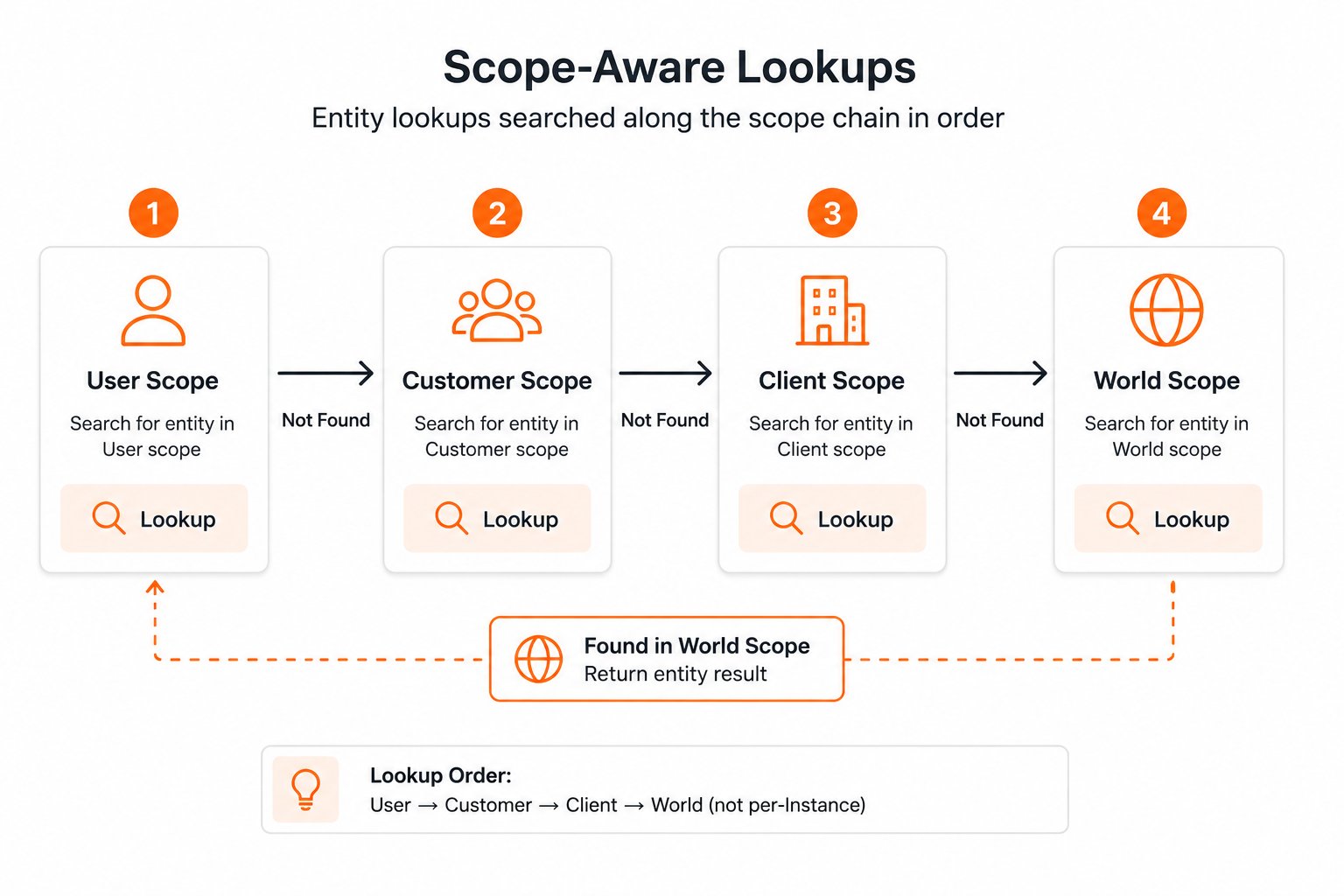 When Synap retrieves memories, it searches the scope chain from narrowest to broadest. User-scoped memories take priority over customer-scoped memories, which take priority over client-scoped, and so on (**USER > CUSTOMER > CLIENT > WORLD**). This ensures the most specific, relevant memories surface first.
### User scope
The most granular scope. Memories stored at the user level are visible only when that specific user is the context for a retrieval query. Use this for personal information, individual preferences, and conversation-specific knowledge.
| Aspect | Detail |
| -------------- | --------------------------------------------------------------- |
| **Visibility** | Only when `user_id` matches the query |
| **Isolation** | Complete: no other user can see these memories |
| **Use cases** | Personal preferences, individual history, private conversations |
**Examples:** "User prefers dark mode and concise responses" · "User's name is Alice Chen" · "User is based in Portland, Oregon" · "User is preparing for an annual review next week".
### Customer scope
Memories shared across all users within a customer or organization. Use this for company-wide knowledge, shared context, and organizational facts. In a B2B SaaS application, a "customer" is typically one of your client's end-customer organizations. (On a B2C Instance this scope is auto-resolved and rarely used directly.)
| Aspect | Detail |
| -------------- | ------------------------------------------------------------- |
| **Visibility** | When `customer_id` matches the query, regardless of `user_id` |
| **Isolation** | All users within the customer can see these memories |
| **Use cases** | Company policies, shared projects, organizational structure |
**Examples:** "Acme Corp's fiscal year ends in March" · "Company uses Jira and Slack" · "The engineering team is migrating to microservices" · "Primary billing contact is [finance@acmecorp.com](mailto:finance@acmecorp.com)".
### Client scope
Memories shared across all customers of your application. In the Synap hierarchy, you (the developer) are the Client. Client-scoped memories are visible to all users of all your customers. Use this for product knowledge, documentation, and announcements.
| Aspect | Detail |
| -------------- | ---------------------------------------------------------------- |
| **Visibility** | All users across all customers of your application |
| **Isolation** | None within your application: all customers share these memories |
| **Use cases** | Product documentation, feature announcements, domain knowledge |
**Examples:** "Our product supports SSO with SAML and OIDC" · "Version 3.2 introduces bulk CSV import" · "Billing inquiries go to [support@yourapp.com](mailto:support@yourapp.com)" · "The API rate limit is 1000 requests per minute".
### World scope
Global knowledge shared across all Instances. This is rarely used directly by application developers. It exists primarily for Synap-managed global knowledge and cross-instance shared resources.
| Aspect | Detail |
| -------------- | --------------------------------------------------------------------- |
| **Visibility** | All Instances, all customers, all users |
| **Isolation** | None: truly global |
| **Use cases** | General domain knowledge, shared ontologies, global entity registries |
Most applications only need User and Customer scopes. Client scope is useful for product-wide knowledge, and World scope is managed by Synap internally. You do not need to use all four levels.
***
## How scoping works with retrieval
When your agent fetches context, Synap merges memories from all applicable scopes in the chain. The merge follows a strict priority order: narrower scopes take precedence over broader scopes.
### Retrieval flow
Based on the `user_id` and `customer_id` in the retrieval request, Synap determines which scopes to search. If both are provided, all four scope levels are searched. If only `customer_id` is provided, User scope is excluded.
The retrieval engine searches vector and graph stores within each applicable scope level, returning candidate memories from each.
Candidates from all scopes are merged. If the same fact exists at multiple scope levels (e.g., a user-scoped fact and a customer-scoped fact about the same topic), the narrower-scoped version takes priority.
Merged candidates are ranked using the configured ranking signals (recency, relevance, confidence) and returned up to the configured budget limits.
### Scoping rules by parameters
What you pass during **ingestion** decides where a memory is stored; what you pass during **retrieval** decides which scopes are searched and in what priority order.
**Ingestion:**
| Parameters provided | Resulting scope | What gets stored |
| ------------------------- | --------------- | ------------------------------------------ |
| `user_id` + `customer_id` | USER | Personal memories for that individual user |
| `customer_id` only | CUSTOMER | Shared memories for the organization |
| Neither | CLIENT | Application-wide memories visible to all |
On a B2C Instance, `customer_id` is auto-resolved server-side, so passing `user_id` alone still lands at the USER scope. The "Neither" row (CLIENT scope) applies to both B2C and B2B.
**Retrieval:**
| Parameters provided | Scopes searched | Priority order |
| ------------------------- | -------------------------------- | -------------------------------- |
| `user_id` + `customer_id` | USER + CUSTOMER + CLIENT + WORLD | User → Customer → Client → World |
| `customer_id` only | CUSTOMER + CLIENT + WORLD | Customer → Client → World |
| Neither | CLIENT + WORLD | Client → World |
### Priority resolution example
Consider a scenario where conflicting information exists at different scopes:
| Scope | Memory | Priority |
| -------- | ---------------------------- | ----------------------------------------------- |
| User | "Preferred language: French" | Highest (returned) |
| Customer | "Company language: English" | Lower (returned as additional context) |
| Client | "Default language: English" | Lowest (may be returned if token budget allows) |
The user's preference ("French") surfaces first because user scope has the highest priority. The customer-level default ("English") is still available as additional context, letting your agent understand both the personal preference and the organizational default.
***
## Scoped ingestion and retrieval
### Ingesting memories with scope
When you ingest content, the scope is determined by the `user_id` and `customer_id` parameters:
```python theme={null}
from maximem_synap import MaximemSynapSDK
sdk = MaximemSynapSDK(api_key="your_api_key")
# User-scoped memory (most specific), pass customer_id only on B2B
await sdk.memories.create(
document="User: My name is Alice and I prefer dark mode.\nAssistant: Noted!",
document_type="ai-chat-conversation",
user_id="user_alice",
customer_id="acme_corp"
)
# Customer-scoped memory (shared across users in the organization)
await sdk.memories.create(
document="""
Acme Corp Engineering Standards:
- All services use Python 3.11+ and PostgreSQL
- Code reviews require two approvals before merge
- Deployments happen on Tuesdays and Thursdays
""",
document_type="document",
customer_id="acme_corp"
# No user_id, scoped to customer level
)
# Client-scoped memory (shared across all customers)
await sdk.memories.create(
document="Our platform now supports webhook notifications for ingestion completion.",
document_type="document"
# No user_id or customer_id, scoped to client level
)
```
### Retrieving memories across scopes
When retrieving, Synap automatically includes all applicable scope levels:
```python theme={null}
# Full scope chain retrieval for a specific user (user + customer + client + world)
context = await sdk.user.context.fetch(
user_id="user_alice",
customer_id="acme_corp",
search_query=["budget review process"]
)
# context.facts might include:
# - "Alice prefers dark mode" (USER scope, highest priority)
# - "Acme Corp deploys Tues/Thurs" (CUSTOMER scope)
# - "Platform supports webhook notifications" (CLIENT scope)
# Retrieve without user scope (customer + client + world only)
context = await sdk.customer.context.fetch(
customer_id="acme_corp",
search_query=["engineering standards"]
)
# Retrieve client scope only
context = await sdk.client.context.fetch()
```
***
## Scope hierarchy table
| Scope | Identified by | Visible to | Typical content | Priority |
| ------------ | ---------------------------------- | ------------------------------ | ---------------------------------------- | -------- |
| **User** | `user_id` (+ `customer_id` on B2B) | Only that user | Personal preferences, individual history | Highest |
| **Customer** | `customer_id` | All users in that customer org | Company policies, shared projects | High |
| **Client** | Implicit (your application) | All users across all customers | Product docs, announcements | Medium |
| **World** | Global | All Instances everywhere | General domain knowledge | Lowest |
***
## Common scoping patterns
For a personal AI assistant serving one user at a time with no multi-tenant requirements.
Ingest everything with `user_id` (omit `customer_id`, it is auto-resolved). Each user has completely isolated memory.
For a B2B application where each customer organization has multiple users, and you need both per-user personalization and shared organizational knowledge.
Ingest user conversations with `user_id` + `customer_id`. Ingest company documents with just `customer_id`. Use client scope for product documentation.
For an application where all users share the same knowledge base and there is no per-user personalization.
All memories are at the Client scope. No user or customer isolation. Simplest setup but no personalization.
For an application where organizational knowledge is primary but individual users can have some personal preferences.
Default scope is customer. Personal preferences can be added by including `user_id` on specific ingestion calls.
On a B2B Instance, a User always belongs to a Customer. Always include the customer context so scope chain retrieval behaves correctly. (On B2C this does not apply, `customer_id` is auto-resolved.)
***
## Next steps
See how identifiers and scopes flow through Synap from ingestion to retrieval.
Fast retrieval uses vector + graph; accurate adds LLM subquery decomposition and reranking.
Configure scoping strategies and extraction in MACA.
Quick reference for identifiers, scopes, and priority resolution.
When Synap retrieves memories, it searches the scope chain from narrowest to broadest. User-scoped memories take priority over customer-scoped memories, which take priority over client-scoped, and so on (**USER > CUSTOMER > CLIENT > WORLD**). This ensures the most specific, relevant memories surface first.
### User scope
The most granular scope. Memories stored at the user level are visible only when that specific user is the context for a retrieval query. Use this for personal information, individual preferences, and conversation-specific knowledge.
| Aspect | Detail |
| -------------- | --------------------------------------------------------------- |
| **Visibility** | Only when `user_id` matches the query |
| **Isolation** | Complete: no other user can see these memories |
| **Use cases** | Personal preferences, individual history, private conversations |
**Examples:** "User prefers dark mode and concise responses" · "User's name is Alice Chen" · "User is based in Portland, Oregon" · "User is preparing for an annual review next week".
### Customer scope
Memories shared across all users within a customer or organization. Use this for company-wide knowledge, shared context, and organizational facts. In a B2B SaaS application, a "customer" is typically one of your client's end-customer organizations. (On a B2C Instance this scope is auto-resolved and rarely used directly.)
| Aspect | Detail |
| -------------- | ------------------------------------------------------------- |
| **Visibility** | When `customer_id` matches the query, regardless of `user_id` |
| **Isolation** | All users within the customer can see these memories |
| **Use cases** | Company policies, shared projects, organizational structure |
**Examples:** "Acme Corp's fiscal year ends in March" · "Company uses Jira and Slack" · "The engineering team is migrating to microservices" · "Primary billing contact is [finance@acmecorp.com](mailto:finance@acmecorp.com)".
### Client scope
Memories shared across all customers of your application. In the Synap hierarchy, you (the developer) are the Client. Client-scoped memories are visible to all users of all your customers. Use this for product knowledge, documentation, and announcements.
| Aspect | Detail |
| -------------- | ---------------------------------------------------------------- |
| **Visibility** | All users across all customers of your application |
| **Isolation** | None within your application: all customers share these memories |
| **Use cases** | Product documentation, feature announcements, domain knowledge |
**Examples:** "Our product supports SSO with SAML and OIDC" · "Version 3.2 introduces bulk CSV import" · "Billing inquiries go to [support@yourapp.com](mailto:support@yourapp.com)" · "The API rate limit is 1000 requests per minute".
### World scope
Global knowledge shared across all Instances. This is rarely used directly by application developers. It exists primarily for Synap-managed global knowledge and cross-instance shared resources.
| Aspect | Detail |
| -------------- | --------------------------------------------------------------------- |
| **Visibility** | All Instances, all customers, all users |
| **Isolation** | None: truly global |
| **Use cases** | General domain knowledge, shared ontologies, global entity registries |
Most applications only need User and Customer scopes. Client scope is useful for product-wide knowledge, and World scope is managed by Synap internally. You do not need to use all four levels.
***
## How scoping works with retrieval
When your agent fetches context, Synap merges memories from all applicable scopes in the chain. The merge follows a strict priority order: narrower scopes take precedence over broader scopes.
### Retrieval flow
Based on the `user_id` and `customer_id` in the retrieval request, Synap determines which scopes to search. If both are provided, all four scope levels are searched. If only `customer_id` is provided, User scope is excluded.
The retrieval engine searches vector and graph stores within each applicable scope level, returning candidate memories from each.
Candidates from all scopes are merged. If the same fact exists at multiple scope levels (e.g., a user-scoped fact and a customer-scoped fact about the same topic), the narrower-scoped version takes priority.
Merged candidates are ranked using the configured ranking signals (recency, relevance, confidence) and returned up to the configured budget limits.
### Scoping rules by parameters
What you pass during **ingestion** decides where a memory is stored; what you pass during **retrieval** decides which scopes are searched and in what priority order.
**Ingestion:**
| Parameters provided | Resulting scope | What gets stored |
| ------------------------- | --------------- | ------------------------------------------ |
| `user_id` + `customer_id` | USER | Personal memories for that individual user |
| `customer_id` only | CUSTOMER | Shared memories for the organization |
| Neither | CLIENT | Application-wide memories visible to all |
On a B2C Instance, `customer_id` is auto-resolved server-side, so passing `user_id` alone still lands at the USER scope. The "Neither" row (CLIENT scope) applies to both B2C and B2B.
**Retrieval:**
| Parameters provided | Scopes searched | Priority order |
| ------------------------- | -------------------------------- | -------------------------------- |
| `user_id` + `customer_id` | USER + CUSTOMER + CLIENT + WORLD | User → Customer → Client → World |
| `customer_id` only | CUSTOMER + CLIENT + WORLD | Customer → Client → World |
| Neither | CLIENT + WORLD | Client → World |
### Priority resolution example
Consider a scenario where conflicting information exists at different scopes:
| Scope | Memory | Priority |
| -------- | ---------------------------- | ----------------------------------------------- |
| User | "Preferred language: French" | Highest (returned) |
| Customer | "Company language: English" | Lower (returned as additional context) |
| Client | "Default language: English" | Lowest (may be returned if token budget allows) |
The user's preference ("French") surfaces first because user scope has the highest priority. The customer-level default ("English") is still available as additional context, letting your agent understand both the personal preference and the organizational default.
***
## Scoped ingestion and retrieval
### Ingesting memories with scope
When you ingest content, the scope is determined by the `user_id` and `customer_id` parameters:
```python theme={null}
from maximem_synap import MaximemSynapSDK
sdk = MaximemSynapSDK(api_key="your_api_key")
# User-scoped memory (most specific), pass customer_id only on B2B
await sdk.memories.create(
document="User: My name is Alice and I prefer dark mode.\nAssistant: Noted!",
document_type="ai-chat-conversation",
user_id="user_alice",
customer_id="acme_corp"
)
# Customer-scoped memory (shared across users in the organization)
await sdk.memories.create(
document="""
Acme Corp Engineering Standards:
- All services use Python 3.11+ and PostgreSQL
- Code reviews require two approvals before merge
- Deployments happen on Tuesdays and Thursdays
""",
document_type="document",
customer_id="acme_corp"
# No user_id, scoped to customer level
)
# Client-scoped memory (shared across all customers)
await sdk.memories.create(
document="Our platform now supports webhook notifications for ingestion completion.",
document_type="document"
# No user_id or customer_id, scoped to client level
)
```
### Retrieving memories across scopes
When retrieving, Synap automatically includes all applicable scope levels:
```python theme={null}
# Full scope chain retrieval for a specific user (user + customer + client + world)
context = await sdk.user.context.fetch(
user_id="user_alice",
customer_id="acme_corp",
search_query=["budget review process"]
)
# context.facts might include:
# - "Alice prefers dark mode" (USER scope, highest priority)
# - "Acme Corp deploys Tues/Thurs" (CUSTOMER scope)
# - "Platform supports webhook notifications" (CLIENT scope)
# Retrieve without user scope (customer + client + world only)
context = await sdk.customer.context.fetch(
customer_id="acme_corp",
search_query=["engineering standards"]
)
# Retrieve client scope only
context = await sdk.client.context.fetch()
```
***
## Scope hierarchy table
| Scope | Identified by | Visible to | Typical content | Priority |
| ------------ | ---------------------------------- | ------------------------------ | ---------------------------------------- | -------- |
| **User** | `user_id` (+ `customer_id` on B2B) | Only that user | Personal preferences, individual history | Highest |
| **Customer** | `customer_id` | All users in that customer org | Company policies, shared projects | High |
| **Client** | Implicit (your application) | All users across all customers | Product docs, announcements | Medium |
| **World** | Global | All Instances everywhere | General domain knowledge | Lowest |
***
## Common scoping patterns
For a personal AI assistant serving one user at a time with no multi-tenant requirements.
Ingest everything with `user_id` (omit `customer_id`, it is auto-resolved). Each user has completely isolated memory.
For a B2B application where each customer organization has multiple users, and you need both per-user personalization and shared organizational knowledge.
Ingest user conversations with `user_id` + `customer_id`. Ingest company documents with just `customer_id`. Use client scope for product documentation.
For an application where all users share the same knowledge base and there is no per-user personalization.
All memories are at the Client scope. No user or customer isolation. Simplest setup but no personalization.
For an application where organizational knowledge is primary but individual users can have some personal preferences.
Default scope is customer. Personal preferences can be added by including `user_id` on specific ingestion calls.
On a B2B Instance, a User always belongs to a Customer. Always include the customer context so scope chain retrieval behaves correctly. (On B2C this does not apply, `customer_id` is auto-resolved.)
***
## Next steps
See how identifiers and scopes flow through Synap from ingestion to retrieval.
Fast retrieval uses vector + graph; accurate adds LLM subquery decomposition and reranking.
Configure scoping strategies and extraction in MACA.
Quick reference for identifiers, scopes, and priority resolution.