> ## Documentation Index
> Fetch the complete documentation index at: https://docs.maximem.ai/llms.txt
> Use this file to discover all available pages before exploring further.
# Tier-1 → Tier-2 Escalation Cluster
> Multi-agent support cluster: a triage agent hands off to a specialist with shared memory across both.
**Status:** In Development · Playground demo coming soon.
The recipe below is complete and runnable today; only the hosted playground showcase is pending.
A two-agent support system where a fast Tier-1 triage agent handles common issues and hands off to a specialist Tier-2 agent for harder cases. Both agents share memory, so the Tier-2 specialist doesn't make the customer re-explain anything. The full context, plus T1's triage summary, is already loaded.
## What you'll build
A multi-agent support cluster where:
* **Tier-1 triages**: answers common questions, takes safe actions, escalates clean
* **Tier-2 specializes**: picks up with full T1 context already in memory, runs deeper diagnostics
* **Memory is shared** across both agents: same `user_id`, same `customer_id`
* **Handoffs are explicit**: the customer is told they're being moved, T1 writes a summary, T2 reads it
**Est. build time:** 60-75 minutes (multi-agent orchestration takes longer to get right).
## When to use this recipe
Build this if:
* Your support has a meaningful skill split (general vs specialist, billing vs technical, etc.)
* A high % of tickets resolve at T1 and you want to keep T2 capacity for the hard ones
* Customer continuity across the handoff matters: no "please explain again" moments
* You can describe the escalation rule clearly (this is the bit that breaks if vague)
## Architecture at a glance
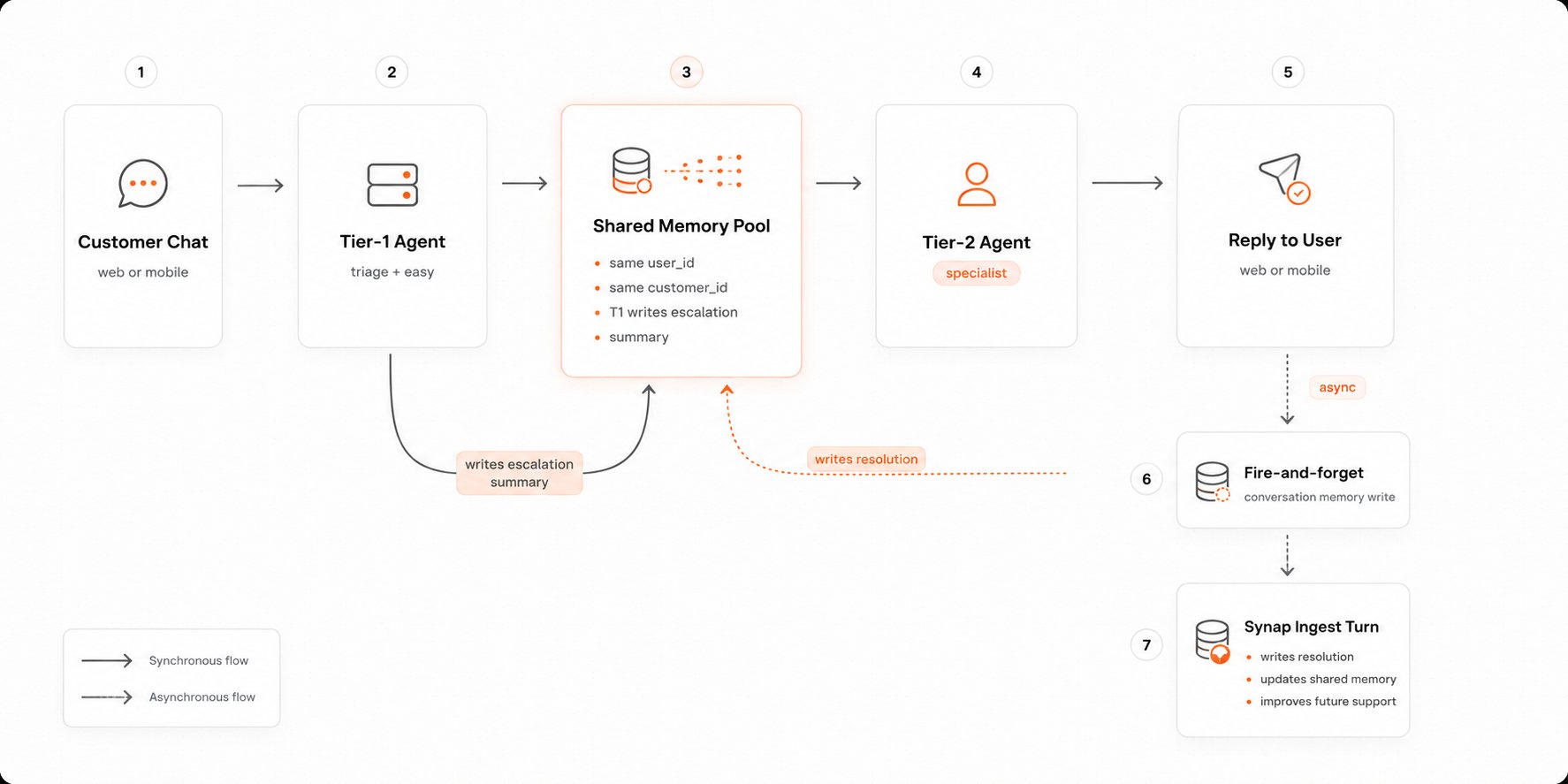 The handoff happens via memory, not state. T2 doesn't need a routing payload; it pulls everything it needs from Synap on first call.
## Stack
| Layer | Choice |
| ----------------- | ----------------------------------------------------------------------------------------------------------------------------------------------------------- |
| **Synap SDK** | `maximem-synap` (Python) / `@maximem/synap-js-sdk` (TypeScript) |
| **Framework** | [OpenAI Agents SDK](/integrations/openai-agents) (Python, uses native handoffs) / [Vercel AI SDK](/integrations/vercel-ai-sdk) (TypeScript, manual routing) |
| **LLM** | OpenAI `gpt-4o-mini` for T1 (cheap + fast) and `gpt-4o` for T2 |
| **Routing state** | In-memory dict for the demo; Redis in production |
Multi-agent orchestration is a great fit for [LangGraph](/integrations/langgraph) (Python) and [Mastra](/integrations/mastra) (TypeScript) if you want graph-shaped routing with retries and persistence baked in. The recipe below uses OpenAI Agents / Vercel AI SDK to stay consistent with the rest of the Cookbook; port to LangGraph/Mastra once your routing graph grows.
## Prerequisites
* A Synap API key. See [Authentication](/setup/authentication)
* **Python:** Python 3.11+
* **TypeScript:** Node 18+ **and** Python 3.11+ on the host
### Install
```bash Python theme={null}
pip install maximem-synap maximem-synap-openai-agents openai-agents
```
```bash uv theme={null}
uv add maximem-synap maximem-synap-openai-agents openai-agents
# pip-compatible (existing venv): uv pip install maximem-synap maximem-synap-openai-agents openai-agents
```
```bash TypeScript theme={null}
npm install @maximem/synap-js-sdk @maximem/synap-vercel-adk ai @ai-sdk/openai zod
```
## Build it
### 1. Shared scoping
Both agents use the same scopes. That's the whole trick.
* `customer_id = ""`: single tenant or per-customer org
* `user_id = `
* `conversation_id`: one per ticket, shared across both agents
`conversation_id`, `user_id`, and `customer_id` must be valid UUIDs. Generate the per-ticket id with `str(uuid.uuid4())` (Python) or `crypto.randomUUID()` (JS), as shown below.
### 2. The escalation policy
This belongs in your code, not the LLM's head. T1 calls a tool to escalate; the tool decides what counts.
```python Python theme={null}
ESCALATE_REASONS = {
"customer_requested_human",
"technical_depth_required",
"policy_exception_needed",
"safety_or_legal",
"repeat_failure", # T1 already tried twice
}
@function_tool
async def escalate_to_t2(user_id: str, reason: str, summary: str) -> dict:
"""Hand off to Tier-2 specialist. Reason must be one of: {reasons}."""
assert reason in ESCALATE_REASONS, f"Invalid escalation reason: {reason}"
# Persist the structured handoff in memory so T2 picks it up
await sdk.memories.create(
document=f"T1 escalation: {summary}",
document_type="support-escalation",
user_id=user_id,
customer_id=CUSTOMER_ID,
metadata={"escalation_reason": reason, "from_tier": "t1", "to_tier": "t2"},
)
ROUTING[user_id] = "t2"
return {"status": "escalated", "to": "t2"}
```
```typescript TypeScript theme={null}
const ESCALATE_REASONS = new Set([
"customer_requested_human",
"technical_depth_required",
"policy_exception_needed",
"safety_or_legal",
"repeat_failure",
]);
const escalateToT2 = tool({
description: "Hand off to Tier-2 specialist. Reason must be a known category.",
parameters: z.object({
userId: z.string(),
reason: z.string(),
summary: z.string(),
}),
execute: async ({ userId, reason, summary }) => {
if (!ESCALATE_REASONS.has(reason)) throw new Error(`Invalid reason: ${reason}`);
await synap.sdk.memories.create({
document: `T1 escalation: ${summary}`,
documentType: "support-escalation",
userId,
customerId: CUSTOMER_ID,
metadata: { escalationReason: reason, fromTier: "t1", toTier: "t2" },
});
ROUTING.set(userId, "t2");
return { status: "escalated", to: "t2" };
},
});
```
### 3. The Tier-1 agent
Fast model, common-issue tools, escalate when out of depth.
```python Python theme={null}
SYSTEM_T1 = """You are a Tier-1 support agent.
- Handle common issues: account questions, basic troubleshooting, status checks, simple refunds.
- If the issue is: safety, legal, a technical deep-dive, a policy exception, or you've already tried twice
without resolution, call escalate_to_t2 with a clear reason and a 1-paragraph summary of what
you tried and what you learned about the customer's situation.
- Never invent answers. If you don't know and can't escalate, say so."""
t1_agent = Agent(
name="t1_support",
instructions=SYSTEM_T1,
model="gpt-4o-mini",
tools=[
FunctionTool(synap_search, name_override="synap_search"),
FunctionTool(synap_store, name_override="synap_store"),
get_account_status, check_outage, basic_refund,
escalate_to_t2,
],
)
```
```typescript TypeScript theme={null}
const SYSTEM_T1 = `You are a Tier-1 support agent.
- Handle common issues: account questions, basic troubleshooting, status checks, simple refunds.
- If the issue is: safety, legal, a technical deep-dive, a policy exception, or you've already tried twice
without resolution, call escalateToT2 with a clear reason and a 1-paragraph summary of what
you tried and what you learned about the customer's situation.
- Never invent answers.`;
const t1Tools = {
get_account_status: tool({ /* ... */ }),
check_outage: tool({ /* ... */ }),
basic_refund: tool({ /* ... */ }),
escalate_to_t2: escalateToT2,
};
```
### 4. The Tier-2 agent
Bigger model, deeper tools, picks up with full T1 context already in memory.
```python Python theme={null}
SYSTEM_T2 = """You are a Tier-2 support specialist.
- Read the T1 escalation summary and the customer's history from memory before responding.
- Greet the customer briefly and confirm what you understand they need; don't make them re-explain.
- Use specialist tools. You have permission to make policy exceptions when justified.
- If you resolve, summarize the resolution back into memory."""
t2_agent = Agent(
name="t2_specialist",
instructions=SYSTEM_T2,
model="gpt-4o",
tools=[
FunctionTool(synap_search, name_override="synap_search"),
FunctionTool(synap_store, name_override="synap_store"),
deep_diagnostic, run_db_query, issue_credit, policy_exception,
],
)
```
```typescript TypeScript theme={null}
const SYSTEM_T2 = `You are a Tier-2 support specialist.
- Read the T1 escalation summary and the customer's history from memory before responding.
- Greet briefly and confirm what you understand they need; don't make them re-explain.
- Use specialist tools. You have permission to make policy exceptions when justified.
- If you resolve, summarize the resolution back into memory.`;
const t2Tools = {
deep_diagnostic: tool({ /* ... */ }),
run_db_query: tool({ /* ... */ }),
issue_credit: tool({ /* ... */ }),
policy_exception: tool({ /* ... */ }),
};
```
### 5. The router
One small function picks which agent gets the next message based on routing state.
```python Python theme={null}
ROUTING: dict[str, str] = {} # user_id -> "t1" | "t2"
CUSTOMER_ID = "your-product"
async def handle_message(user_id: str, text: str) -> str:
conv_id = SESSIONS.setdefault(user_id, str(uuid.uuid4()))
tier = ROUTING.get(user_id, "t1")
if tier == "t2":
# Inject a one-time bridge message on the customer's side so they know
bridge = "Connecting you with a specialist now…"
# T2 will read the escalation summary from memory itself
result = await Runner.run(t2_agent, input=text)
else:
result = await Runner.run(t1_agent, input=text)
reply = result.final_output
asyncio.create_task(sdk.memories.create(
document=f"Customer: {text}\n[{tier.upper()}]: {reply}",
document_type="ai-chat-conversation",
user_id=user_id,
customer_id=CUSTOMER_ID,
metadata={"conversation_id": conv_id, "tier": tier},
))
return reply
```
```typescript TypeScript theme={null}
const ROUTING = new Map();
const CUSTOMER_ID = "your-product";
export async function handleMessage(userId: string, text: string): Promise {
const conversationId = convFor(userId);
const tier = ROUTING.get(userId) ?? "t1";
const system = tier === "t2" ? SYSTEM_T2 : SYSTEM_T1;
const tools = tier === "t2" ? t2Tools : t1Tools;
const model = synap.wrap(openai(tier === "t2" ? "gpt-4o" : "gpt-4o-mini"), {
userId,
customerId: CUSTOMER_ID,
conversationId,
});
const { text: reply } = await generateText({ model, system, prompt: text, tools });
await synap.sdk.memories.create({
document: `Customer: ${text}\n[${tier.toUpperCase()}]: ${reply}`,
documentType: "ai-chat-conversation",
userId,
customerId: CUSTOMER_ID,
metadata: { conversationId, tier },
});
return reply;
}
```
## Run & verify
```text Turn 1 (routes to T1) theme={null}
Customer: My last invoice is wrong, you charged me twice.
T1: I see two charges on 5/12 for $49. The second was retried after a network blip
and refunded automatically the next day. Refund #R-9012. Check your statement
on or after 5/15. Anything else?
```
```text Turn 2 (still T1, but escalates) theme={null}
Customer: No it's not there. And this is the third time I've had double-charges.
T1: That's persistent. I'm bringing in a billing specialist who can look deeper.
One moment.
[Internally: escalate_to_t2(reason=repeat_failure, summary="Customer reports
3rd double-charge incident. Auto-refund R-9012 issued 5/13 not visible to
customer. Pattern check needed.")]
```
```text Turn 3 (now T2) theme={null}
Customer: Hi.
T2: Hi. I've read the history. You're seeing double-charges intermittently, and
the auto-refund for last week didn't reach your account. Let me pull the
merchant ledger for your card and the failure logs on the retry job.
[calls run_db_query, calls issue_credit]
Confirmed: three failed retries this quarter, all on the same card BIN. I've
issued an immediate $98 credit and flagged your account so this can't repeat.
Sorry for the back-and-forth.
```
The customer didn't repeat anything. T2 read the escalation from memory and dove in.
## Customize / extend
* **Three or more tiers** → add tools and routing entries. Memory model is unchanged.
* **Human at the end** → the final tier can be a human queue. See [WhatsApp + Human Handoff](/cookbook/whatsapp-single-handoff) for the pattern.
* **LangGraph / Mastra port** → if routing grows into a real graph, port to [LangGraph](/integrations/langgraph) (Python) or [Mastra](/integrations/mastra) (TypeScript).
* **Slack as the channel for T2** → some teams have T2 specialists working out of Slack. Same agent, different I/O. See [Patterns → Slack Bot](/patterns/slack-bot).
## Troubleshooting
**T2 re-asks the customer to explain**
* Sharpen the T2 system prompt's "don't make them re-explain" rule.
* Confirm the T1 escalation memory is being written before the customer's next turn (no race).
* Check `synap_search` actually fires on the first T2 turn: log tool calls during development.
**T1 escalates too eagerly**
* The escalation rule is too vague in the prompt. Tighten the criteria, and consider gating with a tool-side check: require `synap_search` to have been called first.
**Customer pings the same number after T2 resolves; gets T1 again**
* `ROUTING` is in-process memory. Use Redis with TTL. After a resolution, clear the routing entry so the next ticket starts at T1.
**The handoff feels abrupt**
* The bridge message helps. Customize it per escalation reason ("connecting you with billing" vs "connecting you with engineering").
## Related
* **Integrations:** [OpenAI Agents SDK](/integrations/openai-agents) · [Vercel AI SDK](/integrations/vercel-ai-sdk) · [LangGraph](/integrations/langgraph) · [Mastra](/integrations/mastra)
* **Concepts:** [Memory Scopes](/concepts/memory-scopes) · [Conversational Context Lifecycle](/concepts/context-end-to-end#short-term-context) · [Agent Interactions](/concepts/agent-topologies#agent-interactions)
* **Patterns:** [Slack Bot](/patterns/slack-bot) · [Graceful Degradation](/patterns/graceful-degradation)
* **Other recipes:** [WhatsApp + Human Handoff](/cookbook/whatsapp-single-handoff)
The handoff happens via memory, not state. T2 doesn't need a routing payload; it pulls everything it needs from Synap on first call.
## Stack
| Layer | Choice |
| ----------------- | ----------------------------------------------------------------------------------------------------------------------------------------------------------- |
| **Synap SDK** | `maximem-synap` (Python) / `@maximem/synap-js-sdk` (TypeScript) |
| **Framework** | [OpenAI Agents SDK](/integrations/openai-agents) (Python, uses native handoffs) / [Vercel AI SDK](/integrations/vercel-ai-sdk) (TypeScript, manual routing) |
| **LLM** | OpenAI `gpt-4o-mini` for T1 (cheap + fast) and `gpt-4o` for T2 |
| **Routing state** | In-memory dict for the demo; Redis in production |
Multi-agent orchestration is a great fit for [LangGraph](/integrations/langgraph) (Python) and [Mastra](/integrations/mastra) (TypeScript) if you want graph-shaped routing with retries and persistence baked in. The recipe below uses OpenAI Agents / Vercel AI SDK to stay consistent with the rest of the Cookbook; port to LangGraph/Mastra once your routing graph grows.
## Prerequisites
* A Synap API key. See [Authentication](/setup/authentication)
* **Python:** Python 3.11+
* **TypeScript:** Node 18+ **and** Python 3.11+ on the host
### Install
```bash Python theme={null}
pip install maximem-synap maximem-synap-openai-agents openai-agents
```
```bash uv theme={null}
uv add maximem-synap maximem-synap-openai-agents openai-agents
# pip-compatible (existing venv): uv pip install maximem-synap maximem-synap-openai-agents openai-agents
```
```bash TypeScript theme={null}
npm install @maximem/synap-js-sdk @maximem/synap-vercel-adk ai @ai-sdk/openai zod
```
## Build it
### 1. Shared scoping
Both agents use the same scopes. That's the whole trick.
* `customer_id = ""`: single tenant or per-customer org
* `user_id = `
* `conversation_id`: one per ticket, shared across both agents
`conversation_id`, `user_id`, and `customer_id` must be valid UUIDs. Generate the per-ticket id with `str(uuid.uuid4())` (Python) or `crypto.randomUUID()` (JS), as shown below.
### 2. The escalation policy
This belongs in your code, not the LLM's head. T1 calls a tool to escalate; the tool decides what counts.
```python Python theme={null}
ESCALATE_REASONS = {
"customer_requested_human",
"technical_depth_required",
"policy_exception_needed",
"safety_or_legal",
"repeat_failure", # T1 already tried twice
}
@function_tool
async def escalate_to_t2(user_id: str, reason: str, summary: str) -> dict:
"""Hand off to Tier-2 specialist. Reason must be one of: {reasons}."""
assert reason in ESCALATE_REASONS, f"Invalid escalation reason: {reason}"
# Persist the structured handoff in memory so T2 picks it up
await sdk.memories.create(
document=f"T1 escalation: {summary}",
document_type="support-escalation",
user_id=user_id,
customer_id=CUSTOMER_ID,
metadata={"escalation_reason": reason, "from_tier": "t1", "to_tier": "t2"},
)
ROUTING[user_id] = "t2"
return {"status": "escalated", "to": "t2"}
```
```typescript TypeScript theme={null}
const ESCALATE_REASONS = new Set([
"customer_requested_human",
"technical_depth_required",
"policy_exception_needed",
"safety_or_legal",
"repeat_failure",
]);
const escalateToT2 = tool({
description: "Hand off to Tier-2 specialist. Reason must be a known category.",
parameters: z.object({
userId: z.string(),
reason: z.string(),
summary: z.string(),
}),
execute: async ({ userId, reason, summary }) => {
if (!ESCALATE_REASONS.has(reason)) throw new Error(`Invalid reason: ${reason}`);
await synap.sdk.memories.create({
document: `T1 escalation: ${summary}`,
documentType: "support-escalation",
userId,
customerId: CUSTOMER_ID,
metadata: { escalationReason: reason, fromTier: "t1", toTier: "t2" },
});
ROUTING.set(userId, "t2");
return { status: "escalated", to: "t2" };
},
});
```
### 3. The Tier-1 agent
Fast model, common-issue tools, escalate when out of depth.
```python Python theme={null}
SYSTEM_T1 = """You are a Tier-1 support agent.
- Handle common issues: account questions, basic troubleshooting, status checks, simple refunds.
- If the issue is: safety, legal, a technical deep-dive, a policy exception, or you've already tried twice
without resolution, call escalate_to_t2 with a clear reason and a 1-paragraph summary of what
you tried and what you learned about the customer's situation.
- Never invent answers. If you don't know and can't escalate, say so."""
t1_agent = Agent(
name="t1_support",
instructions=SYSTEM_T1,
model="gpt-4o-mini",
tools=[
FunctionTool(synap_search, name_override="synap_search"),
FunctionTool(synap_store, name_override="synap_store"),
get_account_status, check_outage, basic_refund,
escalate_to_t2,
],
)
```
```typescript TypeScript theme={null}
const SYSTEM_T1 = `You are a Tier-1 support agent.
- Handle common issues: account questions, basic troubleshooting, status checks, simple refunds.
- If the issue is: safety, legal, a technical deep-dive, a policy exception, or you've already tried twice
without resolution, call escalateToT2 with a clear reason and a 1-paragraph summary of what
you tried and what you learned about the customer's situation.
- Never invent answers.`;
const t1Tools = {
get_account_status: tool({ /* ... */ }),
check_outage: tool({ /* ... */ }),
basic_refund: tool({ /* ... */ }),
escalate_to_t2: escalateToT2,
};
```
### 4. The Tier-2 agent
Bigger model, deeper tools, picks up with full T1 context already in memory.
```python Python theme={null}
SYSTEM_T2 = """You are a Tier-2 support specialist.
- Read the T1 escalation summary and the customer's history from memory before responding.
- Greet the customer briefly and confirm what you understand they need; don't make them re-explain.
- Use specialist tools. You have permission to make policy exceptions when justified.
- If you resolve, summarize the resolution back into memory."""
t2_agent = Agent(
name="t2_specialist",
instructions=SYSTEM_T2,
model="gpt-4o",
tools=[
FunctionTool(synap_search, name_override="synap_search"),
FunctionTool(synap_store, name_override="synap_store"),
deep_diagnostic, run_db_query, issue_credit, policy_exception,
],
)
```
```typescript TypeScript theme={null}
const SYSTEM_T2 = `You are a Tier-2 support specialist.
- Read the T1 escalation summary and the customer's history from memory before responding.
- Greet briefly and confirm what you understand they need; don't make them re-explain.
- Use specialist tools. You have permission to make policy exceptions when justified.
- If you resolve, summarize the resolution back into memory.`;
const t2Tools = {
deep_diagnostic: tool({ /* ... */ }),
run_db_query: tool({ /* ... */ }),
issue_credit: tool({ /* ... */ }),
policy_exception: tool({ /* ... */ }),
};
```
### 5. The router
One small function picks which agent gets the next message based on routing state.
```python Python theme={null}
ROUTING: dict[str, str] = {} # user_id -> "t1" | "t2"
CUSTOMER_ID = "your-product"
async def handle_message(user_id: str, text: str) -> str:
conv_id = SESSIONS.setdefault(user_id, str(uuid.uuid4()))
tier = ROUTING.get(user_id, "t1")
if tier == "t2":
# Inject a one-time bridge message on the customer's side so they know
bridge = "Connecting you with a specialist now…"
# T2 will read the escalation summary from memory itself
result = await Runner.run(t2_agent, input=text)
else:
result = await Runner.run(t1_agent, input=text)
reply = result.final_output
asyncio.create_task(sdk.memories.create(
document=f"Customer: {text}\n[{tier.upper()}]: {reply}",
document_type="ai-chat-conversation",
user_id=user_id,
customer_id=CUSTOMER_ID,
metadata={"conversation_id": conv_id, "tier": tier},
))
return reply
```
```typescript TypeScript theme={null}
const ROUTING = new Map();
const CUSTOMER_ID = "your-product";
export async function handleMessage(userId: string, text: string): Promise {
const conversationId = convFor(userId);
const tier = ROUTING.get(userId) ?? "t1";
const system = tier === "t2" ? SYSTEM_T2 : SYSTEM_T1;
const tools = tier === "t2" ? t2Tools : t1Tools;
const model = synap.wrap(openai(tier === "t2" ? "gpt-4o" : "gpt-4o-mini"), {
userId,
customerId: CUSTOMER_ID,
conversationId,
});
const { text: reply } = await generateText({ model, system, prompt: text, tools });
await synap.sdk.memories.create({
document: `Customer: ${text}\n[${tier.toUpperCase()}]: ${reply}`,
documentType: "ai-chat-conversation",
userId,
customerId: CUSTOMER_ID,
metadata: { conversationId, tier },
});
return reply;
}
```
## Run & verify
```text Turn 1 (routes to T1) theme={null}
Customer: My last invoice is wrong, you charged me twice.
T1: I see two charges on 5/12 for $49. The second was retried after a network blip
and refunded automatically the next day. Refund #R-9012. Check your statement
on or after 5/15. Anything else?
```
```text Turn 2 (still T1, but escalates) theme={null}
Customer: No it's not there. And this is the third time I've had double-charges.
T1: That's persistent. I'm bringing in a billing specialist who can look deeper.
One moment.
[Internally: escalate_to_t2(reason=repeat_failure, summary="Customer reports
3rd double-charge incident. Auto-refund R-9012 issued 5/13 not visible to
customer. Pattern check needed.")]
```
```text Turn 3 (now T2) theme={null}
Customer: Hi.
T2: Hi. I've read the history. You're seeing double-charges intermittently, and
the auto-refund for last week didn't reach your account. Let me pull the
merchant ledger for your card and the failure logs on the retry job.
[calls run_db_query, calls issue_credit]
Confirmed: three failed retries this quarter, all on the same card BIN. I've
issued an immediate $98 credit and flagged your account so this can't repeat.
Sorry for the back-and-forth.
```
The customer didn't repeat anything. T2 read the escalation from memory and dove in.
## Customize / extend
* **Three or more tiers** → add tools and routing entries. Memory model is unchanged.
* **Human at the end** → the final tier can be a human queue. See [WhatsApp + Human Handoff](/cookbook/whatsapp-single-handoff) for the pattern.
* **LangGraph / Mastra port** → if routing grows into a real graph, port to [LangGraph](/integrations/langgraph) (Python) or [Mastra](/integrations/mastra) (TypeScript).
* **Slack as the channel for T2** → some teams have T2 specialists working out of Slack. Same agent, different I/O. See [Patterns → Slack Bot](/patterns/slack-bot).
## Troubleshooting
**T2 re-asks the customer to explain**
* Sharpen the T2 system prompt's "don't make them re-explain" rule.
* Confirm the T1 escalation memory is being written before the customer's next turn (no race).
* Check `synap_search` actually fires on the first T2 turn: log tool calls during development.
**T1 escalates too eagerly**
* The escalation rule is too vague in the prompt. Tighten the criteria, and consider gating with a tool-side check: require `synap_search` to have been called first.
**Customer pings the same number after T2 resolves; gets T1 again**
* `ROUTING` is in-process memory. Use Redis with TTL. After a resolution, clear the routing entry so the next ticket starts at T1.
**The handoff feels abrupt**
* The bridge message helps. Customize it per escalation reason ("connecting you with billing" vs "connecting you with engineering").
## Related
* **Integrations:** [OpenAI Agents SDK](/integrations/openai-agents) · [Vercel AI SDK](/integrations/vercel-ai-sdk) · [LangGraph](/integrations/langgraph) · [Mastra](/integrations/mastra)
* **Concepts:** [Memory Scopes](/concepts/memory-scopes) · [Conversational Context Lifecycle](/concepts/context-end-to-end#short-term-context) · [Agent Interactions](/concepts/agent-topologies#agent-interactions)
* **Patterns:** [Slack Bot](/patterns/slack-bot) · [Graceful Degradation](/patterns/graceful-degradation)
* **Other recipes:** [WhatsApp + Human Handoff](/cookbook/whatsapp-single-handoff)