> ## Documentation Index
> Fetch the complete documentation index at: https://docs.maximem.ai/llms.txt
> Use this file to discover all available pages before exploring further.
# What is Maximem Synap?
> Synap is a managed memory layer for AI agents. It sits between your application and your LLM, providing persistent structured memory that survives across sessions, conversations, and deployments. Instead of treating every conversation as a blank slate, your agents can remember, learn, and personalize.
## The mental model: Client, Instance, Customer, User, Conversation
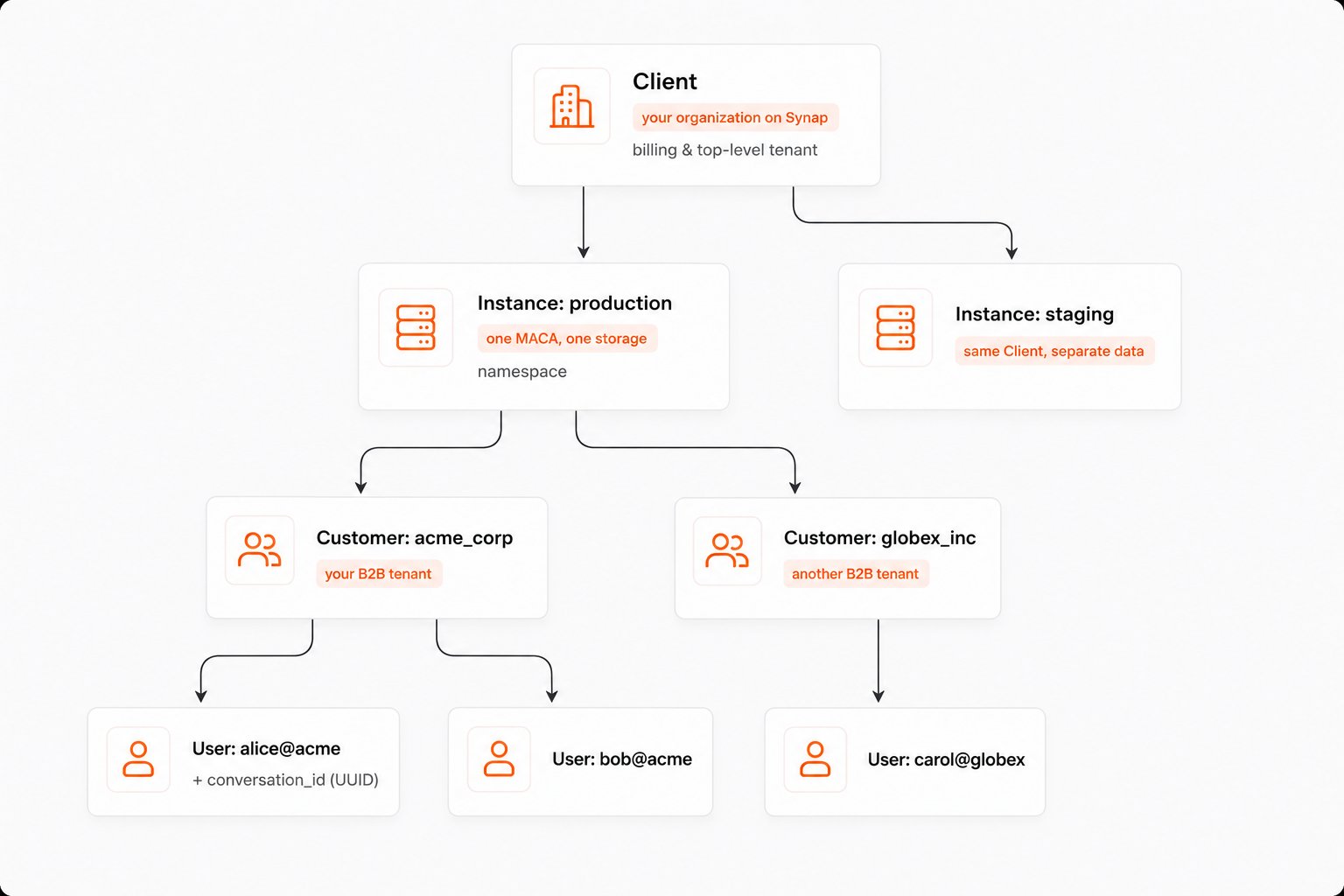
Five identifiers do all the work in Synap. Get these straight before reading anything else.
 | Identifier | Lives in | What it means |
| ------------------------------------------------------------- | --------------------------------------------- | ---------------------------------------------------------------------------------------------------------------------------------------------------------------------- |
| [**Client**](/concepts/memory-scopes#clients-and-instances) | Dashboard | Your company's account with Synap. One per organization. |
| [**Instance**](/concepts/memory-scopes#clients-and-instances) | Dashboard, created under a Client | A logical environment (production, staging, EU, US…). Each Instance has its own API keys, its own [MACA](/concepts/memory-architecture), and its own isolated storage. |
| **Customer** (`customer_id`) | Passed on every SDK call **on B2B instances** | Your B2B tenant. Memories tagged with this are visible to all users within that customer. On B2C instances it is auto-resolved from `user_id`, so you omit it. |
| **User** (`user_id`) | Passed on every SDK call | Your end-user. Memories tagged with this stay private to that user. |
| **Conversation** (`conversation_id`) | Passed on conversation-scoped SDK calls | A single chat thread. Must be a valid UUID; the server rejects non-UUID strings. Lets Synap compact long sessions and route memory to the right thread. |
See [Clients & Instances](/concepts/memory-scopes#clients-and-instances) and [Customers & Users](/concepts/memory-scopes#customers-and-users) for the full breakdown.
## Key capabilities
Automatically extract structured knowledge from raw conversations and documents. Synap identifies and categorizes **facts**, **preferences**, **episodes**, **emotions**, and **temporal events** without any manual annotation.
Isolate memories at the right boundary. Synap supports a hierarchical [scope chain](/concepts/memory-scopes) (**User**, **Customer**, **Client**, and **World**) so personal preferences stay personal while shared knowledge is accessible to everyone who needs it.
Memories are stored in both **vector** and **graph** storage engines. Vector storage powers semantic similarity search. Graph storage captures relationships between entities. You configure the balance through the Memory Architecture Config.
Long conversations don't need to be sent in full every time. Synap compacts conversation context into structured summaries, reducing token usage while preserving the information your agent actually needs.
References to the same person, place, or thing across different conversations are automatically resolved. "John", "John Smith", and "my manager" all map to a single canonical entity, building a coherent knowledge graph over time.
For latency-sensitive applications, the SDK supports low-latency streaming. Stream memories in and context out without waiting for full round-trips.
## Architecture at a glance
Synap follows a clean separation of concerns across three layers:
| Identifier | Lives in | What it means |
| ------------------------------------------------------------- | --------------------------------------------- | ---------------------------------------------------------------------------------------------------------------------------------------------------------------------- |
| [**Client**](/concepts/memory-scopes#clients-and-instances) | Dashboard | Your company's account with Synap. One per organization. |
| [**Instance**](/concepts/memory-scopes#clients-and-instances) | Dashboard, created under a Client | A logical environment (production, staging, EU, US…). Each Instance has its own API keys, its own [MACA](/concepts/memory-architecture), and its own isolated storage. |
| **Customer** (`customer_id`) | Passed on every SDK call **on B2B instances** | Your B2B tenant. Memories tagged with this are visible to all users within that customer. On B2C instances it is auto-resolved from `user_id`, so you omit it. |
| **User** (`user_id`) | Passed on every SDK call | Your end-user. Memories tagged with this stay private to that user. |
| **Conversation** (`conversation_id`) | Passed on conversation-scoped SDK calls | A single chat thread. Must be a valid UUID; the server rejects non-UUID strings. Lets Synap compact long sessions and route memory to the right thread. |
See [Clients & Instances](/concepts/memory-scopes#clients-and-instances) and [Customers & Users](/concepts/memory-scopes#customers-and-users) for the full breakdown.
## Key capabilities
Automatically extract structured knowledge from raw conversations and documents. Synap identifies and categorizes **facts**, **preferences**, **episodes**, **emotions**, and **temporal events** without any manual annotation.
Isolate memories at the right boundary. Synap supports a hierarchical [scope chain](/concepts/memory-scopes) (**User**, **Customer**, **Client**, and **World**) so personal preferences stay personal while shared knowledge is accessible to everyone who needs it.
Memories are stored in both **vector** and **graph** storage engines. Vector storage powers semantic similarity search. Graph storage captures relationships between entities. You configure the balance through the Memory Architecture Config.
Long conversations don't need to be sent in full every time. Synap compacts conversation context into structured summaries, reducing token usage while preserving the information your agent actually needs.
References to the same person, place, or thing across different conversations are automatically resolved. "John", "John Smith", and "my manager" all map to a single canonical entity, building a coherent knowledge graph over time.
For latency-sensitive applications, the SDK supports low-latency streaming. Stream memories in and context out without waiting for full round-trips.
## Architecture at a glance
Synap follows a clean separation of concerns across three layers:
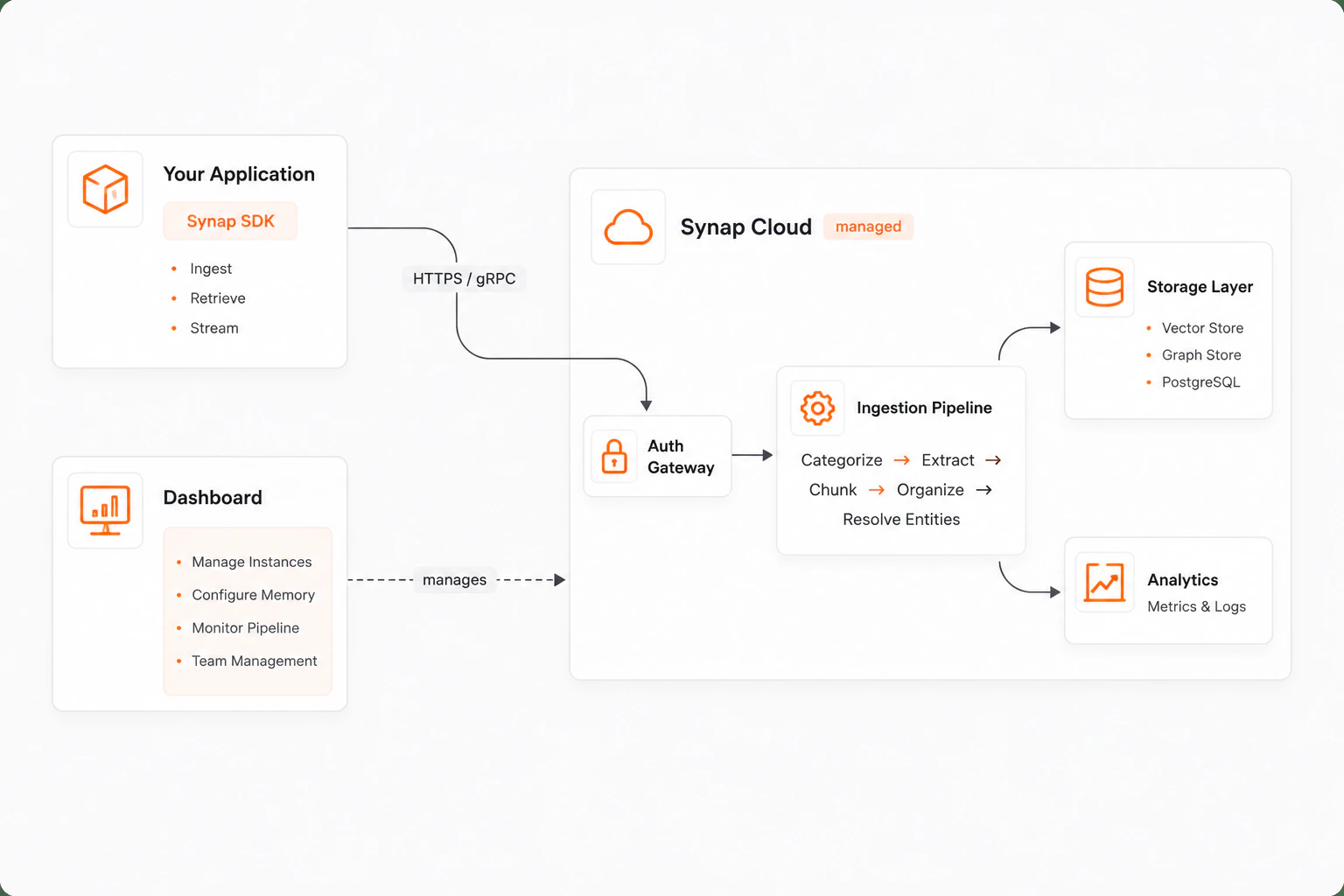 **SDK** lives in your application. It handles authentication, ingestion requests, retrieval queries, and optional low-latency streaming. The SDK never self-asserts identity; all authentication flows through Synap Cloud using a zero-trust model.
**Synap Cloud** is the managed backend. It runs the multi-stage ingestion pipeline (categorize, extract, chunk, organize, resolve entities), stores memories across vector and graph engines, and serves retrieval queries. You never deploy or manage this infrastructure.
**Dashboard** is the web management interface. Create and manage instances, configure memory architecture, monitor ingestion pipelines, manage team access, and set up webhooks.
## Key components
| Component | What it is | What it does |
| ------------------------------------- | ------------------------------------------------------ | -------------------------------------------------------------------------------------------------------------------- |
| **SDK** | Python library installed in your application | Provides the programmatic interface for ingesting memories, retrieving context, and managing the memory lifecycle |
| **Dashboard** | Web UI at [synap.maximem.ai](https://synap.maximem.ai) | Manage instances, configure memory architecture, monitor pipelines, and collaborate with your team |
| **Memory Architecture Config (MACA)** | Per-instance memory configuration | Defines how memory is stored, what gets extracted, retrieval strategies, and retention policies for each instance |
| **Instances** | Deployed agent memory containers | Each instance is an isolated memory environment with its own configuration and storage. Identified by `inst_` |
| **Clients** | Organization-level containers | A client represents your organization or application. Contains one or more instances. Identified by `cli_` |
| **Scopes** | Memory isolation boundaries | Hierarchical boundaries (User > Customer > Client > World) that control who can access which memories |
## The memory lifecycle
Every piece of content that enters Synap follows a structured pipeline:
Raw content (conversations, documents, notes) is submitted through the SDK. Each ingestion is tagged with a scope (user, customer, etc.) and document type.
The pipeline classifies the content type and determines which extraction strategies to apply based on the Memory Architecture Config.
Structured knowledge is extracted: facts ("User lives in San Francisco"), preferences ("User prefers dark mode"), episodes ("User signed up last Tuesday"), emotions ("User was frustrated with billing"), and temporal events.
Extracted entities are resolved against the existing knowledge graph. New entities are auto-registered at the appropriate scope. The resolution follows the scope chain: User > Customer > Client > World.
Resolved memories are stored in both vector storage (for semantic search) and graph storage (for relationship traversal). Storage configuration is driven by MACA.
When your agent needs context, Synap retrieves and ranks relevant memories from both storage engines, respecting scope boundaries and applying the configured retrieval strategy.
The entire pipeline runs asynchronously. When you call `sdk.memories.create()`, the SDK returns immediately with an ingestion ID. You can track ingestion status through the SDK or Dashboard.
## Next steps
Get up and running with Synap in under 10 minutes.
Detailed installation instructions, environment configuration, and dependency options.
Understand Synap's zero-trust authentication model, API keys, and credential management.
Deep dive into memory scoping and isolation boundaries.
**SDK** lives in your application. It handles authentication, ingestion requests, retrieval queries, and optional low-latency streaming. The SDK never self-asserts identity; all authentication flows through Synap Cloud using a zero-trust model.
**Synap Cloud** is the managed backend. It runs the multi-stage ingestion pipeline (categorize, extract, chunk, organize, resolve entities), stores memories across vector and graph engines, and serves retrieval queries. You never deploy or manage this infrastructure.
**Dashboard** is the web management interface. Create and manage instances, configure memory architecture, monitor ingestion pipelines, manage team access, and set up webhooks.
## Key components
| Component | What it is | What it does |
| ------------------------------------- | ------------------------------------------------------ | -------------------------------------------------------------------------------------------------------------------- |
| **SDK** | Python library installed in your application | Provides the programmatic interface for ingesting memories, retrieving context, and managing the memory lifecycle |
| **Dashboard** | Web UI at [synap.maximem.ai](https://synap.maximem.ai) | Manage instances, configure memory architecture, monitor pipelines, and collaborate with your team |
| **Memory Architecture Config (MACA)** | Per-instance memory configuration | Defines how memory is stored, what gets extracted, retrieval strategies, and retention policies for each instance |
| **Instances** | Deployed agent memory containers | Each instance is an isolated memory environment with its own configuration and storage. Identified by `inst_` |
| **Clients** | Organization-level containers | A client represents your organization or application. Contains one or more instances. Identified by `cli_` |
| **Scopes** | Memory isolation boundaries | Hierarchical boundaries (User > Customer > Client > World) that control who can access which memories |
## The memory lifecycle
Every piece of content that enters Synap follows a structured pipeline:
Raw content (conversations, documents, notes) is submitted through the SDK. Each ingestion is tagged with a scope (user, customer, etc.) and document type.
The pipeline classifies the content type and determines which extraction strategies to apply based on the Memory Architecture Config.
Structured knowledge is extracted: facts ("User lives in San Francisco"), preferences ("User prefers dark mode"), episodes ("User signed up last Tuesday"), emotions ("User was frustrated with billing"), and temporal events.
Extracted entities are resolved against the existing knowledge graph. New entities are auto-registered at the appropriate scope. The resolution follows the scope chain: User > Customer > Client > World.
Resolved memories are stored in both vector storage (for semantic search) and graph storage (for relationship traversal). Storage configuration is driven by MACA.
When your agent needs context, Synap retrieves and ranks relevant memories from both storage engines, respecting scope boundaries and applying the configured retrieval strategy.
The entire pipeline runs asynchronously. When you call `sdk.memories.create()`, the SDK returns immediately with an ingestion ID. You can track ingestion status through the SDK or Dashboard.
## Next steps
Get up and running with Synap in under 10 minutes.
Detailed installation instructions, environment configuration, and dependency options.
Understand Synap's zero-trust authentication model, API keys, and credential management.
Deep dive into memory scoping and isolation boundaries.