> ## Documentation Index
> Fetch the complete documentation index at: https://docs.maximem.ai/llms.txt
> Use this file to discover all available pages before exploring further.
# Multi-User Memory Scoping
> Most real-world applications serve multiple users, often across multiple organizations. Synap's scoping system ensures that memories are properly isolated while still enabling shared context where appropriate. This guide explains the scope hierarchy, walks through common patterns, and shows you how to configure scoping for your application.
## The Problem
Consider a SaaS application with an AI assistant. You need to handle several competing requirements:
* **User A** should not see **User B**'s personal memories
* Users within the same **organization** should share some common context (e.g., company policies, project details)
* Your **application** has global knowledge that all users should benefit from (e.g., product documentation, feature capabilities)
* All of this needs to work without manual access control lists or complex permission logic
Synap solves this with a hierarchical scope system that handles isolation and merging automatically.
***
## The Scope Hierarchy
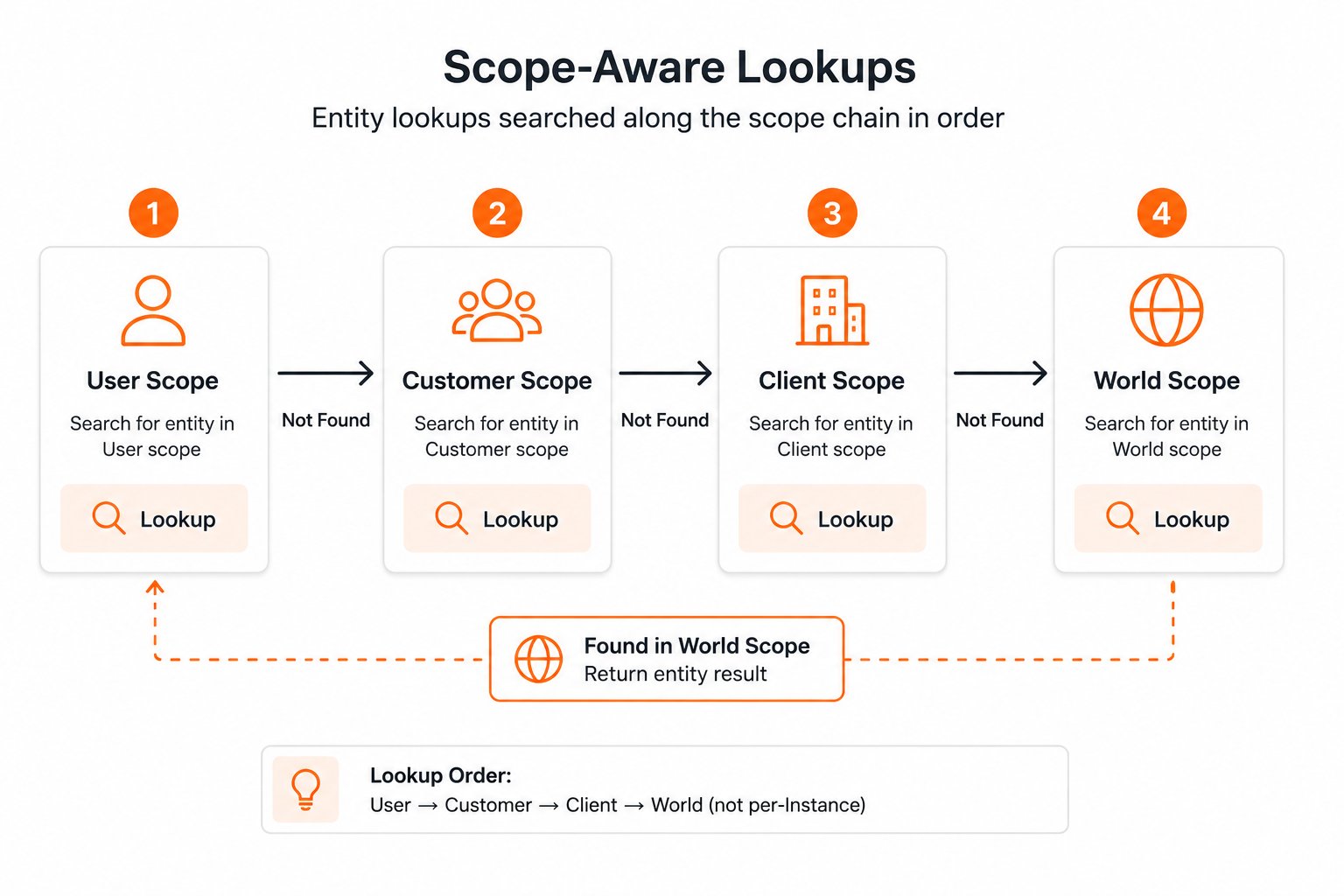
Synap organizes memories into four nested scopes. Each scope is a superset of the one above it:
 | Scope | Isolation Level | Contains | Example |
| ------------ | ---------------- | -------------------------------------------- | -------------------------------------------- |
| **USER** | Per-individual | Memories specific to one person | "Alice prefers dark mode" |
| **CUSTOMER** | Per-organization | Memories shared across users in one org | "Acme Corp uses Kubernetes for deployment" |
| **CLIENT** | Per-application | Memories shared across all users of your app | "Our product supports SSO via SAML and OIDC" |
| **WORLD** | Global | Memories shared across all Synap instances | General knowledge (managed by Synap) |
### How Scope Isolation Works
When you ingest a memory, Synap assigns it to a scope based on the identifiers you provide:
* Pass `user_id`: memory is stored at **USER** scope
* Pass `customer_id` (without `user_id`): memory is stored at **CUSTOMER** scope
* Pass neither: memory is stored at **CLIENT** scope
When you retrieve context, Synap merges memories from the narrowest applicable scope upward; the chain is resolved **server-side**:
```
Retrieval for user_id="user_alice" (server resolves customer_id="cust_acme" from ingestion):
USER (user_alice) ← Alice's personal memories
+ CUSTOMER (cust_acme) ← Acme Corp's shared memories
+ CLIENT ← Your application's shared memories
+ WORLD ← General knowledge
─────────────────────────
= Merged context (user memories take priority on conflicts)
```
The merge happens because the user's `customer_id` was set at **ingestion time** and stored server-side. On retrieval, Synap looks up that association and walks the chain for you. You can also pass `customer_id` explicitly on `sdk.user.context.fetch(user_id=..., customer_id=...)` for B2B instances when you want to assert the customer association at query time.
When memories at different scopes conflict (e.g., a user preference contradicts a customer-level default), the **narrower scope wins**. User-level memories always override customer-level, which override client-level.
***
## Setting Up User Scope
User scope is the most common isolation boundary. Every time you ingest a memory that belongs to a specific individual, pass their `user_id`.
```python theme={null}
# Ingest a memory scoped to a specific user
await sdk.memories.create(
document="User: I prefer to communicate in Spanish.\nAssistant: Got it! I'll respond in Spanish from now on.",
document_type="ai-chat-conversation",
user_id="user_alice",
customer_id="cust_acme",
mode="fast"
)
```
To retrieve memories for that user:
```python theme={null}
# Retrieve context scoped to a specific user
# This returns: user_alice memories + cust_acme memories + client memories
context = await sdk.user.context.fetch(
user_id="user_alice",
customer_id="cust_acme"
)
for fact in context.facts:
print(f"- {fact.content}")
# Output:
# - Prefers communication in Spanish
# - Acme Corp uses Slack for internal communication
# - Product supports 12 languages including Spanish
```
`ContextResponse.facts` returns a merged, ranked list: the server has already walked the USER → CUSTOMER → CLIENT chain for you. If you need per-fact scope attribution (e.g., to render USER-scoped memories with different visual treatment), call `sdk.fetch(...)` instead and read `UnifiedContextResponse.scope_map` on the cross-scope unified response.
***
## Setting Up Customer Scope
Customer scope represents an organization, team, or account. Memories at this scope are shared across all users within that customer.
```python theme={null}
# Ingest a memory at customer scope
# Note: passing customer_id WITHOUT user_id stores at CUSTOMER scope
await sdk.memories.create(
document="Acme Corp's fiscal year ends in March. All Q4 reports are due by March 15.",
document_type="document",
customer_id="cust_acme",
mode="fast",
metadata={"source": "company-policy-doc"}
)
```
Any user within `cust_acme` will see this memory in their context:
```python theme={null}
# Alice sees Acme's memories
alice_ctx = await sdk.user.context.fetch(
user_id="user_alice",
customer_id="cust_acme"
)
# Bob also sees the same Acme memories (plus his own user memories)
bob_ctx = await sdk.user.context.fetch(
user_id="user_bob",
customer_id="cust_acme"
)
```
You can also retrieve customer-level context without specifying a user:
```python theme={null}
# Retrieve ONLY customer-scoped memories (no user-specific memories)
customer_ctx = await sdk.customer.context.fetch(
customer_id="cust_acme"
)
```
Customer scope is ideal for ingesting organizational knowledge: company policies, team structures, project details, shared preferences, and onboarding materials. Ingest these documents once and all users in that organization benefit.
***
## Setting Up Client Scope
Client scope represents your entire application. Memories at this scope are visible to every user across all customers.
```python theme={null}
# Ingest a memory at client scope
# Note: no user_id or customer_id, stores at CLIENT scope
await sdk.memories.create(
document="Our product supports SSO via SAML 2.0 and OIDC. Configuration is available in Settings > Security > SSO.",
document_type="document",
mode="fast",
metadata={"source": "product-docs", "version": "2.4"}
)
```
Client-scoped memories appear in every user's context, regardless of their customer:
```python theme={null}
# Alice at Acme sees client memories
alice_ctx = await sdk.user.context.fetch(
user_id="user_alice", customer_id="cust_acme"
)
# Charlie at a completely different customer also sees client memories
charlie_ctx = await sdk.user.context.fetch(
user_id="user_charlie", customer_id="cust_globex"
)
```
You can retrieve only client-scoped context:
```python theme={null}
# Retrieve ONLY client-scoped memories
client_ctx = await sdk.client.context.fetch()
```
Client scope is useful for ingesting your product documentation, feature announcements, FAQ content, and any other knowledge that should be available to all users of your application.
***
## Example: SaaS Project Management Tool
Let's walk through a complete example. You are building an AI assistant for a project management tool. The assistant helps team members with tasks, deadlines, and project context.
### Defining Your Scope Strategy
| Scope | What Goes Here | Examples |
| ------------ | ---------------------------------------------------------------- | ------------------------------------------------------------------------------------------------ |
| **USER** | Individual preferences, personal task notes, communication style | "Alice prefers Kanban boards", "Bob's standup is at 9am PST" |
| **CUSTOMER** | Company processes, team structure, project details | "Sprint reviews are every other Friday", "The API team reports to Dana" |
| **CLIENT** | Product capabilities, feature documentation, best practices | "You can create custom fields in Settings > Fields", "Keyboard shortcut: Cmd+K for quick search" |
### Ingestion Code
```python theme={null}
# --- User-scoped: Alice's personal preferences ---
await sdk.memories.create(
document=(
"User: Can you show tasks in a Kanban view by default?\n"
"Assistant: Sure! I've noted your preference for Kanban boards."
),
document_type="ai-chat-conversation",
user_id="user_alice",
customer_id="cust_acme",
mode="fast"
)
# --- Customer-scoped: Acme's team processes ---
await sdk.memories.create(
document=(
"Acme Engineering Team Processes:\n"
"- Sprint duration: 2 weeks\n"
"- Sprint reviews: Every other Friday at 2pm PT\n"
"- Definition of Done: Code reviewed, tests passing, docs updated\n"
"- Escalation path: Team Lead → Engineering Manager → VP Engineering"
),
document_type="document",
customer_id="cust_acme",
mode="fast",
metadata={"source": "team-handbook", "department": "engineering"}
)
# --- Client-scoped: Product documentation ---
await sdk.memories.create(
document=(
"TaskFlow Pro Features:\n"
"- Custom fields: Create custom fields in Settings > Fields\n"
"- Automations: Set up workflow automations in Settings > Automations\n"
"- Integrations: Connect Slack, GitHub, and Jira in Settings > Integrations\n"
"- Keyboard shortcuts: Cmd+K for quick search, Cmd+N for new task"
),
document_type="document",
mode="fast",
metadata={"source": "product-docs", "version": "3.1"}
)
```
### Retrieval Code
```python theme={null}
# Alice asks about sprint schedules
context = await sdk.conversation.context.fetch(
conversation_id="conv_alice_001",
search_query=["when is the next sprint review?"],
max_results=5,
mode="fast"
)
# The merged context will contain:
# - Alice prefers Kanban boards (may not be relevant to this query)
# - Sprint reviews: Every other Friday at 2pm PT ← Most relevant
# - TaskFlow Pro feature info (if relevant)
# Build the prompt from the merged, ranked list
memory_lines = []
for fact in context.facts:
memory_lines.append(f"- {fact.content}")
print("\n".join(memory_lines))
# - Acme sprint reviews are every other Friday at 2pm PT
# - Sprint duration is 2 weeks
# - Alice prefers Kanban board view
```
If you need to render USER-scoped memories differently from CUSTOMER-scoped ones in the UI, use `sdk.fetch(...)`: its `UnifiedContextResponse.scope_map` carries per-fact scope attribution. Single-scope `ContextResponse` does not.
***
## Example: Consumer Mobile App
For simpler consumer applications without an organization concept, the scoping model is straightforward.
### Defining Your Scope Strategy
| Scope | What Goes Here |
| ------------ | ------------------------------------------------- |
| **USER** | Everything specific to the individual consumer |
| **CUSTOMER** | Not used, skip this scope entirely |
| **CLIENT** | App-wide knowledge (tips, features, general info) |
### Ingestion Code
```python theme={null}
# User-scoped: Individual consumer context
await sdk.memories.create(
document=(
"User: I'm vegetarian and allergic to nuts.\n"
"Assistant: I've noted your dietary restrictions. "
"I'll make sure all recipe suggestions are vegetarian and nut-free."
),
document_type="ai-chat-conversation",
user_id="user_maria",
mode="fast"
)
# Client-scoped: App-wide knowledge
await sdk.memories.create(
document=(
"RecipeBot supports the following dietary filters: "
"vegetarian, vegan, gluten-free, dairy-free, nut-free, keto, paleo. "
"Users can combine multiple filters."
),
document_type="document",
mode="fast"
)
```
### Retrieval Code
```python theme={null}
# Retrieve context for Maria, no customer_id needed
context = await sdk.user.context.fetch(
user_id="user_maria"
)
# Returns a merged, ranked list across USER + CLIENT scopes, e.g.:
# - Maria is vegetarian and allergic to nuts
# - RecipeBot supports vegetarian, nut-free, and other dietary filters
```
If your application is single-user (e.g., a local desktop AI assistant), you can skip both customer and user scopes. Just use a single fixed `user_id` for all memories, or let everything land at client scope.
***
## Primary scope: what Synap optimizes for
Each Instance has a **primary scope**: the level Synap optimizes indexing, caching, and retrieval for. It is chosen automatically based on your [use-case file](/concepts/memory-architecture#the-use-case-file):
| Optimized for | Used when |
| ---------------------- | ---------------------------------------------------------------------- |
| Per-user retrieval | Most applications, where each user gets personalized context |
| Per-customer retrieval | Enterprise apps where team-level context is the primary access pattern |
| Per-client retrieval | Knowledge bases, single-user agents, shared-context tools |
If your agent's primary audience changes (e.g., from per-user personalization to per-team collaboration), re-upload your use-case file. Synap will re-evaluate and update the Instance. Existing memories keep their original scope assignment; new memories follow the updated behavior.
***
## Testing Scoped Access
When developing, verify that scope isolation works correctly by testing cross-scope access patterns:
```python theme={null}
import asyncio
async def verify_scope_isolation(sdk):
"""Verify that user memories are properly isolated."""
# Ingest a secret for Alice
await sdk.memories.create(
document="User: My password recovery email is alice@personal.com",
document_type="ai-chat-conversation",
user_id="user_alice",
customer_id="cust_acme",
mode="fast"
)
# Wait for ingestion to process
await asyncio.sleep(3)
# Retrieve as Bob. Alice's secret should NOT appear
bob_ctx = await sdk.user.context.fetch(
user_id="user_bob",
customer_id="cust_acme"
)
alice_facts = [
f for f in bob_ctx.facts
if "alice@personal.com" in f.content.lower()
]
assert len(alice_facts) == 0, (
"ISOLATION FAILURE: Bob can see Alice's user-scoped memories!"
)
print("Scope isolation verified: Bob cannot see Alice's memories.")
# Retrieve as Alice. Her own memory SHOULD appear
alice_ctx = await sdk.user.context.fetch(
user_id="user_alice",
customer_id="cust_acme"
)
alice_facts = [
f for f in alice_ctx.facts
if "alice@personal.com" in f.content.lower()
]
assert len(alice_facts) > 0, (
"RETRIEVAL FAILURE: Alice cannot see her own memories!"
)
print("Scope access verified: Alice can see her own memories.")
```
In production, Synap's PII handling would redact or mask the email address before storage. This test uses raw content for simplicity.
***
## Scope Decision Flowchart
Use this flowchart to decide which scope identifiers to pass when ingesting memories:
**Yes.** Pass `user_id` (and `customer_id` if the user belongs to an organization).
**No.** Continue to the next question.
**Yes.** Pass `customer_id` only (no `user_id`).
**No.** Continue to the next question.
**Yes.** Pass neither `user_id` nor `customer_id`. It will be stored at client scope.
**No.** This is likely general knowledge. Store at client scope or consider whether it should be ingested at all.
***
## Best Practices
Establish a convention for `user_id` and `customer_id` values and enforce it across your application. Inconsistent IDs (e.g., `"alice"` vs `"user_alice"` vs `"user-alice"`) create fragmented memory silos.
Recommended: prefix-based IDs like `user_` and `cust_`.
Even if you primarily use user scope, always pass `customer_id` alongside `user_id` during ingestion and retrieval. This ensures customer-scoped memories are properly accessible and the scope hierarchy works correctly.
```python theme={null}
# Good: both identifiers
await sdk.memories.create(
document=conversation,
document_type="ai-chat-conversation",
user_id="user_alice",
customer_id="cust_acme", # Always include when available
mode="fast"
)
# Less ideal: missing customer_id
await sdk.memories.create(
document=conversation,
document_type="ai-chat-conversation",
user_id="user_alice",
# customer_id omitted, customer-scoped memories won't merge
mode="fast"
)
```
A common mistake is ingesting organizational knowledge at user scope (by including a `user_id`). This makes the knowledge invisible to other users in the same organization. Ingest shared content at customer or client scope explicitly.
Do not wait until production to test multi-user scenarios. Set up at least two test users and one test customer during development and verify isolation before deploying.
***
## Next Steps
The use-case file is how you tell Synap what to optimize scope behavior for.
Deeper conceptual explanation of the scope hierarchy and conflict resolution.
Learn how entities are resolved and shared across scopes.
Ensure your multi-tenant setup is production-ready.
| Scope | Isolation Level | Contains | Example |
| ------------ | ---------------- | -------------------------------------------- | -------------------------------------------- |
| **USER** | Per-individual | Memories specific to one person | "Alice prefers dark mode" |
| **CUSTOMER** | Per-organization | Memories shared across users in one org | "Acme Corp uses Kubernetes for deployment" |
| **CLIENT** | Per-application | Memories shared across all users of your app | "Our product supports SSO via SAML and OIDC" |
| **WORLD** | Global | Memories shared across all Synap instances | General knowledge (managed by Synap) |
### How Scope Isolation Works
When you ingest a memory, Synap assigns it to a scope based on the identifiers you provide:
* Pass `user_id`: memory is stored at **USER** scope
* Pass `customer_id` (without `user_id`): memory is stored at **CUSTOMER** scope
* Pass neither: memory is stored at **CLIENT** scope
When you retrieve context, Synap merges memories from the narrowest applicable scope upward; the chain is resolved **server-side**:
```
Retrieval for user_id="user_alice" (server resolves customer_id="cust_acme" from ingestion):
USER (user_alice) ← Alice's personal memories
+ CUSTOMER (cust_acme) ← Acme Corp's shared memories
+ CLIENT ← Your application's shared memories
+ WORLD ← General knowledge
─────────────────────────
= Merged context (user memories take priority on conflicts)
```
The merge happens because the user's `customer_id` was set at **ingestion time** and stored server-side. On retrieval, Synap looks up that association and walks the chain for you. You can also pass `customer_id` explicitly on `sdk.user.context.fetch(user_id=..., customer_id=...)` for B2B instances when you want to assert the customer association at query time.
When memories at different scopes conflict (e.g., a user preference contradicts a customer-level default), the **narrower scope wins**. User-level memories always override customer-level, which override client-level.
***
## Setting Up User Scope
User scope is the most common isolation boundary. Every time you ingest a memory that belongs to a specific individual, pass their `user_id`.
```python theme={null}
# Ingest a memory scoped to a specific user
await sdk.memories.create(
document="User: I prefer to communicate in Spanish.\nAssistant: Got it! I'll respond in Spanish from now on.",
document_type="ai-chat-conversation",
user_id="user_alice",
customer_id="cust_acme",
mode="fast"
)
```
To retrieve memories for that user:
```python theme={null}
# Retrieve context scoped to a specific user
# This returns: user_alice memories + cust_acme memories + client memories
context = await sdk.user.context.fetch(
user_id="user_alice",
customer_id="cust_acme"
)
for fact in context.facts:
print(f"- {fact.content}")
# Output:
# - Prefers communication in Spanish
# - Acme Corp uses Slack for internal communication
# - Product supports 12 languages including Spanish
```
`ContextResponse.facts` returns a merged, ranked list: the server has already walked the USER → CUSTOMER → CLIENT chain for you. If you need per-fact scope attribution (e.g., to render USER-scoped memories with different visual treatment), call `sdk.fetch(...)` instead and read `UnifiedContextResponse.scope_map` on the cross-scope unified response.
***
## Setting Up Customer Scope
Customer scope represents an organization, team, or account. Memories at this scope are shared across all users within that customer.
```python theme={null}
# Ingest a memory at customer scope
# Note: passing customer_id WITHOUT user_id stores at CUSTOMER scope
await sdk.memories.create(
document="Acme Corp's fiscal year ends in March. All Q4 reports are due by March 15.",
document_type="document",
customer_id="cust_acme",
mode="fast",
metadata={"source": "company-policy-doc"}
)
```
Any user within `cust_acme` will see this memory in their context:
```python theme={null}
# Alice sees Acme's memories
alice_ctx = await sdk.user.context.fetch(
user_id="user_alice",
customer_id="cust_acme"
)
# Bob also sees the same Acme memories (plus his own user memories)
bob_ctx = await sdk.user.context.fetch(
user_id="user_bob",
customer_id="cust_acme"
)
```
You can also retrieve customer-level context without specifying a user:
```python theme={null}
# Retrieve ONLY customer-scoped memories (no user-specific memories)
customer_ctx = await sdk.customer.context.fetch(
customer_id="cust_acme"
)
```
Customer scope is ideal for ingesting organizational knowledge: company policies, team structures, project details, shared preferences, and onboarding materials. Ingest these documents once and all users in that organization benefit.
***
## Setting Up Client Scope
Client scope represents your entire application. Memories at this scope are visible to every user across all customers.
```python theme={null}
# Ingest a memory at client scope
# Note: no user_id or customer_id, stores at CLIENT scope
await sdk.memories.create(
document="Our product supports SSO via SAML 2.0 and OIDC. Configuration is available in Settings > Security > SSO.",
document_type="document",
mode="fast",
metadata={"source": "product-docs", "version": "2.4"}
)
```
Client-scoped memories appear in every user's context, regardless of their customer:
```python theme={null}
# Alice at Acme sees client memories
alice_ctx = await sdk.user.context.fetch(
user_id="user_alice", customer_id="cust_acme"
)
# Charlie at a completely different customer also sees client memories
charlie_ctx = await sdk.user.context.fetch(
user_id="user_charlie", customer_id="cust_globex"
)
```
You can retrieve only client-scoped context:
```python theme={null}
# Retrieve ONLY client-scoped memories
client_ctx = await sdk.client.context.fetch()
```
Client scope is useful for ingesting your product documentation, feature announcements, FAQ content, and any other knowledge that should be available to all users of your application.
***
## Example: SaaS Project Management Tool
Let's walk through a complete example. You are building an AI assistant for a project management tool. The assistant helps team members with tasks, deadlines, and project context.
### Defining Your Scope Strategy
| Scope | What Goes Here | Examples |
| ------------ | ---------------------------------------------------------------- | ------------------------------------------------------------------------------------------------ |
| **USER** | Individual preferences, personal task notes, communication style | "Alice prefers Kanban boards", "Bob's standup is at 9am PST" |
| **CUSTOMER** | Company processes, team structure, project details | "Sprint reviews are every other Friday", "The API team reports to Dana" |
| **CLIENT** | Product capabilities, feature documentation, best practices | "You can create custom fields in Settings > Fields", "Keyboard shortcut: Cmd+K for quick search" |
### Ingestion Code
```python theme={null}
# --- User-scoped: Alice's personal preferences ---
await sdk.memories.create(
document=(
"User: Can you show tasks in a Kanban view by default?\n"
"Assistant: Sure! I've noted your preference for Kanban boards."
),
document_type="ai-chat-conversation",
user_id="user_alice",
customer_id="cust_acme",
mode="fast"
)
# --- Customer-scoped: Acme's team processes ---
await sdk.memories.create(
document=(
"Acme Engineering Team Processes:\n"
"- Sprint duration: 2 weeks\n"
"- Sprint reviews: Every other Friday at 2pm PT\n"
"- Definition of Done: Code reviewed, tests passing, docs updated\n"
"- Escalation path: Team Lead → Engineering Manager → VP Engineering"
),
document_type="document",
customer_id="cust_acme",
mode="fast",
metadata={"source": "team-handbook", "department": "engineering"}
)
# --- Client-scoped: Product documentation ---
await sdk.memories.create(
document=(
"TaskFlow Pro Features:\n"
"- Custom fields: Create custom fields in Settings > Fields\n"
"- Automations: Set up workflow automations in Settings > Automations\n"
"- Integrations: Connect Slack, GitHub, and Jira in Settings > Integrations\n"
"- Keyboard shortcuts: Cmd+K for quick search, Cmd+N for new task"
),
document_type="document",
mode="fast",
metadata={"source": "product-docs", "version": "3.1"}
)
```
### Retrieval Code
```python theme={null}
# Alice asks about sprint schedules
context = await sdk.conversation.context.fetch(
conversation_id="conv_alice_001",
search_query=["when is the next sprint review?"],
max_results=5,
mode="fast"
)
# The merged context will contain:
# - Alice prefers Kanban boards (may not be relevant to this query)
# - Sprint reviews: Every other Friday at 2pm PT ← Most relevant
# - TaskFlow Pro feature info (if relevant)
# Build the prompt from the merged, ranked list
memory_lines = []
for fact in context.facts:
memory_lines.append(f"- {fact.content}")
print("\n".join(memory_lines))
# - Acme sprint reviews are every other Friday at 2pm PT
# - Sprint duration is 2 weeks
# - Alice prefers Kanban board view
```
If you need to render USER-scoped memories differently from CUSTOMER-scoped ones in the UI, use `sdk.fetch(...)`: its `UnifiedContextResponse.scope_map` carries per-fact scope attribution. Single-scope `ContextResponse` does not.
***
## Example: Consumer Mobile App
For simpler consumer applications without an organization concept, the scoping model is straightforward.
### Defining Your Scope Strategy
| Scope | What Goes Here |
| ------------ | ------------------------------------------------- |
| **USER** | Everything specific to the individual consumer |
| **CUSTOMER** | Not used, skip this scope entirely |
| **CLIENT** | App-wide knowledge (tips, features, general info) |
### Ingestion Code
```python theme={null}
# User-scoped: Individual consumer context
await sdk.memories.create(
document=(
"User: I'm vegetarian and allergic to nuts.\n"
"Assistant: I've noted your dietary restrictions. "
"I'll make sure all recipe suggestions are vegetarian and nut-free."
),
document_type="ai-chat-conversation",
user_id="user_maria",
mode="fast"
)
# Client-scoped: App-wide knowledge
await sdk.memories.create(
document=(
"RecipeBot supports the following dietary filters: "
"vegetarian, vegan, gluten-free, dairy-free, nut-free, keto, paleo. "
"Users can combine multiple filters."
),
document_type="document",
mode="fast"
)
```
### Retrieval Code
```python theme={null}
# Retrieve context for Maria, no customer_id needed
context = await sdk.user.context.fetch(
user_id="user_maria"
)
# Returns a merged, ranked list across USER + CLIENT scopes, e.g.:
# - Maria is vegetarian and allergic to nuts
# - RecipeBot supports vegetarian, nut-free, and other dietary filters
```
If your application is single-user (e.g., a local desktop AI assistant), you can skip both customer and user scopes. Just use a single fixed `user_id` for all memories, or let everything land at client scope.
***
## Primary scope: what Synap optimizes for
Each Instance has a **primary scope**: the level Synap optimizes indexing, caching, and retrieval for. It is chosen automatically based on your [use-case file](/concepts/memory-architecture#the-use-case-file):
| Optimized for | Used when |
| ---------------------- | ---------------------------------------------------------------------- |
| Per-user retrieval | Most applications, where each user gets personalized context |
| Per-customer retrieval | Enterprise apps where team-level context is the primary access pattern |
| Per-client retrieval | Knowledge bases, single-user agents, shared-context tools |
If your agent's primary audience changes (e.g., from per-user personalization to per-team collaboration), re-upload your use-case file. Synap will re-evaluate and update the Instance. Existing memories keep their original scope assignment; new memories follow the updated behavior.
***
## Testing Scoped Access
When developing, verify that scope isolation works correctly by testing cross-scope access patterns:
```python theme={null}
import asyncio
async def verify_scope_isolation(sdk):
"""Verify that user memories are properly isolated."""
# Ingest a secret for Alice
await sdk.memories.create(
document="User: My password recovery email is alice@personal.com",
document_type="ai-chat-conversation",
user_id="user_alice",
customer_id="cust_acme",
mode="fast"
)
# Wait for ingestion to process
await asyncio.sleep(3)
# Retrieve as Bob. Alice's secret should NOT appear
bob_ctx = await sdk.user.context.fetch(
user_id="user_bob",
customer_id="cust_acme"
)
alice_facts = [
f for f in bob_ctx.facts
if "alice@personal.com" in f.content.lower()
]
assert len(alice_facts) == 0, (
"ISOLATION FAILURE: Bob can see Alice's user-scoped memories!"
)
print("Scope isolation verified: Bob cannot see Alice's memories.")
# Retrieve as Alice. Her own memory SHOULD appear
alice_ctx = await sdk.user.context.fetch(
user_id="user_alice",
customer_id="cust_acme"
)
alice_facts = [
f for f in alice_ctx.facts
if "alice@personal.com" in f.content.lower()
]
assert len(alice_facts) > 0, (
"RETRIEVAL FAILURE: Alice cannot see her own memories!"
)
print("Scope access verified: Alice can see her own memories.")
```
In production, Synap's PII handling would redact or mask the email address before storage. This test uses raw content for simplicity.
***
## Scope Decision Flowchart
Use this flowchart to decide which scope identifiers to pass when ingesting memories:
**Yes.** Pass `user_id` (and `customer_id` if the user belongs to an organization).
**No.** Continue to the next question.
**Yes.** Pass `customer_id` only (no `user_id`).
**No.** Continue to the next question.
**Yes.** Pass neither `user_id` nor `customer_id`. It will be stored at client scope.
**No.** This is likely general knowledge. Store at client scope or consider whether it should be ingested at all.
***
## Best Practices
Establish a convention for `user_id` and `customer_id` values and enforce it across your application. Inconsistent IDs (e.g., `"alice"` vs `"user_alice"` vs `"user-alice"`) create fragmented memory silos.
Recommended: prefix-based IDs like `user_` and `cust_`.
Even if you primarily use user scope, always pass `customer_id` alongside `user_id` during ingestion and retrieval. This ensures customer-scoped memories are properly accessible and the scope hierarchy works correctly.
```python theme={null}
# Good: both identifiers
await sdk.memories.create(
document=conversation,
document_type="ai-chat-conversation",
user_id="user_alice",
customer_id="cust_acme", # Always include when available
mode="fast"
)
# Less ideal: missing customer_id
await sdk.memories.create(
document=conversation,
document_type="ai-chat-conversation",
user_id="user_alice",
# customer_id omitted, customer-scoped memories won't merge
mode="fast"
)
```
A common mistake is ingesting organizational knowledge at user scope (by including a `user_id`). This makes the knowledge invisible to other users in the same organization. Ingest shared content at customer or client scope explicitly.
Do not wait until production to test multi-user scenarios. Set up at least two test users and one test customer during development and verify isolation before deploying.
***
## Next Steps
The use-case file is how you tell Synap what to optimize scope behavior for.
Deeper conceptual explanation of the scope hierarchy and conflict resolution.
Learn how entities are resolved and shared across scopes.
Ensure your multi-tenant setup is production-ready.