> ## Documentation Index
> Fetch the complete documentation index at: https://docs.maximem.ai/llms.txt
> Use this file to discover all available pages before exploring further.
# Maximem Synap Developer Documentation
> Synap gives your AI agents long-term memory. Ingest conversations, extract structured knowledge, and retrieve contextual memories, all through a simple SDK. No infrastructure to manage, no vector databases to tune, no retrieval pipelines to build.
Maximem Synap gives your agents durable long-term memory and efficient short-term context across conversations, your customers, and your whole organization.
## Synap in 90 seconds
**What is Maximem Synap?** Synap is a managed memory layer for AI agents. It ingests conversations and documents, extracts structured knowledge (facts, preferences, episodes, emotions, temporal events), and serves ranked, scope-aware context back to your agent at retrieval time.
**When should I use it?**
* You're building an agent that needs to remember users, customers, or organizations across sessions.
* You want structured memory (entities, preferences, episodes) without running a vector DB or building a retrieval pipeline.
* You need multi-tenant memory [scoping](/concepts/memory-scopes) (per-user, per-customer, per-org) out of the box.
**What languages/runtimes?** Python 3.11+ (primary) and JavaScript/TypeScript on Node.js 18+. The JS SDK is a thin wrapper that spawns the Python SDK as a subprocess, so it also requires Python 3.11+ on the host and does not run on Edge Runtime, Cloudflare Workers, Bun, Deno Deploy, or AWS Lambda Node-only runtimes. See [Installation](/setup/installation#javascript-typescript-sdk). If you're on Next.js, pin the route to `runtime = "nodejs"`; Edge is unsupported.
**Install:**
```bash pip theme={null}
pip install maximem-synap
```
```bash uv theme={null}
uv add maximem-synap
# pip-compatible (existing venv): uv pip install maximem-synap
```
Install, create an instance, ingest your first memory, and retrieve it, in 10 minutes.
Spin up a working memory agent in the browser. No install, no API key needed.
Zero to working memory in 10 minutes: install the SDK, create an instance, ingest and retrieve.
Let your AI coding agent wire Synap into your stack. Works with Claude Code, Cursor, Codex, and more.
Install, authenticate, and wire Synap into FastAPI / Flask / Next.js / Django.
Full Python SDK reference: initialization, ingestion, context fetch, compaction, error handling.
Drop Synap into LangChain, LangGraph, Vercel AI SDK, CrewAI, LiveKit, MCP, and 14 more.
Hands-on walkthroughs: first integration, multi-user scoping, production checklist, migration.
Memory scopes, entity resolution, the ingestion-to-retrieval lifecycle, [MACA](/concepts/memory-architecture), and use-case markdown.
Manage instances and memory architecture from the Synap Dashboard.
## Maximem Synap works with popular Agent Frameworks
Pick your stack: each tile jumps straight to the integration you'll actually use, so you skip the raw-SDK steps you don't need.
## Choose your path
Three common journeys through these docs. Pick the one that matches where you are.
1. [Quickstart](/getting-started/quickstart)
2. [First Integration](/setup/first-integration)
3. [Memory Model Cheat Sheet](/concepts/memory-model-cheat-sheet)
4. [Playground](/getting-started/playground)
1. [Choose your stack](/integrations/overview)
2. [Your framework's integration page](/integrations/overview)
3. [A recipe](/patterns/overview)
4. [Production Checklist](/guides/production-checklist)
1. [What is Synap?](/getting-started/overview)
2. [Identifiers & Scopes](/concepts/memory-scopes)
3. [Multi-tenant SaaS](/patterns/multi-tenant-saas)
4. [Security & Trust](/resources/security-trust)
## What can you build
Synap handles the hard parts of agent memory so you can focus on building great AI experiences:
* **Personalized chatbots** that remember user preferences, past interactions, and evolving context across sessions
* **Context-aware support agents** that recall customer history, previous tickets, and account details without re-asking
* **Agents that learn over time** by extracting and retaining facts, preferences, emotions, and temporal events from every conversation
* **Multi-user, memory-scoped applications** where each user, customer, or organization has isolated, structured memory boundaries
## How it works
Three calls, end to end:
```python theme={null}
# pip install maximem-synap · export SYNAP_API_KEY=synap_...
from maximem_synap import MaximemSynapSDK
sdk = MaximemSynapSDK() # reads SYNAP_API_KEY from the environment
await sdk.initialize()
# 1. Ingest a turn after it happens (B2C: user_id only)
await sdk.memories.create(
document="User: I prefer dark mode.\nAssistant: Got it!",
document_type="ai-chat-conversation",
user_id="user_123",
)
# 2. Retrieve relevant memory before the next LLM call
ctx = await sdk.user.context.fetch(
user_id="user_123",
search_query=["user preferences"],
)
# 3. Inject ctx.facts / ctx.preferences into your system prompt. Done.
```
Behind those three calls, Synap categorizes the content, extracts **facts**, **preferences**, **episodes**, **emotions**, and **temporal events**, resolves entities across conversations, and stores everything in vector + graph engines. For the full mental model see [What is Synap?](/getting-started/overview).
## Three layers
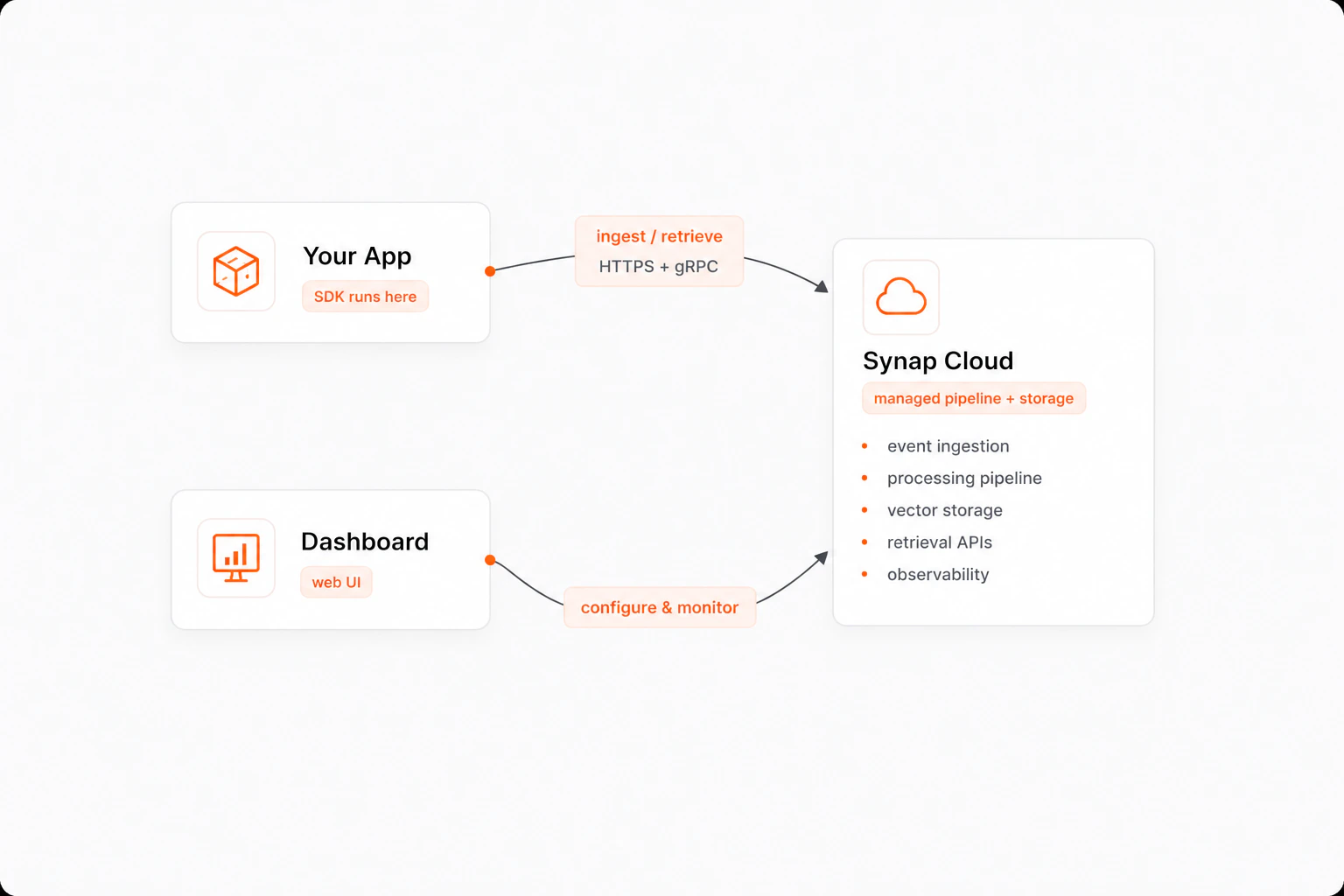 | Component | Role | How you interact |
| --------------- | ------------------------------------------------------------------------ | -------------------------------------------- |
| **SDK** | Runs in your application. Handles ingestion, retrieval, auth, streaming. | `pip install maximem-synap` |
| **Synap Cloud** | Managed backend. Pipeline + storage + retrieval. | Fully managed, nothing to deploy |
| **Dashboard** | Web UI for instances, memory architecture, monitoring. | [synap.maximem.ai](https://synap.maximem.ai) |
Synap is async-first. The SDK uses Python's `asyncio` for non-blocking operations, and the ingestion pipeline processes memories asynchronously so your application stays responsive.
| Component | Role | How you interact |
| --------------- | ------------------------------------------------------------------------ | -------------------------------------------- |
| **SDK** | Runs in your application. Handles ingestion, retrieval, auth, streaming. | `pip install maximem-synap` |
| **Synap Cloud** | Managed backend. Pipeline + storage + retrieval. | Fully managed, nothing to deploy |
| **Dashboard** | Web UI for instances, memory architecture, monitoring. | [synap.maximem.ai](https://synap.maximem.ai) |
Synap is async-first. The SDK uses Python's `asyncio` for non-blocking operations, and the ingestion pipeline processes memories asynchronously so your application stays responsive.