> ## Documentation Index
> Fetch the complete documentation index at: https://docs.maximem.ai/llms.txt
> Use this file to discover all available pages before exploring further.
# Integrations Overview
> Drop-in packages that add Synap memory to popular AI frameworks and agent SDKs.
Synap ships a library of thin integration packages so you can add persistent memory to your existing agent stack without rewriting your application. Each package handles the translation between Synap's API and the framework's native memory or tool interface.
## Three ways to add Synap
Install the skill and let Claude Code, Cursor, or Codex wire Synap in for you.
Drop in the package for your framework: LangChain, LangGraph, and 16 more (below).
Connect any MCP client with a URL and a token. No code.
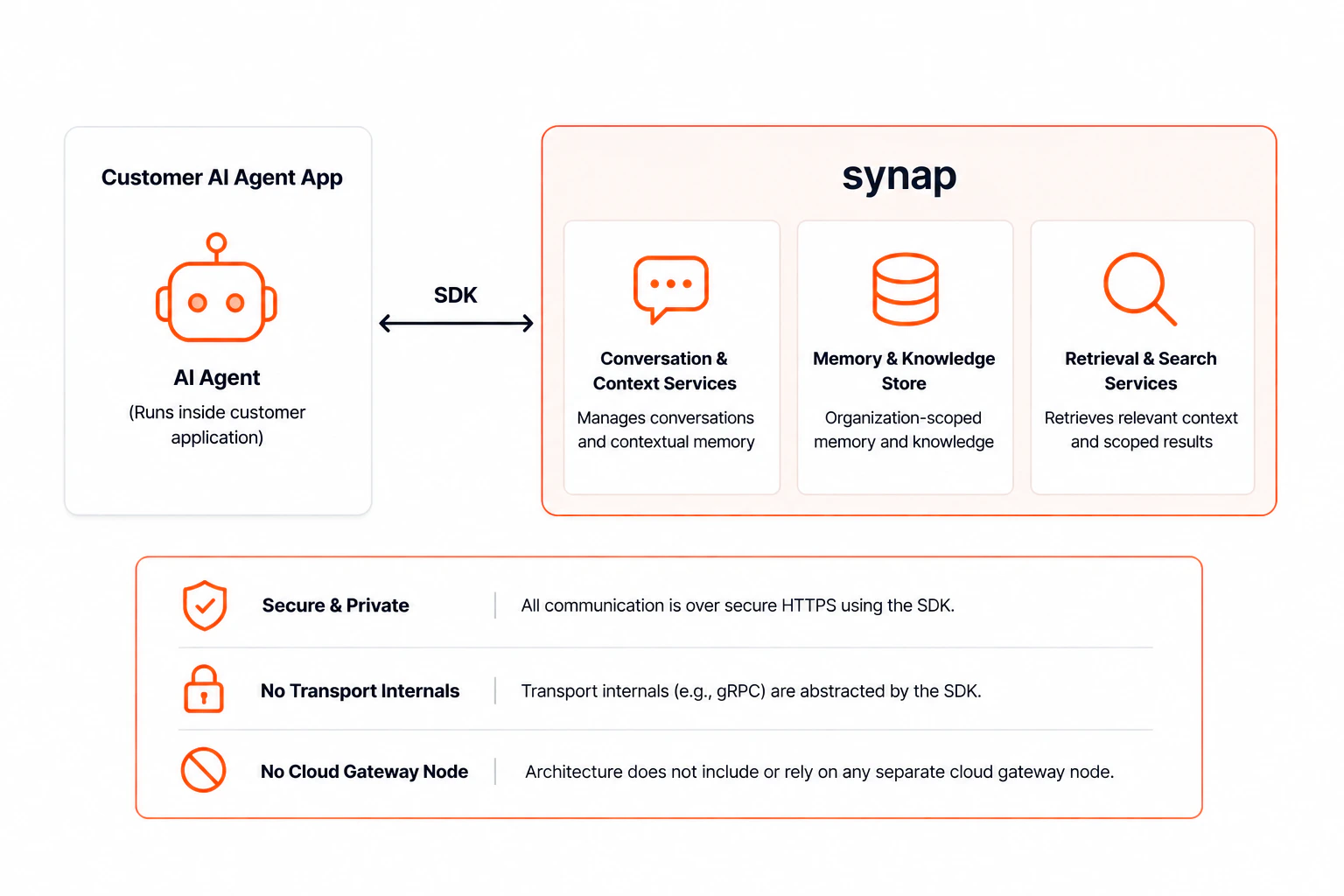 All packages share the same contract:
* **Read-side failures degrade gracefully**: a failed context fetch returns an empty result and logs an error, so your agent keeps running.
* **Write-side failures surface explicitly**: failed ingestion raises `SynapIntegrationError` (or equivalent) so callers know if memory persistence failed.
* **Same scoping model everywhere**: every package accepts `user_id`, optional `customer_id`, and optional `conversation_id`.
## How integrations plug in
Every framework exposes a few hook points in its agent loop, and each Synap package maps onto the same set of points. No matter which framework you use, an integration plugs in through one or more of these:
| Plug point | What it does | When it fires |
| ----------------------- | ------------------------------------------------------------------------------------------------------------- | -------------------------------- |
| **History / memory** | Replaces the framework's conversation memory so prior turns and long-term memories are loaded into the agent. | Always-on, before generation. |
| **Callback / recorder** | Captures each completed turn and ingests it into Synap so future conversations remember it. | Always-on, after generation. |
| **Retriever** | Fetches relevant memories for a query and returns them as context or documents. | Always-on, before generation. |
| **Tools** | Exposes explicit `search_memory` and `store_memory` functions the model can call on its own. | Model-driven, during generation. |
These fall into two modes:
* **Always-on memory**: history, callback, and retriever points run on every turn without the model deciding to. This is the default for memory-augmented agents and needs no prompt changes.
* **Model-driven memory**: tools let the agent choose when to read or write memory. Use this when you want the model to reason about what to remember or look up, or when always-on context would be too broad.
Most integrations support several of these points, so you can combine always-on context with model-driven tools in the same agent. The per-framework pages below note exactly which points each package provides.
## Available Integrations
Connect Gumloop, n8n, Claude, or any MCP client with just a URL and a token, no code.
Memory, callbacks, retriever, and tools for LangChain chains and agents.
Checkpointer and cross-thread store for LangGraph graphs.
`BaseMemory` implementation and retriever for LlamaIndex pipelines.
Search and store tools for the OpenAI Agents SDK.
Dependency dataclass and tool registration for Pydantic AI agents.
`StorageBackend` implementation for CrewAI's unified Memory system.
Search and store `BaseTool` implementations for AutoGen agents.
`FunctionTool` factory for Google Agent Development Kit agents.
`SynapRetriever` and `SynapMemoryWriter` pipeline components for Haystack.
Drop-in `InMemoryDb` replacement that routes user memories through Synap.
Kernel plugin with `search_memory` and `store_memory` functions.
Context and history providers for the Microsoft Agent Framework.
`MemoryEditor` implementation for NVIDIA NeMo Agent Toolkit workflows.
Context preloading and turn recording for LiveKit voice agents.
Frame processors for memory injection and recording in Pipecat pipelines.
Native `MemoryStore`, short-term context hook, tools, and anticipation-stream feed.
Native `AgentMemory` that augments CAMEL's history with Synap recall and persistence.
Memory tools and a per-step turn recorder for Hugging Face Smolagents.
Hooks and MCP server for Anthropic's Claude Agent SDK (Python & TypeScript).
`SynapMemory` class and tools for Mastra (TypeScript).
Middleware that wraps any Vercel AI SDK model with automatic Synap context.
Memory tools and a per-turn short-term-context resolver for eve agents.
## Quick Comparison
| Package | Language | Integration point | Install |
| ---------------------------------- | ---------- | ---------------------------------- | ---------------------------------------------- |
| `maximem-synap-langchain` | Python | Memory, callback, retriever, tools | `pip install maximem-synap-langchain` |
| `maximem-synap-langgraph` | Python | Checkpointer + Store | `pip install maximem-synap-langgraph` |
| `maximem-synap-llamaindex` | Python | `BaseMemory` + retriever | `pip install maximem-synap-llamaindex` |
| `maximem-synap-openai-agents` | Python | Function tools | `pip install maximem-synap-openai-agents` |
| `maximem-synap-pydantic-ai` | Python | Deps + tools | `pip install maximem-synap-pydantic-ai` |
| `maximem-synap-crewai` | Python | `StorageBackend` | `pip install maximem-synap-crewai` |
| `maximem-synap-autogen` | Python | `BaseTool` | `pip install maximem-synap-autogen` |
| `maximem-synap-google-adk` | Python | `FunctionTool` factory | `pip install maximem-synap-google-adk` |
| `maximem-synap-haystack` | Python | Pipeline components | `pip install maximem-synap-haystack` |
| `maximem-synap-agno` | Python | `InMemoryDb` subclass | `pip install maximem-synap-agno` |
| `maximem-synap-semantic-kernel` | Python | Kernel plugin | `pip install maximem-synap-semantic-kernel` |
| `maximem-synap-microsoft-agent` | Python | Context + history providers | `pip install maximem-synap-microsoft-agent` |
| `maximem-synap-nemo-agent-toolkit` | Python | `MemoryEditor` | `pip install maximem-synap-nemo-agent-toolkit` |
| `maximem-synap-livekit-agents` | Python | Helpers + function tools | `pip install maximem-synap-livekit-agents` |
| `maximem-synap-pipecat` | Python | Frame processors | `pip install maximem-synap-pipecat` |
| `maximem-synap-strands-agents` | Python | `MemoryStore` + hooks + tools | `pip install maximem-synap-strands-agents` |
| `maximem-synap-camel-ai` | Python | `AgentMemory` + tools | `pip install maximem-synap-camel-ai` |
| `maximem-synap-smolagents` | Python | Tools + step recorder | `pip install maximem-synap-smolagents` |
| `maximem-synap-claude-agent` | Python | Hooks + MCP server | `pip install maximem-synap-claude-agent` |
| `@maximem/synap-claude-agent` | TypeScript | Hooks + MCP server | `npm install @maximem/synap-claude-agent` |
| `@maximem/synap-mastra` | TypeScript | `MastraMemory` + tools | `npm install @maximem/synap-mastra` |
| `@maximem/synap-vercel-adk` | TypeScript | Model middleware | `npm install @maximem/synap-vercel-adk` |
| `@maximem/synap-eve` | TypeScript | Tools + instructions resolver | `npm install @maximem/synap-eve` |
The TypeScript packages wrap the JavaScript SDK, which spawns the Python SDK as a subprocess. **They require a Python 3.11+ runtime on the host** and do not run on Edge Runtime, Cloudflare Workers, Bun, Deno Deploy, or AWS Lambda Node-only runtimes. See [Installation → JavaScript / TypeScript SDK](/setup/installation#javascript-typescript-sdk).
## Prerequisites
Every integration requires a configured `MaximemSynapSDK` instance:
```python Python theme={null}
import os
from maximem_synap import MaximemSynapSDK, SDKConfig
sdk = MaximemSynapSDK(
api_key=os.environ["SYNAP_API_KEY"],
config=SDKConfig(cache_backend="sqlite"),
)
await sdk.initialize()
```
```typescript TypeScript theme={null}
import { createClient } from "@maximem/synap-js-sdk";
const sdk = createClient({
apiKey: process.env.SYNAP_API_KEY!,
});
await sdk.init();
```
See [SDK Initialization](/sdk/initialization) and [Authentication](/setup/authentication) for full setup details.
## Going further
* [Patterns overview](/patterns/overview): reusable memory patterns across frameworks.
* [Cookbook overview](/cookbook/overview): end-to-end worked examples.
All packages share the same contract:
* **Read-side failures degrade gracefully**: a failed context fetch returns an empty result and logs an error, so your agent keeps running.
* **Write-side failures surface explicitly**: failed ingestion raises `SynapIntegrationError` (or equivalent) so callers know if memory persistence failed.
* **Same scoping model everywhere**: every package accepts `user_id`, optional `customer_id`, and optional `conversation_id`.
## How integrations plug in
Every framework exposes a few hook points in its agent loop, and each Synap package maps onto the same set of points. No matter which framework you use, an integration plugs in through one or more of these:
| Plug point | What it does | When it fires |
| ----------------------- | ------------------------------------------------------------------------------------------------------------- | -------------------------------- |
| **History / memory** | Replaces the framework's conversation memory so prior turns and long-term memories are loaded into the agent. | Always-on, before generation. |
| **Callback / recorder** | Captures each completed turn and ingests it into Synap so future conversations remember it. | Always-on, after generation. |
| **Retriever** | Fetches relevant memories for a query and returns them as context or documents. | Always-on, before generation. |
| **Tools** | Exposes explicit `search_memory` and `store_memory` functions the model can call on its own. | Model-driven, during generation. |
These fall into two modes:
* **Always-on memory**: history, callback, and retriever points run on every turn without the model deciding to. This is the default for memory-augmented agents and needs no prompt changes.
* **Model-driven memory**: tools let the agent choose when to read or write memory. Use this when you want the model to reason about what to remember or look up, or when always-on context would be too broad.
Most integrations support several of these points, so you can combine always-on context with model-driven tools in the same agent. The per-framework pages below note exactly which points each package provides.
## Available Integrations
Connect Gumloop, n8n, Claude, or any MCP client with just a URL and a token, no code.
Memory, callbacks, retriever, and tools for LangChain chains and agents.
Checkpointer and cross-thread store for LangGraph graphs.
`BaseMemory` implementation and retriever for LlamaIndex pipelines.
Search and store tools for the OpenAI Agents SDK.
Dependency dataclass and tool registration for Pydantic AI agents.
`StorageBackend` implementation for CrewAI's unified Memory system.
Search and store `BaseTool` implementations for AutoGen agents.
`FunctionTool` factory for Google Agent Development Kit agents.
`SynapRetriever` and `SynapMemoryWriter` pipeline components for Haystack.
Drop-in `InMemoryDb` replacement that routes user memories through Synap.
Kernel plugin with `search_memory` and `store_memory` functions.
Context and history providers for the Microsoft Agent Framework.
`MemoryEditor` implementation for NVIDIA NeMo Agent Toolkit workflows.
Context preloading and turn recording for LiveKit voice agents.
Frame processors for memory injection and recording in Pipecat pipelines.
Native `MemoryStore`, short-term context hook, tools, and anticipation-stream feed.
Native `AgentMemory` that augments CAMEL's history with Synap recall and persistence.
Memory tools and a per-step turn recorder for Hugging Face Smolagents.
Hooks and MCP server for Anthropic's Claude Agent SDK (Python & TypeScript).
`SynapMemory` class and tools for Mastra (TypeScript).
Middleware that wraps any Vercel AI SDK model with automatic Synap context.
Memory tools and a per-turn short-term-context resolver for eve agents.
## Quick Comparison
| Package | Language | Integration point | Install |
| ---------------------------------- | ---------- | ---------------------------------- | ---------------------------------------------- |
| `maximem-synap-langchain` | Python | Memory, callback, retriever, tools | `pip install maximem-synap-langchain` |
| `maximem-synap-langgraph` | Python | Checkpointer + Store | `pip install maximem-synap-langgraph` |
| `maximem-synap-llamaindex` | Python | `BaseMemory` + retriever | `pip install maximem-synap-llamaindex` |
| `maximem-synap-openai-agents` | Python | Function tools | `pip install maximem-synap-openai-agents` |
| `maximem-synap-pydantic-ai` | Python | Deps + tools | `pip install maximem-synap-pydantic-ai` |
| `maximem-synap-crewai` | Python | `StorageBackend` | `pip install maximem-synap-crewai` |
| `maximem-synap-autogen` | Python | `BaseTool` | `pip install maximem-synap-autogen` |
| `maximem-synap-google-adk` | Python | `FunctionTool` factory | `pip install maximem-synap-google-adk` |
| `maximem-synap-haystack` | Python | Pipeline components | `pip install maximem-synap-haystack` |
| `maximem-synap-agno` | Python | `InMemoryDb` subclass | `pip install maximem-synap-agno` |
| `maximem-synap-semantic-kernel` | Python | Kernel plugin | `pip install maximem-synap-semantic-kernel` |
| `maximem-synap-microsoft-agent` | Python | Context + history providers | `pip install maximem-synap-microsoft-agent` |
| `maximem-synap-nemo-agent-toolkit` | Python | `MemoryEditor` | `pip install maximem-synap-nemo-agent-toolkit` |
| `maximem-synap-livekit-agents` | Python | Helpers + function tools | `pip install maximem-synap-livekit-agents` |
| `maximem-synap-pipecat` | Python | Frame processors | `pip install maximem-synap-pipecat` |
| `maximem-synap-strands-agents` | Python | `MemoryStore` + hooks + tools | `pip install maximem-synap-strands-agents` |
| `maximem-synap-camel-ai` | Python | `AgentMemory` + tools | `pip install maximem-synap-camel-ai` |
| `maximem-synap-smolagents` | Python | Tools + step recorder | `pip install maximem-synap-smolagents` |
| `maximem-synap-claude-agent` | Python | Hooks + MCP server | `pip install maximem-synap-claude-agent` |
| `@maximem/synap-claude-agent` | TypeScript | Hooks + MCP server | `npm install @maximem/synap-claude-agent` |
| `@maximem/synap-mastra` | TypeScript | `MastraMemory` + tools | `npm install @maximem/synap-mastra` |
| `@maximem/synap-vercel-adk` | TypeScript | Model middleware | `npm install @maximem/synap-vercel-adk` |
| `@maximem/synap-eve` | TypeScript | Tools + instructions resolver | `npm install @maximem/synap-eve` |
The TypeScript packages wrap the JavaScript SDK, which spawns the Python SDK as a subprocess. **They require a Python 3.11+ runtime on the host** and do not run on Edge Runtime, Cloudflare Workers, Bun, Deno Deploy, or AWS Lambda Node-only runtimes. See [Installation → JavaScript / TypeScript SDK](/setup/installation#javascript-typescript-sdk).
## Prerequisites
Every integration requires a configured `MaximemSynapSDK` instance:
```python Python theme={null}
import os
from maximem_synap import MaximemSynapSDK, SDKConfig
sdk = MaximemSynapSDK(
api_key=os.environ["SYNAP_API_KEY"],
config=SDKConfig(cache_backend="sqlite"),
)
await sdk.initialize()
```
```typescript TypeScript theme={null}
import { createClient } from "@maximem/synap-js-sdk";
const sdk = createClient({
apiKey: process.env.SYNAP_API_KEY!,
});
await sdk.init();
```
See [SDK Initialization](/sdk/initialization) and [Authentication](/setup/authentication) for full setup details.
## Going further
* [Patterns overview](/patterns/overview): reusable memory patterns across frameworks.
* [Cookbook overview](/cookbook/overview): end-to-end worked examples.