> ## Documentation Index
> Fetch the complete documentation index at: https://docs.maximem.ai/llms.txt
> Use this file to discover all available pages before exploring further.
# Initializing the SDK
> Set up the Synap SDK in your application.
## Overview
Before your application can ingest memories or retrieve context, you must initialize the Synap SDK. Initialization validates your API key, establishes a secure connection, and prepares local caching. The SDK follows a strict **initialize, use, shutdown** lifecycle.
## Basic Initialization
The simplest way to get started requires only your `SYNAP_API_KEY` environment variable. Generate an API key from the [Synap Dashboard](https://synap.maximem.ai) and set it in your environment.
```python theme={null}
from maximem_synap import MaximemSynapSDK
sdk = MaximemSynapSDK(
api_key="synap_your_key_here"
)
await sdk.initialize()
```
You **must** call `await sdk.initialize()` before invoking any SDK operations. Calling methods like `sdk.memories.create()` before initialization raises an `AuthenticationError`.
### What `initialize()` Does
When you call `initialize()`, the SDK performs the following steps in order:
The SDK picks up the API key from the `api_key=` argument (if passed) or the `SYNAP_API_KEY` environment variable.
The SDK opens an authenticated connection to Synap and, if real-time streaming is enabled, an additional streaming channel.
If a `cache_backend` is configured (default: `sqlite`), the SDK sets up the local cache database at the storage path.
## Initialization with Custom Configuration
Pass an `SDKConfig` object to customize SDK behavior at construction time.
```python theme={null}
from maximem_synap import MaximemSynapSDK, SDKConfig, TimeoutConfig, RetryPolicy
config = SDKConfig(
storage_path="/var/lib/myapp/synap",
cache_backend="sqlite",
session_timeout_minutes=60,
timeouts=TimeoutConfig(
connect=10.0,
read=45.0,
write=15.0,
stream_idle=120.0
),
retry_policy=RetryPolicy(
max_attempts=5,
backoff_base=1.5,
backoff_max=30.0,
backoff_jitter=True
),
log_level="INFO"
)
sdk = MaximemSynapSDK(
api_key="synap_your_key_here",
config=config
)
await sdk.initialize()
```
See [SDK Configuration](/sdk/configuration) for a complete reference of all configuration options. For the full `initialize()` signature and parameters, see the [API Reference](/sdk-reference/lifecycle/initialize).
## Singleton Pattern
By default, the SDK maintains a **single instance per `instance_id`**, where `instance_id` defaults to `""` (empty string) and is resolved from the API key at initialization. If you construct a second `MaximemSynapSDK` without passing `instance_id`, both constructions key off the same default empty string, so you receive a reference to the existing instance rather than creating a new one.
```python theme={null}
sdk_a = MaximemSynapSDK(api_key="synap_key_1")
sdk_b = MaximemSynapSDK(api_key="synap_key_1")
# Both default to instance_id="" (resolved from the API key via whoami),
# so they point to the same SDK instance.
assert sdk_a is sdk_b
```
This prevents accidental duplication of connections and caches in applications that construct the SDK from multiple modules.
Instances are a Dashboard-only concept and are not SDK-addressable. Do not pass `instance_id` to disambiguate constructions; it is resolved automatically from the API key.
### Overriding the Singleton for Testing
In test environments, use `_force_new=True` to bypass the singleton cache and create a fresh SDK instance each time.
```python theme={null}
sdk = MaximemSynapSDK(
api_key="synap_test_key",
_force_new=True
)
```
The `_force_new` parameter is intended for testing only. Using it in production can lead to multiple SDK instances competing for the same credential files and cache database.
### Running multiple instances in one process
The supported model is **one live SDK per process**. The singleton, the credential store, and the local cache database are all process-wide, so two SDKs constructed in the same process with the default `instance_id` collapse into the same object: you cannot point one at staging and another at production this way.
To run staging and production side by side, give each its **own process** (separate worker, container, or service), each with its own `SYNAP_API_KEY`. Constructing multiple live SDKs in a single process is not a supported configuration and can lead to the credential/cache contention described above.
## Environment Variable Initialization
For CI/CD, containers, serverless, and production, just set the environment variable:
```bash Linux / macOS theme={null}
export SYNAP_API_KEY="synap_your_key_here"
```
```powershell Windows (PowerShell, session) theme={null}
$env:SYNAP_API_KEY = "synap_your_key_here"
```
```powershell Windows (PowerShell, persistent) theme={null}
[System.Environment]::SetEnvironmentVariable("SYNAP_API_KEY", "synap_your_key_here", "User")
```
```ini .env file (with python-dotenv) theme={null}
SYNAP_API_KEY=synap_your_key_here
```
```python theme={null}
from maximem_synap import MaximemSynapSDK
sdk = MaximemSynapSDK()
await sdk.initialize()
```
The SDK reads `SYNAP_API_KEY` automatically and resolves the instance ID from the server.
## The `configure()` Method
If you need to adjust configuration after constructing the SDK but before calling `initialize()`, use the `configure()` method.
```python theme={null}
sdk = MaximemSynapSDK(
api_key="synap_your_key_here"
)
# Adjust config before initialization
sdk.configure(
log_level="DEBUG",
session_timeout_minutes=120
)
await sdk.initialize()
```
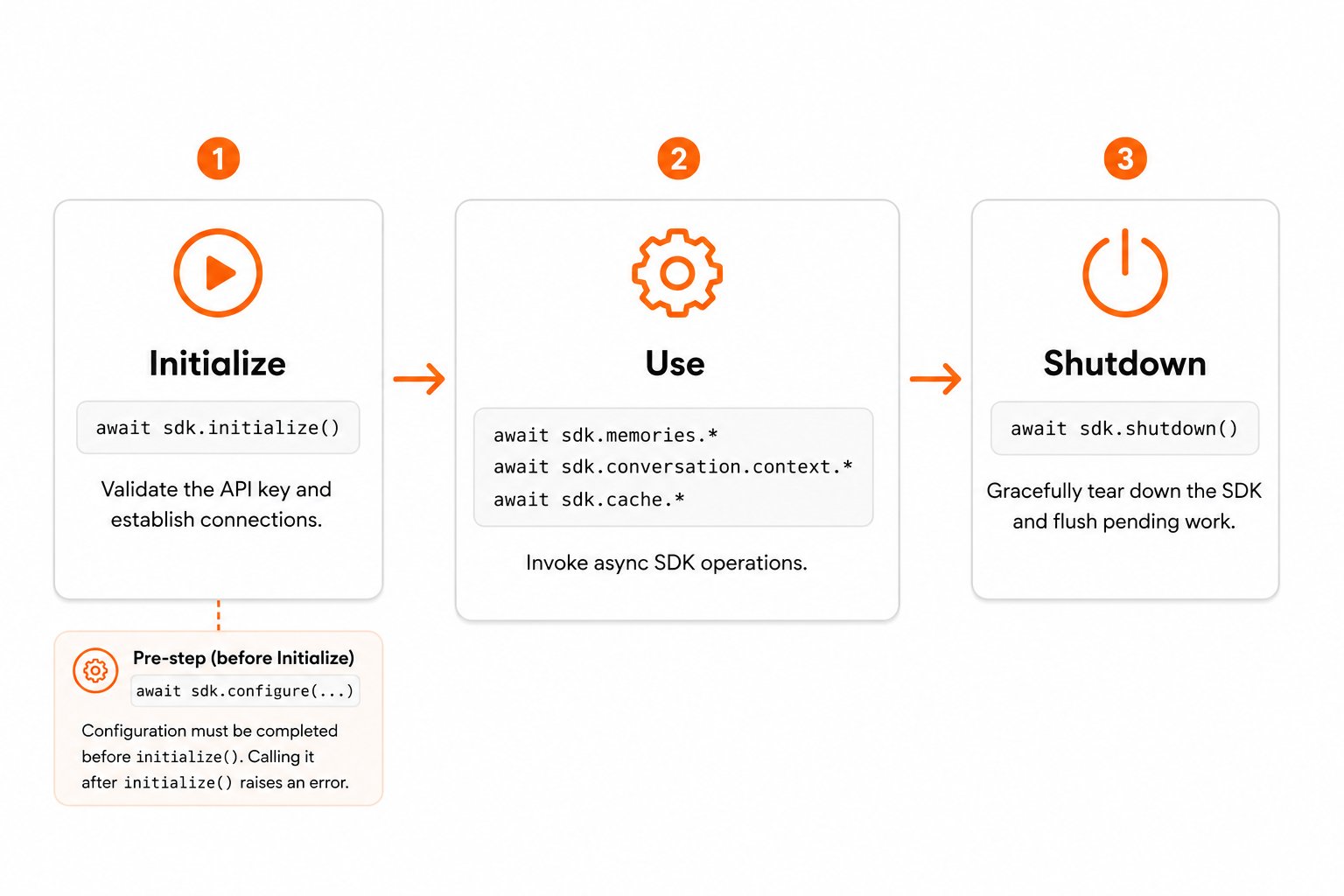
Calling `configure()` after `initialize()` raises `InvalidInputError('Cannot reconfigure after initialization')`. All configuration must be finalized before the SDK is initialized.
## SDK Lifecycle
The SDK follows a strict three-phase lifecycle:
 ### 1. Initialize
Call `await sdk.initialize()` to validate the API key and establish connections.
### 2. Use
Invoke SDK operations: `sdk.memories.*`, `sdk.conversation.context.*`, `sdk.cache.*`, etc. All operations are async and must be awaited.
### 3. Shutdown
Call `await sdk.shutdown()` to gracefully tear down the SDK.
```python theme={null}
await sdk.shutdown()
```
Always call `shutdown()` before your application exits to ensure pending telemetry is flushed and active streaming connections are closed cleanly. Failing to call `shutdown()` may result in lost telemetry data and lingering connections.
## Initialize and Shut Down Cleanly
For cleaner lifecycle management, wrap your application logic in a `try/finally` so `shutdown()` always runs, even if an error is raised mid-flight.
```python theme={null}
from maximem_synap import MaximemSynapSDK
sdk = MaximemSynapSDK(
api_key="synap_your_key_here"
)
try:
await sdk.initialize()
# Your application logic
response = await sdk.memories.create(
document="User asked about project deadlines...",
document_type="ai-chat-conversation",
user_id="user_12345",
customer_id="acme_corp",
)
print(f"Ingestion ID: {response.ingestion_id}")
finally:
await sdk.shutdown()
```
## Full Example with Error Handling
The following example demonstrates a production-ready initialization pattern with comprehensive error handling.
```python theme={null}
import logging
import uuid
from maximem_synap import MaximemSynapSDK, SDKConfig, TimeoutConfig, RetryPolicy
from maximem_synap import (
AuthenticationError,
NetworkTimeoutError,
SynapError,
)
logger = logging.getLogger(__name__)
async def create_synap_sdk() -> MaximemSynapSDK:
"""Initialize the Synap SDK with production-ready configuration."""
config = SDKConfig(
storage_path="/var/lib/myapp/synap",
cache_backend="sqlite",
session_timeout_minutes=60,
timeouts=TimeoutConfig(connect=10.0, read=30.0),
retry_policy=RetryPolicy(max_attempts=3),
log_level="WARNING",
)
sdk = MaximemSynapSDK(
api_key="synap_your_key_here",
config=config,
)
try:
await sdk.initialize()
logger.info("Synap SDK initialized successfully")
return sdk
except AuthenticationError as e:
logger.error(
"Authentication failed: %s (correlation_id=%s)",
e, e.correlation_id
)
raise
except NetworkTimeoutError:
logger.error(
"Could not reach Synap Cloud. Check network connectivity."
)
raise
except SynapError as e:
logger.error(
"Unexpected Synap error during init: %s (correlation_id=%s)",
e, e.correlation_id
)
raise
async def main():
sdk = await create_synap_sdk()
try:
# Application logic here.
# conversation_id must be a valid UUID string; generate one with
# str(uuid.uuid4()) or reuse a UUID you already manage per conversation.
context = await sdk.conversation.context.fetch(
conversation_id=str(uuid.uuid4()),
mode="fast"
)
print(f"Retrieved {len(context.facts)} facts")
finally:
await sdk.shutdown()
logger.info("Synap SDK shut down cleanly")
```
The API key is read fresh on every start. There is no one-time setup step: the same `SYNAP_API_KEY` works forever (until you revoke it in the Dashboard).
## Next Steps
Send conversations and documents into Synap's memory system.
Query contextual memories for your AI agent.
Explore all configuration options in detail.
### 1. Initialize
Call `await sdk.initialize()` to validate the API key and establish connections.
### 2. Use
Invoke SDK operations: `sdk.memories.*`, `sdk.conversation.context.*`, `sdk.cache.*`, etc. All operations are async and must be awaited.
### 3. Shutdown
Call `await sdk.shutdown()` to gracefully tear down the SDK.
```python theme={null}
await sdk.shutdown()
```
Always call `shutdown()` before your application exits to ensure pending telemetry is flushed and active streaming connections are closed cleanly. Failing to call `shutdown()` may result in lost telemetry data and lingering connections.
## Initialize and Shut Down Cleanly
For cleaner lifecycle management, wrap your application logic in a `try/finally` so `shutdown()` always runs, even if an error is raised mid-flight.
```python theme={null}
from maximem_synap import MaximemSynapSDK
sdk = MaximemSynapSDK(
api_key="synap_your_key_here"
)
try:
await sdk.initialize()
# Your application logic
response = await sdk.memories.create(
document="User asked about project deadlines...",
document_type="ai-chat-conversation",
user_id="user_12345",
customer_id="acme_corp",
)
print(f"Ingestion ID: {response.ingestion_id}")
finally:
await sdk.shutdown()
```
## Full Example with Error Handling
The following example demonstrates a production-ready initialization pattern with comprehensive error handling.
```python theme={null}
import logging
import uuid
from maximem_synap import MaximemSynapSDK, SDKConfig, TimeoutConfig, RetryPolicy
from maximem_synap import (
AuthenticationError,
NetworkTimeoutError,
SynapError,
)
logger = logging.getLogger(__name__)
async def create_synap_sdk() -> MaximemSynapSDK:
"""Initialize the Synap SDK with production-ready configuration."""
config = SDKConfig(
storage_path="/var/lib/myapp/synap",
cache_backend="sqlite",
session_timeout_minutes=60,
timeouts=TimeoutConfig(connect=10.0, read=30.0),
retry_policy=RetryPolicy(max_attempts=3),
log_level="WARNING",
)
sdk = MaximemSynapSDK(
api_key="synap_your_key_here",
config=config,
)
try:
await sdk.initialize()
logger.info("Synap SDK initialized successfully")
return sdk
except AuthenticationError as e:
logger.error(
"Authentication failed: %s (correlation_id=%s)",
e, e.correlation_id
)
raise
except NetworkTimeoutError:
logger.error(
"Could not reach Synap Cloud. Check network connectivity."
)
raise
except SynapError as e:
logger.error(
"Unexpected Synap error during init: %s (correlation_id=%s)",
e, e.correlation_id
)
raise
async def main():
sdk = await create_synap_sdk()
try:
# Application logic here.
# conversation_id must be a valid UUID string; generate one with
# str(uuid.uuid4()) or reuse a UUID you already manage per conversation.
context = await sdk.conversation.context.fetch(
conversation_id=str(uuid.uuid4()),
mode="fast"
)
print(f"Retrieved {len(context.facts)} facts")
finally:
await sdk.shutdown()
logger.info("Synap SDK shut down cleanly")
```
The API key is read fresh on every start. There is no one-time setup step: the same `SYNAP_API_KEY` works forever (until you revoke it in the Dashboard).
## Next Steps
Send conversations and documents into Synap's memory system.
Query contextual memories for your AI agent.
Explore all configuration options in detail.