> ## Documentation Index
> Fetch the complete documentation index at: https://docs.maximem.ai/llms.txt
> Use this file to discover all available pages before exploring further.
# First Integration
> The opinionated, recommended integration path: an end-to-end FastAPI + OpenAI walkthrough that builds a memory-enabled chatbot from scratch.
This is the **canonical end-to-end tutorial**: read it top-to-bottom. It assumes you've finished the [Quickstart](/getting-started/quickstart) and want to wire Synap into a real application.
If you only need a snippet for a specific framework (Flask, Next.js, Django) or LLM provider (Anthropic, Vercel AI SDK), open [Setup → Integration](/setup/detailed-integration) and copy the relevant tab instead.
Prefer to explore the SDK in a browser before writing code? Use the [live playground](https://synap.maximem.ai/playground).
## Prerequisites
Before you begin, make sure you have:
* **Python 3.11+** installed on your machine
* A **Synap account** with access to the [Dashboard](https://synap.maximem.ai)
* An **instance** created in the Dashboard (see [Quickstart](/getting-started/quickstart) if you haven't done this yet). For best results, upload a Use-Case Markdown file when creating your instance; see [Use-Case Markdown](/concepts/memory-architecture#the-use-case-file) for the template and authoring guide.
* An **OpenAI API key** (or any LLM provider; we use OpenAI in this tutorial for simplicity). No paid key yet? Use [Google Gemini's free tier](https://aistudio.google.com/apikey); see the Gemini snippet in [Setup → Integration](/setup/detailed-integration#llm-provider-integration).
This tutorial assumes basic familiarity with Python async/await. If you are new to async Python, check out the [asyncio documentation](https://docs.python.org/3/library/asyncio.html) first.
***
Create a new directory for your project and install the required dependencies:
```bash theme={null}
mkdir synap-chatbot && cd synap-chatbot
python -m venv venv
source venv/bin/activate
```
Install the SDK and supporting libraries:
```bash pip theme={null}
pip install maximem-synap openai fastapi uvicorn
```
```bash poetry theme={null}
poetry add maximem-synap openai fastapi uvicorn
```
```bash uv theme={null}
uv add maximem-synap openai fastapi uvicorn
# pip-compatible (existing venv): uv pip install maximem-synap openai fastapi uvicorn
```
Your project will have the following structure:
```
synap-chatbot/
startup.py # SDK initialization and lifecycle
main.py # FastAPI application with chat endpoint
.env # Environment variables (not committed)
```
Create a `.env` file with your credentials. You will need two values:
* **SYNAP\_API\_KEY**: The API key generated for your instance (format: `synap_`). Generate one from the Dashboard: open your instance, click **Generate API Key**, and copy the key; it is shown only once.
* **OPENAI\_API\_KEY**: Your OpenAI API key
```bash .env theme={null}
SYNAP_API_KEY=synap_your_key_here
OPENAI_API_KEY=sk-your-openai-key-here
```
Never commit `.env` files to version control. Add `.env` to your `.gitignore` immediately. In production, use a secrets manager (AWS Secrets Manager, GCP Secret Manager, HashiCorp Vault) instead of environment files.
Create a `startup.py` module that manages the SDK lifecycle. This module will be imported by your FastAPI application.
```python startup.py theme={null}
from maximem_synap import MaximemSynapSDK, SDKConfig
import os
sdk = MaximemSynapSDK(
api_key=os.environ["SYNAP_API_KEY"],
config=SDKConfig(
cache_backend="sqlite",
log_level="INFO"
)
)
async def init():
"""Validate the API key and establish the connection to Synap Cloud."""
await sdk.initialize()
async def cleanup():
"""Flush pending operations and close connections."""
await sdk.shutdown()
```
Key points about this setup:
* **`cache_backend="sqlite"`** enables local caching for faster repeated retrievals.
* **`log_level="INFO"`** is appropriate for development. Switch to `"WARNING"` or `"ERROR"` in production.
* The `sdk` object is a module-level singleton. Import it from any module and it will reference the same initialized instance.
The API key is read fresh every time the SDK starts. Leave `SYNAP_API_KEY` in your `.env` (or secrets manager); the same key keeps working until you revoke it in the Dashboard.
Now create the `main.py` file. Start with the application lifespan manager, which ensures the SDK initializes on startup and shuts down cleanly when the server stops.
```python main.py theme={null}
import os
from contextlib import asynccontextmanager
from fastapi import FastAPI
from pydantic import BaseModel
from openai import AsyncOpenAI
from startup import sdk, init, cleanup
# --- Lifespan Management ---
@asynccontextmanager
async def lifespan(app):
"""Initialize Synap SDK on startup, shut down on exit."""
await init()
print("Synap SDK initialized. Ready to serve requests.")
yield
await cleanup()
print("Synap SDK shut down cleanly.")
app = FastAPI(
title="Synap Chatbot",
description="A memory-enabled chatbot powered by Synap",
lifespan=lifespan
)
openai_client = AsyncOpenAI(api_key=os.environ.get("OPENAI_API_KEY"))
# --- Request/Response Models ---
class ChatRequest(BaseModel):
message: str
conversation_id: str
user_id: str
customer_id: str | None = None
class ChatResponse(BaseModel):
response: str
memories_used: int
```
The `lifespan` context manager is the recommended way to manage startup/shutdown in modern FastAPI applications (v0.95+). It replaces the older `@app.on_event("startup")` and `@app.on_event("shutdown")` hooks.
Add the chat endpoint to `main.py`. This endpoint performs five operations in sequence:
1. **Record** the incoming user message: this registers the conversation so context can be fetched back
2. **Retrieve** relevant memories from Synap
3. **Build** a system prompt enriched with memory context
4. **Call** the LLM with the enriched prompt
5. **Record + Ingest** the conversation turn back into Synap for future memory
Registering each turn with `record_message` is what makes the conversation
retrievable. Context fetched by `conversation_id` only returns turns that were
recorded; passing `conversation_id` solely as `metadata` on `memories.create`
does **not** register the conversation (metadata is stored, not indexed for
conversation-scoped retrieval). An unregistered conversation returns empty
results by design.
```python main.py (continued) theme={null}
@app.post("/chat", response_model=ChatResponse)
async def chat(req: ChatRequest):
# -------------------------------------------------------
# Step 1: Record the user's message (registers the conversation)
# -------------------------------------------------------
await sdk.conversation.record_message(
conversation_id=req.conversation_id,
role="user",
content=req.message,
user_id=req.user_id,
customer_id=req.customer_id,
)
# -------------------------------------------------------
# Step 2: Retrieve relevant memories for this conversation
# -------------------------------------------------------
context = await sdk.conversation.context.fetch(
conversation_id=req.conversation_id,
search_query=[req.message],
max_results=5,
types=["facts", "preferences"],
mode="fast"
)
# -------------------------------------------------------
# Step 3: Build system prompt with memory context
# -------------------------------------------------------
memory_lines = []
for fact in context.facts:
memory_lines.append(
f"- {fact.content} (confidence: {fact.confidence:.0%})"
)
for pref in context.preferences:
memory_lines.append(f"- User preference: {pref.content}")
memory_block = "\n".join(memory_lines) if memory_lines else (
"No prior context available."
)
system_prompt = f"""You are a helpful assistant with memory.
Known information about this user:
{memory_block}
Use this context naturally in your responses. Do not explicitly mention
that you are reading from a memory system, just be naturally informed."""
# -------------------------------------------------------
# Step 4: Call the LLM
# -------------------------------------------------------
response = await openai_client.chat.completions.create(
model="gpt-4o",
messages=[
{"role": "system", "content": system_prompt},
{"role": "user", "content": req.message}
],
temperature=0.7,
max_tokens=1024
)
assistant_message = response.choices[0].message.content
# -------------------------------------------------------
# Step 5: Record the assistant reply, then ingest the turn
# -------------------------------------------------------
# record_message keeps the conversation history complete so the
# next turn's context.fetch can see this exchange.
await sdk.conversation.record_message(
conversation_id=req.conversation_id,
role="assistant",
content=assistant_message,
user_id=req.user_id,
customer_id=req.customer_id,
)
# memories.create extracts long-term, scope-aware knowledge from the turn.
await sdk.memories.create(
document=f"User: {req.message}\nAssistant: {assistant_message}",
document_type="ai-chat-conversation",
user_id=req.user_id,
customer_id=req.customer_id,
mode="fast", # real-time turn; use mode="long-range" for deeper profile-building ingests
metadata={
"conversation_id": req.conversation_id,
"source": "chatbot-tutorial"
}
)
return ChatResponse(
response=assistant_message,
memories_used=len(memory_lines)
)
```
Let's break down each step:
`sdk.conversation.record_message()` appends the turn to the conversation's
rolling history **and registers the conversation** under this
`conversation_id`. This registration is what later lets
`conversation.context.fetch(conversation_id=...)` resolve scope and return
the conversation's turns. Skip it and the first `fetch` for a brand-new
`conversation_id` comes back empty, by design.
The `sdk.conversation.context.fetch()` call searches Synap's vector and graph stores for memories relevant to the user's message. Key parameters:
* **`search_query`**: A list of strings used for semantic search. Passing the user's message ensures we find contextually relevant memories.
* **`max_results=5`**: Limits context to the top 5 most relevant memories, keeping the prompt concise.
* **`types=["facts", "preferences"]`**: Retrieves only facts and preferences. Other types include `episodes`, `emotions`, and `temporal`. Use `all` to retrieve every type.
* **`mode="fast"`**: Uses the `fast` retrieval path (lower latency). Use `accurate` when precision matters more; accurate adds LLM subquery decomposition + reranking on top of the same vector + graph search.
The retrieved memories are formatted as bullet points and injected into the system prompt. This gives the LLM access to user-specific context without modifying the conversation history.
The confidence score (e.g., `92%`) is included to help the LLM weigh how certain each piece of information is. You can omit confidence scores if you prefer a cleaner prompt.
A standard OpenAI chat completion call. The system prompt now contains personalized context, so the LLM can respond as if it "remembers" the user. This works with any LLM provider: replace the OpenAI call with your preferred provider.
Two distinct writes happen here, and they serve different purposes:
* **`record_message(role="assistant", ...)`** completes the turn in the
conversation's rolling history, so the next turn's `context.fetch` sees the
full exchange. This is the call that makes conversation-scoped retrieval work.
* **`memories.create(...)`** runs the ingestion pipeline, which extracts
structured long-term knowledge (facts, preferences, entities, temporal
events) from the text. Its `metadata` (including `conversation_id`) is stored
for filtering and audit but is **not** what registers the conversation;
that is `record_message`'s job.
On `memories.create`:
* **`document_type="ai-chat-conversation"`** tells the pipeline to expect a conversational format with `User:` and `Assistant:` turns.
* **`mode="fast"`** processes asynchronously without blocking the response.
* **`metadata`** attaches arbitrary key-value pairs for later filtering and audit.
Good practice for production deployments: add a health check that verifies the SDK is connected:
```python main.py (continued) theme={null}
@app.get("/health")
async def health():
try:
stats = sdk.cache.stats()
return {
"status": "healthy",
"synap_connected": True,
"cache_entries": stats["total_entries"]
}
except Exception as e:
return {
"status": "degraded",
"synap_connected": False,
"error": str(e)
}
```
Load your environment variables and start the server:
```bash theme={null}
# Load environment variables
export $(cat .env | xargs)
# Start the FastAPI server
uvicorn main:app --reload --port 8000
```
You should see output confirming the SDK has initialized:
```
INFO: Started server process
Synap SDK initialized. Ready to serve requests.
INFO: Application startup complete.
INFO: Uvicorn running on http://127.0.0.1:8000
```
Now test with a few conversation turns:
```bash theme={null}
# First message, no memories exist yet
# conversation_id must be a UUID; generate one with `python -c "import uuid; print(uuid.uuid4())"`
curl -X POST http://localhost:8000/chat \
-H "Content-Type: application/json" \
-d '{
"message": "Hi! I am planning a trip to Japan next month. Any tips?",
"conversation_id": "3f6b1a2c-4d5e-6f7a-8b9c-0d1e2f3a4b5c",
"user_id": "user_alice"
}'
```
```json theme={null}
{
"response": "Japan is wonderful! What kind of experience are you looking for...",
"memories_used": 0
}
```
```bash theme={null}
# Second message, Synap now has context from the first turn
# Reuse the same UUID to keep both turns in the same conversation.
curl -X POST http://localhost:8000/chat \
-H "Content-Type: application/json" \
-d '{
"message": "What should I pack?",
"conversation_id": "3f6b1a2c-4d5e-6f7a-8b9c-0d1e2f3a4b5c",
"user_id": "user_alice"
}'
```
```json theme={null}
{
"response": "Since you're heading to Japan next month, here's what I'd recommend packing...",
"memories_used": 2
}
```
Notice that `memories_used` increases as Synap accumulates knowledge about the user. Because the first turn was registered with `record_message` (and ingested with `memories.create`), the second turn's `context.fetch` finds the earlier exchange and the assistant naturally references the Japan trip. Had the conversation never been recorded, that second fetch would return empty and `memories_used` would stay `0`.
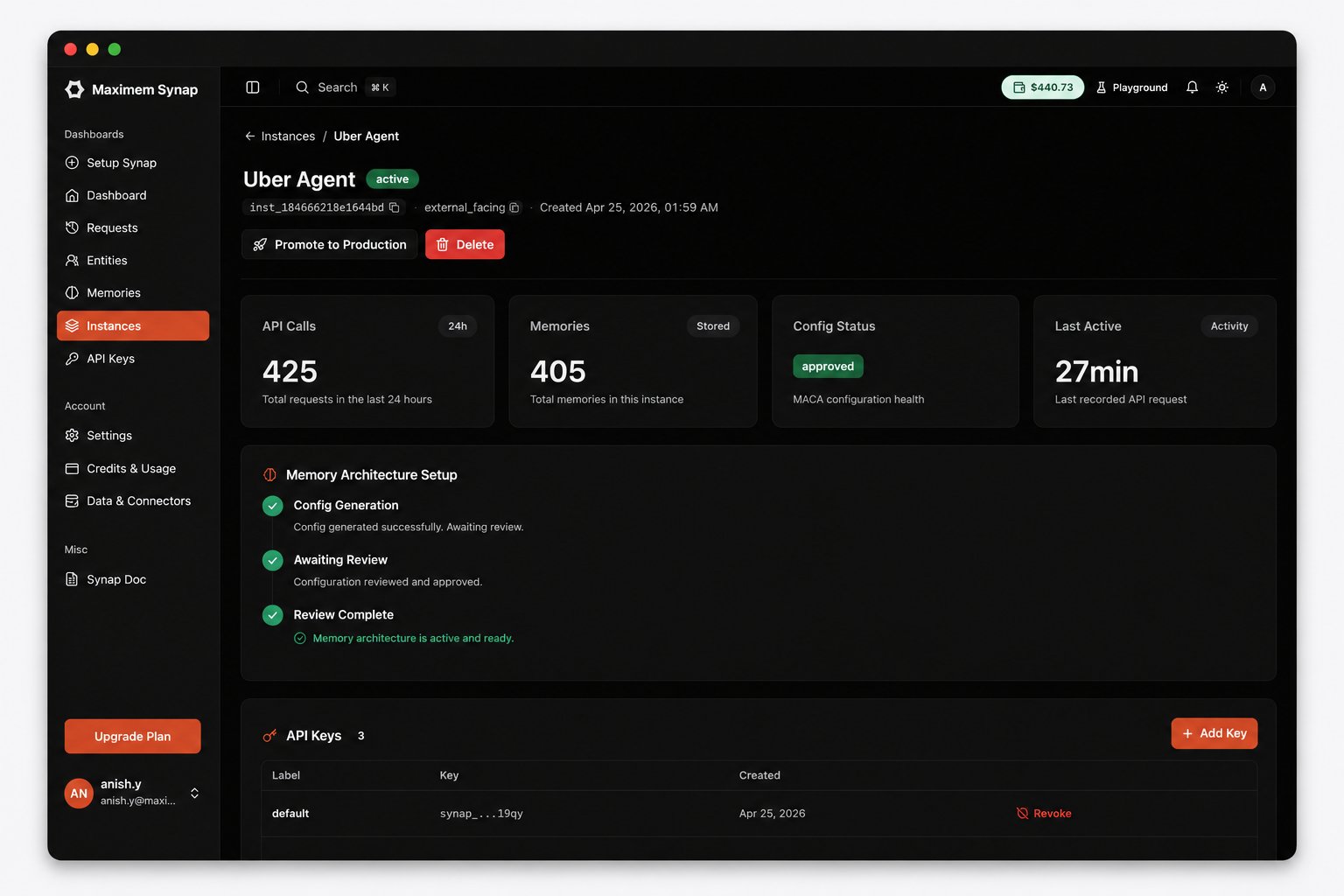
Open the [Synap Dashboard](https://synap.maximem.ai) and navigate to your instance. You should see:
* **API call counts** reflecting your test requests
* **Memory counts** showing extracted facts, preferences, and entities
* **Ingestion history** with the conversation turns you sent
 ***
## Complete Code
Here is the final version of both files for reference:
```python startup.py theme={null}
from maximem_synap import MaximemSynapSDK, SDKConfig
import os
sdk = MaximemSynapSDK(
api_key=os.environ["SYNAP_API_KEY"],
config=SDKConfig(
cache_backend="sqlite",
log_level="INFO"
)
)
async def init():
"""Validate the API key and establish the connection to Synap Cloud."""
await sdk.initialize()
async def cleanup():
"""Flush pending operations and close connections."""
await sdk.shutdown()
```
```python main.py theme={null}
import os
from contextlib import asynccontextmanager
from fastapi import FastAPI
from pydantic import BaseModel
from openai import AsyncOpenAI
from startup import sdk, init, cleanup
@asynccontextmanager
async def lifespan(app):
await init()
print("Synap SDK initialized. Ready to serve requests.")
yield
await cleanup()
print("Synap SDK shut down cleanly.")
app = FastAPI(
title="Synap Chatbot",
description="A memory-enabled chatbot powered by Synap",
lifespan=lifespan
)
openai_client = AsyncOpenAI(api_key=os.environ.get("OPENAI_API_KEY"))
class ChatRequest(BaseModel):
message: str
conversation_id: str
user_id: str
customer_id: str | None = None
class ChatResponse(BaseModel):
response: str
memories_used: int
@app.post("/chat", response_model=ChatResponse)
async def chat(req: ChatRequest):
# Record the user's message (registers the conversation)
await sdk.conversation.record_message(
conversation_id=req.conversation_id,
role="user",
content=req.message,
user_id=req.user_id,
customer_id=req.customer_id,
)
# Retrieve relevant memories
context = await sdk.conversation.context.fetch(
conversation_id=req.conversation_id,
search_query=[req.message],
max_results=5,
types=["facts", "preferences"],
mode="fast"
)
# Build system prompt with memory context
memory_lines = []
for fact in context.facts:
memory_lines.append(
f"- {fact.content} (confidence: {fact.confidence:.0%})"
)
for pref in context.preferences:
memory_lines.append(f"- User preference: {pref.content}")
memory_block = "\n".join(memory_lines) if memory_lines else (
"No prior context available."
)
system_prompt = f"""You are a helpful assistant with memory.
Known information about this user:
{memory_block}
Use this context naturally in your responses. Do not explicitly mention
that you are reading from a memory system, just be naturally informed."""
# Call the LLM
response = await openai_client.chat.completions.create(
model="gpt-4o",
messages=[
{"role": "system", "content": system_prompt},
{"role": "user", "content": req.message}
],
temperature=0.7,
max_tokens=1024
)
assistant_message = response.choices[0].message.content
# Record the assistant reply so the next turn's fetch sees the full exchange
await sdk.conversation.record_message(
conversation_id=req.conversation_id,
role="assistant",
content=assistant_message,
user_id=req.user_id,
customer_id=req.customer_id,
)
# Ingest this conversation turn for long-term memory
await sdk.memories.create(
document=f"User: {req.message}\nAssistant: {assistant_message}",
document_type="ai-chat-conversation",
user_id=req.user_id,
customer_id=req.customer_id,
mode="fast",
metadata={
"conversation_id": req.conversation_id,
"source": "chatbot-tutorial"
}
)
return ChatResponse(
response=assistant_message,
memories_used=len(memory_lines)
)
@app.get("/health")
async def health():
try:
stats = sdk.cache.stats()
return {
"status": "healthy",
"synap_connected": True,
"cache_entries": stats["total_entries"]
}
except Exception as e:
return {
"status": "degraded",
"synap_connected": False,
"error": str(e)
}
```
***
## What's Next?
You have a working memory-enabled chatbot. Here are the natural next steps to make it production-ready:
The use-case file is how Synap tunes what gets extracted, how it is stored, and how retrieval ranking works for your Instance.
Set up memory isolation for multi-tenant applications with user, customer, and client scopes.
Manage long conversations by compacting context to fit within your LLM's token budget.
Security, performance, and monitoring best practices before going live.
***
## Complete Code
Here is the final version of both files for reference:
```python startup.py theme={null}
from maximem_synap import MaximemSynapSDK, SDKConfig
import os
sdk = MaximemSynapSDK(
api_key=os.environ["SYNAP_API_KEY"],
config=SDKConfig(
cache_backend="sqlite",
log_level="INFO"
)
)
async def init():
"""Validate the API key and establish the connection to Synap Cloud."""
await sdk.initialize()
async def cleanup():
"""Flush pending operations and close connections."""
await sdk.shutdown()
```
```python main.py theme={null}
import os
from contextlib import asynccontextmanager
from fastapi import FastAPI
from pydantic import BaseModel
from openai import AsyncOpenAI
from startup import sdk, init, cleanup
@asynccontextmanager
async def lifespan(app):
await init()
print("Synap SDK initialized. Ready to serve requests.")
yield
await cleanup()
print("Synap SDK shut down cleanly.")
app = FastAPI(
title="Synap Chatbot",
description="A memory-enabled chatbot powered by Synap",
lifespan=lifespan
)
openai_client = AsyncOpenAI(api_key=os.environ.get("OPENAI_API_KEY"))
class ChatRequest(BaseModel):
message: str
conversation_id: str
user_id: str
customer_id: str | None = None
class ChatResponse(BaseModel):
response: str
memories_used: int
@app.post("/chat", response_model=ChatResponse)
async def chat(req: ChatRequest):
# Record the user's message (registers the conversation)
await sdk.conversation.record_message(
conversation_id=req.conversation_id,
role="user",
content=req.message,
user_id=req.user_id,
customer_id=req.customer_id,
)
# Retrieve relevant memories
context = await sdk.conversation.context.fetch(
conversation_id=req.conversation_id,
search_query=[req.message],
max_results=5,
types=["facts", "preferences"],
mode="fast"
)
# Build system prompt with memory context
memory_lines = []
for fact in context.facts:
memory_lines.append(
f"- {fact.content} (confidence: {fact.confidence:.0%})"
)
for pref in context.preferences:
memory_lines.append(f"- User preference: {pref.content}")
memory_block = "\n".join(memory_lines) if memory_lines else (
"No prior context available."
)
system_prompt = f"""You are a helpful assistant with memory.
Known information about this user:
{memory_block}
Use this context naturally in your responses. Do not explicitly mention
that you are reading from a memory system, just be naturally informed."""
# Call the LLM
response = await openai_client.chat.completions.create(
model="gpt-4o",
messages=[
{"role": "system", "content": system_prompt},
{"role": "user", "content": req.message}
],
temperature=0.7,
max_tokens=1024
)
assistant_message = response.choices[0].message.content
# Record the assistant reply so the next turn's fetch sees the full exchange
await sdk.conversation.record_message(
conversation_id=req.conversation_id,
role="assistant",
content=assistant_message,
user_id=req.user_id,
customer_id=req.customer_id,
)
# Ingest this conversation turn for long-term memory
await sdk.memories.create(
document=f"User: {req.message}\nAssistant: {assistant_message}",
document_type="ai-chat-conversation",
user_id=req.user_id,
customer_id=req.customer_id,
mode="fast",
metadata={
"conversation_id": req.conversation_id,
"source": "chatbot-tutorial"
}
)
return ChatResponse(
response=assistant_message,
memories_used=len(memory_lines)
)
@app.get("/health")
async def health():
try:
stats = sdk.cache.stats()
return {
"status": "healthy",
"synap_connected": True,
"cache_entries": stats["total_entries"]
}
except Exception as e:
return {
"status": "degraded",
"synap_connected": False,
"error": str(e)
}
```
***
## What's Next?
You have a working memory-enabled chatbot. Here are the natural next steps to make it production-ready:
The use-case file is how Synap tunes what gets extracted, how it is stored, and how retrieval ranking works for your Instance.
Set up memory isolation for multi-tenant applications with user, customer, and client scopes.
Manage long conversations by compacting context to fit within your LLM's token budget.
Security, performance, and monitoring best practices before going live.