

The Problem
Consider a SaaS application with an AI assistant. You need to handle several competing requirements:- User A should not see User B’s personal memories
- Users within the same organization should share some common context (e.g., company policies, project details)
- Your application has global knowledge that all users should benefit from (e.g., product documentation, feature capabilities)
- All of this needs to work without manual access control lists or complex permission logic
The Scope Hierarchy
Synap organizes memories into four nested scopes. Each scope is a superset of the one above it: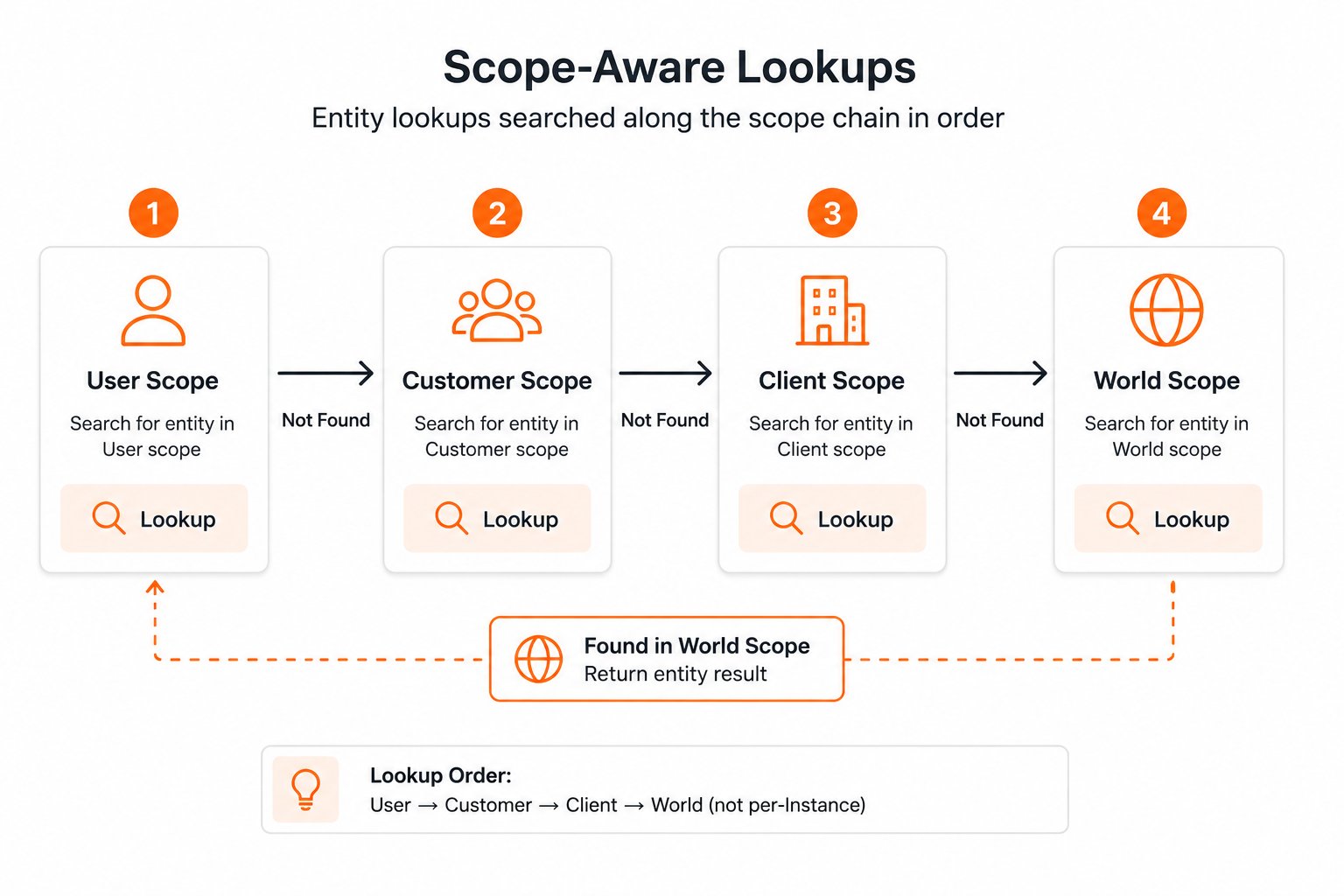
The scope hierarchy: USER is the narrowest (most isolated), WORLD is the broadest (shared across all instances).
How Scope Isolation Works
When you ingest a memory, Synap assigns it to a scope based on the identifiers you provide:- Pass
user_id: memory is stored at USER scope - Pass
customer_id(withoutuser_id): memory is stored at CUSTOMER scope - Pass neither: memory is stored at CLIENT scope
customer_id was set at ingestion time and stored server-side. On retrieval, Synap looks up that association and walks the chain for you. You can also pass customer_id explicitly on sdk.user.context.fetch(user_id=..., customer_id=...) for B2B instances when you want to assert the customer association at query time.
When memories at different scopes conflict (e.g., a user preference contradicts a customer-level default), the narrower scope wins. User-level memories always override customer-level, which override client-level.
Setting Up User Scope
User scope is the most common isolation boundary. Every time you ingest a memory that belongs to a specific individual, pass theiruser_id.
ContextResponse.facts returns a merged, ranked list: the server has already walked the USER → CUSTOMER → CLIENT chain for you. If you need per-fact scope attribution (e.g., to render USER-scoped memories with different visual treatment), call sdk.fetch(...) instead and read UnifiedContextResponse.scope_map on the cross-scope unified response.
Setting Up Customer Scope
Customer scope represents an organization, team, or account. Memories at this scope are shared across all users within that customer.cust_acme will see this memory in their context:
Setting Up Client Scope
Client scope represents your entire application. Memories at this scope are visible to every user across all customers.Client scope is useful for ingesting your product documentation, feature announcements, FAQ content, and any other knowledge that should be available to all users of your application.
Example: SaaS Project Management Tool
Let’s walk through a complete example. You are building an AI assistant for a project management tool. The assistant helps team members with tasks, deadlines, and project context.Defining Your Scope Strategy
Ingestion Code
Retrieval Code
Example: Consumer Mobile App
For simpler consumer applications without an organization concept, the scoping model is straightforward.Defining Your Scope Strategy
Ingestion Code
Retrieval Code
Primary scope: what Synap optimizes for
Each Instance has a primary scope: the level Synap optimizes indexing, caching, and retrieval for. It is chosen automatically based on your use-case file:
If your agent’s primary audience changes (e.g., from per-user personalization to per-team collaboration), re-upload your use-case file. Synap will re-evaluate and update the Instance. Existing memories keep their original scope assignment; new memories follow the updated behavior.
Testing Scoped Access
When developing, verify that scope isolation works correctly by testing cross-scope access patterns:In production, Synap’s PII handling would redact or mask the email address before storage. This test uses raw content for simplicity.
Scope Decision Flowchart
Use this flowchart to decide which scope identifiers to pass when ingesting memories:1
Is this memory about a specific individual?
Yes. Pass
user_id (and customer_id if the user belongs to an organization).No. Continue to the next question.2
Is this memory about a specific organization or team?
Yes. Pass
customer_id only (no user_id).No. Continue to the next question.3
Is this memory about your application or product?
Yes. Pass neither
user_id nor customer_id. It will be stored at client scope.No. This is likely general knowledge. Store at client scope or consider whether it should be ingested at all.Best Practices
Use consistent ID formats
Use consistent ID formats
Establish a convention for
user_id and customer_id values and enforce it across your application. Inconsistent IDs (e.g., "alice" vs "user_alice" vs "user-alice") create fragmented memory silos.Recommended: prefix-based IDs like user_<your_internal_id> and cust_<your_internal_id>.Always pass customer_id when you have it
Always pass customer_id when you have it
Even if you primarily use user scope, always pass
customer_id alongside user_id during ingestion and retrieval. This ensures customer-scoped memories are properly accessible and the scope hierarchy works correctly.Test with multiple users early
Test with multiple users early
Do not wait until production to test multi-user scenarios. Set up at least two test users and one test customer during development and verify isolation before deploying.
Next Steps
Writing a Use-Case Markdown File
The use-case file is how you tell Synap what to optimize scope behavior for.
Scopes (Core Concept)
Deeper conceptual explanation of the scope hierarchy and conflict resolution.
Entity Resolution
Learn how entities are resolved and shared across scopes.
Production Checklist
Ensure your multi-tenant setup is production-ready.