

Agent interactions
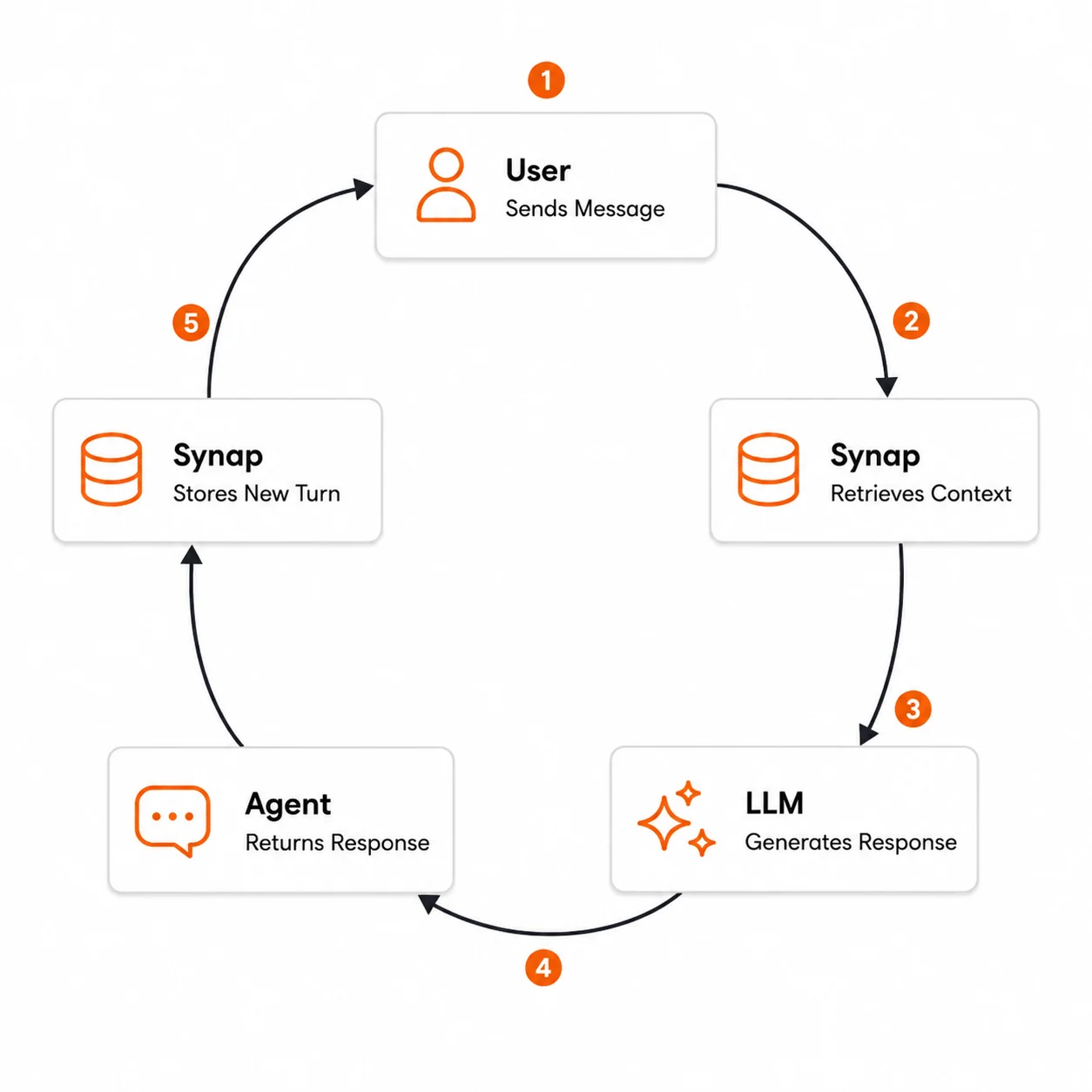
The core pattern for a live agent is a four-phase cycle: Report, Retrieve, Generate, Report. The agent tells Synap what just happened on a long-lived stream, and Synap handles both sides of memory: pushing anticipated context down before the agent asks, and forming long-term memory from the reported turns when the conversation compacts. This loop is the same whether you run one agent or many. Only the scope IDs you address change.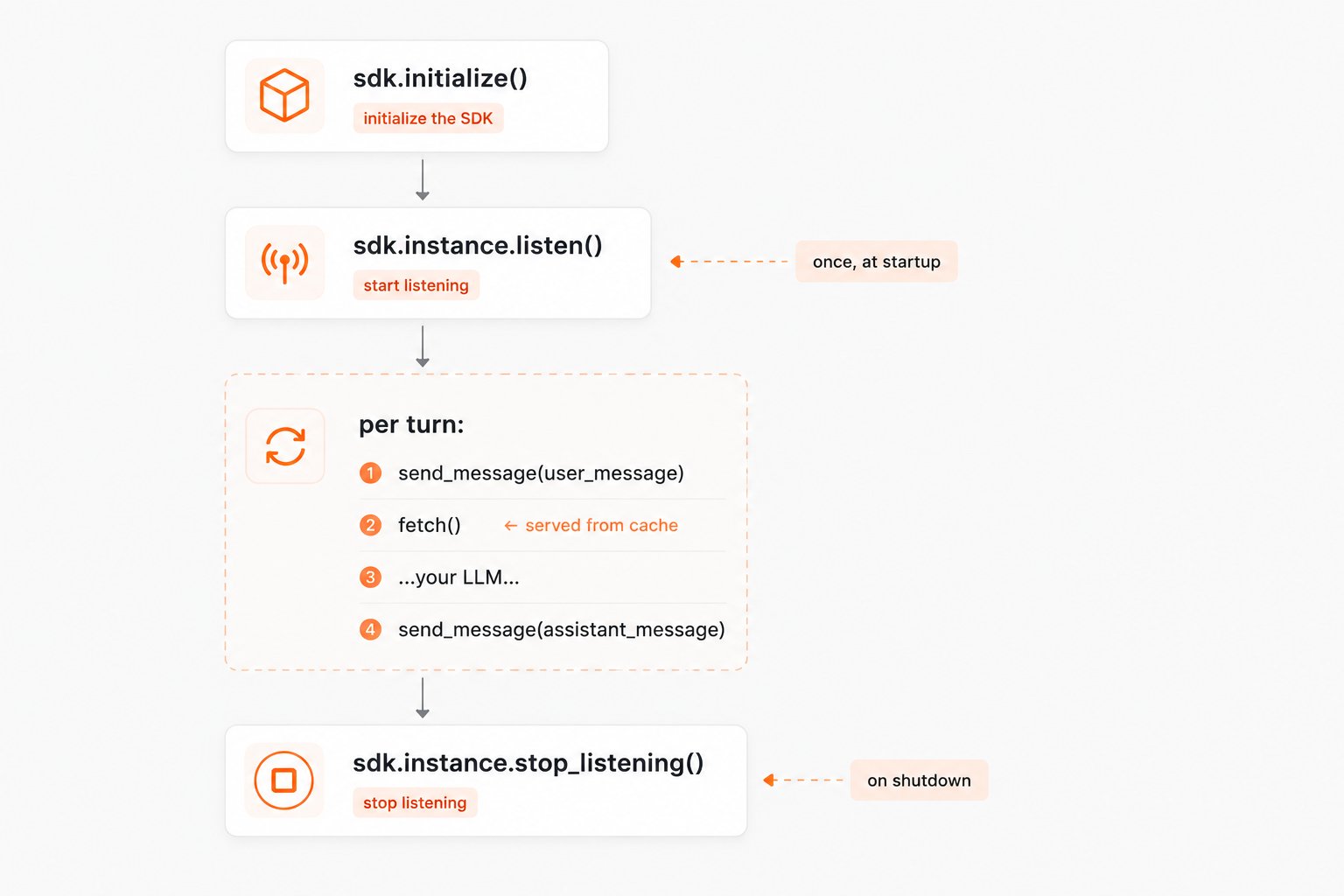
There is no ingestion call in this loop. Reported turns become long-term memory when the conversation compacts, at 3,000 tokens, 10 messages, or 5 minutes of inactivity. See Agent Integration for the full walkthrough, and Retrieve, generate, ingest below for the request-response alternative.
1
User sends a message
Your application receives a message from the user through whatever channel you support: a chat widget, API endpoint, mobile app, voice interface, or other integration.
2
Agent retrieves relevant context from Synap
Before calling the LLM, the agent queries Synap for memories relevant to the current message. This retrieval considers the user’s history, their organization’s shared knowledge, and any client-scoped information.
conversation_id must be a valid UUID. Generate one with str(uuid.uuid4()) and reuse the same value for every turn in the conversation.3
Agent builds the prompt
The agent assembles the full prompt for the LLM: a system prompt, the retrieved memories as context, the recent conversation history, and the current user message. The retrieved context bridges the gap between what the LLM knows (nothing about this user) and what it needs to know.
4
Agent generates a response
The agent calls the LLM (Anthropic, OpenAI, or any provider) with the assembled prompt. The LLM generates a response that is informed by the user’s history and organizational context.
5
Agent delivers the response
The generated response is sent back to the user through your application’s interface.
6
Agent reports the reply
After the response is delivered, the agent reports it on the stream. This completes the turn in conversation history and is what pre-warms anticipation for the next turn, so it belongs after the LLM call rather than before.Nothing else is required. Both reported turns enter the long-term ingestion pipeline when this conversation compacts.
7
Loop repeats
When the user sends the next message, the cycle begins again. This time the retrieval step often resolves from the anticipation cache in about a millisecond, because Synap pushed a bundle down the stream between turns. Once the conversation compacts, earlier turns are also available as long-term memories, creating a continuously improving feedback loop.
Injecting retrieved context into the prompt
The most critical part of the integration is how you structure the retrieved context within your LLM prompt. The retrieved memories need to be clearly separated from the system instructions and the conversation history so the LLM can use them effectively.Choosing a retrieval mode
Retrieval is on the critical path of your agent’s response time: the user is waiting while your agent fetches context. The mode you pick trades latency for retrieval depth.
For most real-time conversational agents, use
fast mode: it returns quickly and adds minimal overhead. Reserve accurate mode for cases where retrieval quality matters more than speed, such as end-of-day summaries or complex analytical questions. See Retrieval Modes for the full comparison.
Retrieve, generate, ingest
Some agents cannot hold a stream open. A per-request serverless handler is the common case: the process ends with the response, so there is nothing to keep a connection alive. Those agents run the older three-phase cycle instead, replacing bothsend_message calls with an explicit ingestion at the end of the turn.
When to ingest explicitly
If you are on the request-response loop above, or you are ingesting content that never travels the stream, these are the three common strategies and their tradeoffs:- After every turn
- At conversation end
- Hybrid approach
Ingest each conversation turn (user message + agent response) immediately after the response is delivered. This is the standard choice on the request-response loop.Pros:
- Memories are available for retrieval within the same conversation session
- No risk of data loss if the session ends unexpectedly
- Fine-grained temporal resolution
- Higher API call volume
- Each turn is ingested independently, without full conversation context
Best practices
Always retrieve before generating
Always retrieve before generating
Even if you think the current query does not need historical context, always call retrieval. Synap’s ranking ensures that irrelevant context is not returned, so the overhead is minimal. Skipping retrieval means your agent cannot benefit from accumulated memory.
Keep system prompt instructions about memory concise
Keep system prompt instructions about memory concise
The LLM does not need to know how Synap works internally. Simply tell it to use the retrieved context naturally and to not fabricate memories. Over-engineering the memory instructions can cause the LLM to behave unnaturally.
Separate retrieval latency from generation latency
Separate retrieval latency from generation latency
Log retrieval and generation latencies independently. If your agent feels slow, retrieval in fast mode is rarely the bottleneck. LLM generation is usually the dominant factor. Measuring both independently helps you optimize the right layer.
Use conversation_id for multi-turn tracking
Use conversation_id for multi-turn tracking
When your application supports multi-turn conversations, pass a consistent
conversation_id (a valid UUID) alongside the user_id. This helps Synap group related turns for better contextual understanding during retrieval.Single-agent memory
Most Synap deployments are single-agent: one AI agent, backed by one Instance running one MACA. All memory flows through that single Instance, and the people your agent serves are kept separate by scopes, not by running additional Instances. A single-agent architecture has three fixed pieces:- One Instance: the deployed unit that owns the memory store and credentials.
- One MACA: generated automatically from the Use-Case Markdown file you upload at creation. It governs what gets extracted, how it is stored, and how retrieval ranks results for this agent.
- Scopes for isolation: every memory is written and read at a scope in the chain User → Customer → Client. Two different end-users on the same Instance never see each other’s memories, because their memories live at different
user_idscopes.
user_id values (and customer_id values in B2B deployments), never by provisioning more Instances.
How you map your world onto scopes
The right way to map your world onto Synap’s scopes depends on who your agent serves. Describe these roles in the Role Descriptions section of your use-case file, and Synap tunes the MACA’s primary scope accordingly.Personal assistant
One person is the Client, Customer, and User at once. The scope hierarchy collapses: effectively everything is User-scoped. Best for consumer (B2C) apps where each account is a single individual.
Single-tenant app
One organization (Customer) with many individual Users. Shared organizational knowledge lives at Customer scope; personal context lives at User scope.
B2B multi-tenant
Many Customers, each with many Users, all served by the same agent on one Instance. The most common SaaS shape. Customer scope isolates tenants; User scope isolates individuals within a tenant.
Scaling a single agent
A single-agent architecture scales to many users and customers without any change to its topology:- More users or customers never require more Instances. Pass new scope IDs and the chain isolates them automatically.
- Staging vs. production is a separate concern. Use a distinct Instance per environment so test data never mixes with production memory, each is still a single-agent deployment.
- Behavior changes (new task categories, new compliance rules) are made by re-uploading the use-case file, which regenerates the MACA. The topology stays the same.
Separate Instances for staging and production is an environment split, not a multi-agent architecture. You still have one agent per Instance, each with its own MACA.
Multi-agent memory
A multi-agent architecture runs more than one agent against Synap: for example a sales agent, a support agent, and an onboarding agent that together serve the same users. The central question is always the same: which agents should share what they remember, and which should stay isolated?The key rule: sharing is by scope, not by Instance
An Instance is infrastructure: it is not a memory scope. What two agents share is decided entirely by the scope IDs they address: if they ingest and retrieve with the sameuser_id (and customer_id in B2B), they share that user’s and customer’s memories. The scope chain (User → Customer → Client) is the sharing boundary; the Instance boundary is the isolation boundary.
Every pattern below is just a different combination of which Instance agents run on and which scopes they address.
Three architecture patterns
Shared Instance + shared scopes
All agents run on one Instance and address the same scopes. Because memory is keyed by scope, every agent automatically sees what the others have stored for that user or customer. This is how handoffs work: the receiving agent inherits the context the previous one built. This is the simplest and most common multi-agent setup.Separate Instance per agent
Give each agent its own Instance, and therefore its own MACA generated from its own Use-Case Markdown. A support agent can prioritize extracting error details and resolutions, while a sales agent prioritizes buying signals and account context. Memory is isolated per Instance: the agents do not automatically see each other’s memories. Use this when agents have genuinely different jobs, or when policy requires their memories to stay separate. If two such agents still need a shared baseline (e.g. product knowledge), write that knowledge at Client scope in each Instance, or keep a dedicated knowledge Instance, but per-user context will not cross the Instance boundary.Hierarchical Instances (agent teams)
When you have a team of specialized agents that belong together, model them as hierarchical Instances: create a parent Instance and point each child’sparent_instance_id at it. This is an organizational tool for grouping related deployments and sharing configuration patterns. Memory isolation is still enforced per-Instance. Hierarchy organizes your agents, it does not merge their memory.
Per-agent vs. shared knowledge
Once you have picked a pattern, decide deliberately what to share:- To share across agents, have them address the same scope IDs. User- and Customer-scoped memories then flow between them automatically.
- To isolate agents, give them separate Instances: the Instance boundary prevents per-user memory from leaking between agents even if they happen to use the same IDs.
- For knowledge every agent should see, write it at Client scope (no
user_id/customer_id); it is visible to all retrievals within an Instance.
Next steps
Context End to End
Follow a single turn through retrieval, generation, and ingestion across the full system.
Retrieval Modes
Fast vs. accurate retrieval and when to use each.
Memory Scopes
The Client, Customer, and User scopes that isolate and share memory.
Customized Memory Architectures
The MACA that Synap generates for each Instance.