

This page explains the identity model and the scope chain. Code examples are illustrative. For the canonical SDK call signatures and full parameter reference, see SDK → Ingestion and SDK → Context Fetch.
The identifiers at a glance
Synap organizes memory around five identifiers. Two describe your infrastructure (who you are and what you deployed); three describe who your agent is serving and drive how memory is scoped.Clients are created by Synap on signup; Instances are created and managed in the Synap Dashboard. Customers, Users, and Conversations are implicitly created: they come into existence the first time you pass their IDs during ingestion or retrieval. There is no separate registration step.
This four-level chain is the default, not the only shape. Every account
starts on
Client → Customer → User, and for almost every integration that is
the right model and the rest of this page is all you need.Underneath, Synap stores scopes as a ladder of named levels, and the
default is simply a ladder three rungs deep. If your business has a real level
between your customers and your people, a team inside an organization or a
region above it, see Scope ladder for what that
changes and what it does not.B2C vs B2B: which scopes apply to you
How many of these scopes you actually use depends on your Instance’s tenancy shape. This is set once per Instance by the User Relationship setting (in the Dashboard, under Instance Settings), and it decides whethercustomer_id is part of your scoping at all. The setting is exposed to your code as user_context_isolation: equals_customer for B2C, strict for B2B.
- B2C (personal app): one tier of users, with no organization above them. You identify each user by
user_idonly.customer_idis not accepted on a B2C Instance: any call carrying it is rejected with HTTP 400. The customer-scope fetch (customer.context.fetch,POST /v1/context/customer/fetch) is B2B-only and is rejected here too. Memories live at the user scope, with client and world above them. This is the right model when your users are individuals: a companion app, a personal assistant, or your first hobby agent. - B2B (multi-tenant): your customers are organizations, each containing many users. Every user is scoped under a
customer_id, so you pass bothuser_idandcustomer_idon every call. This is what activates the customer scope: facts tagged at customer scope are shared across that tenant’s users, while user-scoped memories stay private to the individual.
How to tell which you have: open your Instance in the Dashboard and check User Relationship under Instance Settings, or call
GET /api/v1/auth/whoami, which returns your instance’s user_context_isolation. equals_customer means B2C: send user_id alone and never customer_id. strict means B2B: include customer_id on every call. The default for a brand-new personal agent is B2C (user_id only).Clients and instances
Clients and Instances are Synap’s infrastructure layer: they describe who you are and what you deployed, not who your agent serves. Memory isolation itself happens along the Customer/User scope chain inside an Instance.What is a Client?
A Client is the top-level organizational entity in Synap. It represents your company, team, or application. When you sign up for Synap and create an account, you are creating a Client. Every Client has a unique identifier in the formatcli_<hex16> (for example, cli_a3f8b1c2d4e5f678). This identifier is immutable and used throughout the Synap API and SDK to scope operations to your organization. A Client carries human-readable metadata (name, website, description), arbitrary JSON context, and a status of active, inactive, or soft_deleted.
When a Client is set to
inactive or soft_deleted, all of its Instances are effectively suspended. No ingestion or retrieval operations will succeed until the Client is reactivated.What is an Instance?
An Instance is a deployed Synap memory agent. It is the unit of deployment: each Instance has its own isolated memory store, configuration, credentials, and scope hierarchy. You create Instances under a Client to represent different AI agents, environments (staging vs. production), or use cases. Every Instance has a unique identifier in the formatinst_<hex16> (for example, inst_7b2e9a1c3d4f5678). You never pass the instance_id directly on SDK calls: the Instance is resolved from the API key you authenticate with. Each API key (format synap_<random>) belongs to exactly one Instance, so the key both authenticates you and selects which Instance’s memory you are reading and writing.
What each Instance owns
Each Instance is a fully isolated environment. When you create an Instance, Synap provisions these resources exclusively for it:API Keys
One or more API keys (format:
synap_<random>) generated from the Dashboard. Each key authenticates the SDK and resolves to this Instance. The SHA-256 hash is stored; the raw key is shown once at generation time and can be individually revoked.Memory Architecture Config
The per-instance Memory Architecture Configuration (MACA) that controls how memories are extracted, stored, and retrieved. Synap generates it automatically from the Use-Case Markdown file you upload at instance creation: the more detail you provide there, the better the starting configuration. See Memory Architecture.
Memory Store
Isolated vector and graph storage namespaces. Memories stored in one Instance are never accessible from another Instance unless explicitly shared through scope configuration.
Scoped Memory Boundaries
Within an Instance, memory is isolated along the scope chain (User → Customer → Client), enforced at the storage layer.
Clients and Instances are created and managed through the Synap Dashboard (synap.maximem.ai → Instances). The SDK runs inside an Instance once it exists; it does not create or list Instances.
Customers and users
Customers and Users are your entities, not Synap’s. You provide thecustomer_id and user_id strings, and Synap uses them to organize and isolate memories. You do not need to register these identifiers in advance. Simply pass them during ingestion and retrieval.
What is a Customer?
A Customer represents a tenant or organization in your application. If you are building a B2B SaaS product, each of your client companies is a Customer. If you are building a consumer app, each household or account group could be a Customer. Customers are identified by acustomer_id string that you provide. This string is opaque to Synap: it can be a UUID, a slug, a database ID, or any identifier that is unique within your application. Synap uses it to create a memory boundary at the CUSTOMER scope level.
Examples of Customers: "acme_corp", "startup_xyz", "household_9a3f", "team_engineering".
On a B2C Instance there is no organization above the user, so customer_id is not accepted: passing it returns HTTP 400. On a B2B Instance, customer_id is required on every call and is what shares facts across a tenant’s users.
What is a User?
A User represents an individual end-user of your application. Each person interacting with your AI agent is a User. Users are identified by auser_id string that you provide, following the same rules as customer_id: it is opaque to Synap and can be any unique identifier.
Users map to the USER scope, the narrowest and most private scope level. Memories stored at the User scope are visible only when that specific user_id is provided in a retrieval query.
Examples of Users: "user_alice_chen", "u_8b2f4a91", "github|12345", "employee_0042".
Conversations
A Conversation is a single chat or session for a user, identified by an optionalconversation_id you pass alongside user_id. It groups exchanges within the USER scope so the agent can distinguish “this session” from a user’s broader history. Conversation IDs are opaque strings; UUIDs are typical:
The scope chain
Synap uses a four-level hierarchical scope chain, ordered from narrowest (most private) to broadest (most shared):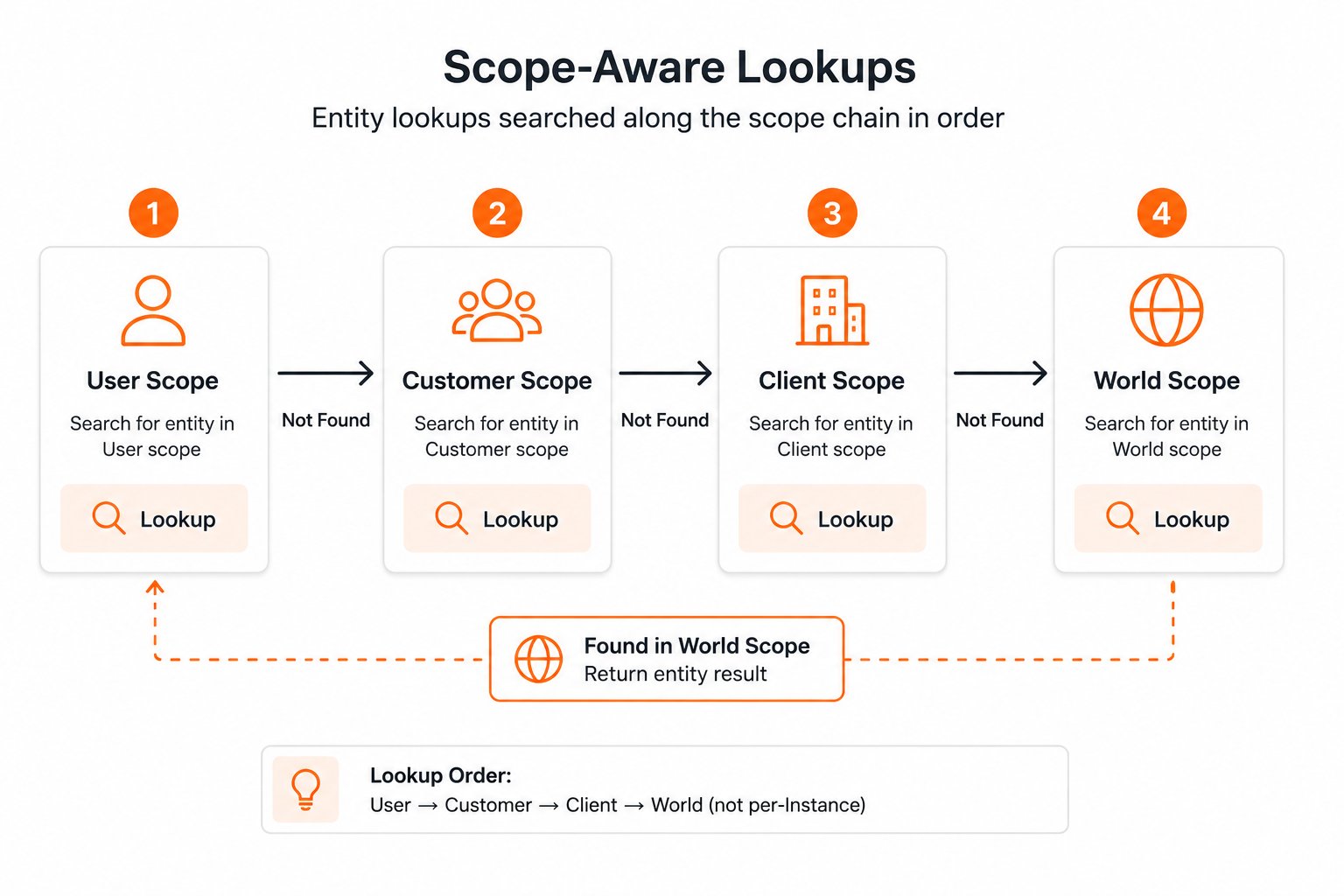
User scope
The most granular scope. Memories stored at the user level are visible only when that specific user is the context for a retrieval query. Use this for personal information, individual preferences, and conversation-specific knowledge.
Examples: “User prefers dark mode and concise responses” · “User’s name is Alice Chen” · “User is based in Portland, Oregon” · “User is preparing for an annual review next week”.
Customer scope
Memories shared across all users within a customer or organization. Use this for company-wide knowledge, shared context, and organizational facts. In a B2B SaaS application, a “customer” is typically one of your client’s end-customer organizations. This scope is B2B-only: a B2C Instance does not acceptcustomer_id and rejects customer.context.fetch outright.
Examples: “Acme Corp’s fiscal year ends in March” · “Company uses Jira and Slack” · “The engineering team is migrating to microservices” · “Primary billing contact is [email protected]”.
Client scope
Memories shared across all customers of your application. In the Synap hierarchy, you (the developer) are the Client. Client-scoped memories are visible to all users of all your customers. Use this for product knowledge, documentation, and announcements.
Examples: “Our product supports SSO with SAML and OIDC” · “Version 3.2 introduces bulk CSV import” · “Billing inquiries go to [email protected]” · “The API rate limit is 1000 requests per minute”.
World scope
Global knowledge shared across all Instances. This is rarely used directly by application developers. It exists primarily for Synap-managed global knowledge and cross-instance shared resources.Most applications only need User and Customer scopes. Client scope is useful for product-wide knowledge, and World scope is managed by Synap internally. You do not need to use all four levels.
How scoping works with retrieval
When your agent fetches context, Synap merges memories from all applicable scopes in the chain. The merge follows a strict priority order: narrower scopes take precedence over broader scopes.Retrieval flow
1
Identify applicable scopes
Based on the
user_id and customer_id in the retrieval request, Synap determines which scopes to search. If both are provided, all four scope levels are searched. If only customer_id is provided, User scope is excluded.2
Search each scope
The retrieval engine searches vector and graph stores within each applicable scope level, returning candidate memories from each.
3
Merge and deduplicate
Candidates from all scopes are merged. If the same fact exists at multiple scope levels (e.g., a user-scoped fact and a customer-scoped fact about the same topic), the narrower-scoped version takes priority.
4
Rank and return
Merged candidates are ranked using the configured ranking signals (recency, relevance, confidence) and returned up to the configured budget limits.
Scoping rules by parameters
What you pass during ingestion decides where a memory is stored; what you pass during retrieval decides which scopes are searched and in what priority order. Ingestion:The table above and the retrieval table below describe a B2B Instance. On a B2C Instance you pass
user_id alone: that lands at the USER scope on ingestion and searches USER + CLIENT + WORLD on retrieval. customer_id is not accepted on B2C, so any row that carries it is B2B-only and the same call on a B2C Instance is rejected with HTTP 400. The “Neither” row (CLIENT scope) applies to both shapes.Priority resolution example
Consider a scenario where conflicting information exists at different scopes:
The user’s preference (“French”) surfaces first because user scope has the highest priority. The customer-level default (“English”) is still available as additional context, letting your agent understand both the personal preference and the organizational default.
Scoped ingestion and retrieval
Ingesting memories with scope
When you ingest content, the scope is determined by theuser_id and customer_id parameters:
Retrieving memories across scopes
When retrieving, Synap automatically includes all applicable scope levels:Scope hierarchy table
Common scoping patterns
Single-user personal assistant (B2C)
Single-user personal assistant (B2C)
For a personal AI assistant serving one user at a time with no multi-tenant requirements.Ingest everything with
user_id. Do not pass customer_id: a B2C Instance does not accept it and rejects the call with HTTP 400. Each user has completely isolated memory.Multi-tenant B2B SaaS
Multi-tenant B2B SaaS
For a B2B application where each customer organization has multiple users, and you need both per-user personalization and shared organizational knowledge.Ingest user conversations with
user_id + customer_id. Ingest company documents with just customer_id. Use client scope for product documentation.Customer-first with optional personalization
Customer-first with optional personalization
For an application where organizational knowledge is primary but individual users can have some personal preferences.Default scope is customer. Personal preferences can be added by including
user_id on specific ingestion calls.Never provide user_id without customer_id (on B2B)
Never provide user_id without customer_id (on B2B)
On a B2B Instance, a User always belongs to a Customer. Always include the customer context so scope chain retrieval behaves correctly. (On B2C this does not apply: there is no customer above the user, and passing
customer_id is rejected with HTTP 400.)Next steps
Context, End to End
See how identifiers and scopes flow through Synap from ingestion to retrieval.
Retrieval Modes
Fast retrieval uses vector + graph; accurate adds LLM subquery decomposition and reranking.
Memory Architecture
Configure scoping strategies and extraction in MACA.
Memory Model Cheat Sheet
Quick reference for identifiers, scopes, and priority resolution.