

The mental model: Client, Instance, Customer, User, Conversation
Five identifiers do all the work in Synap. Get these straight before reading anything else.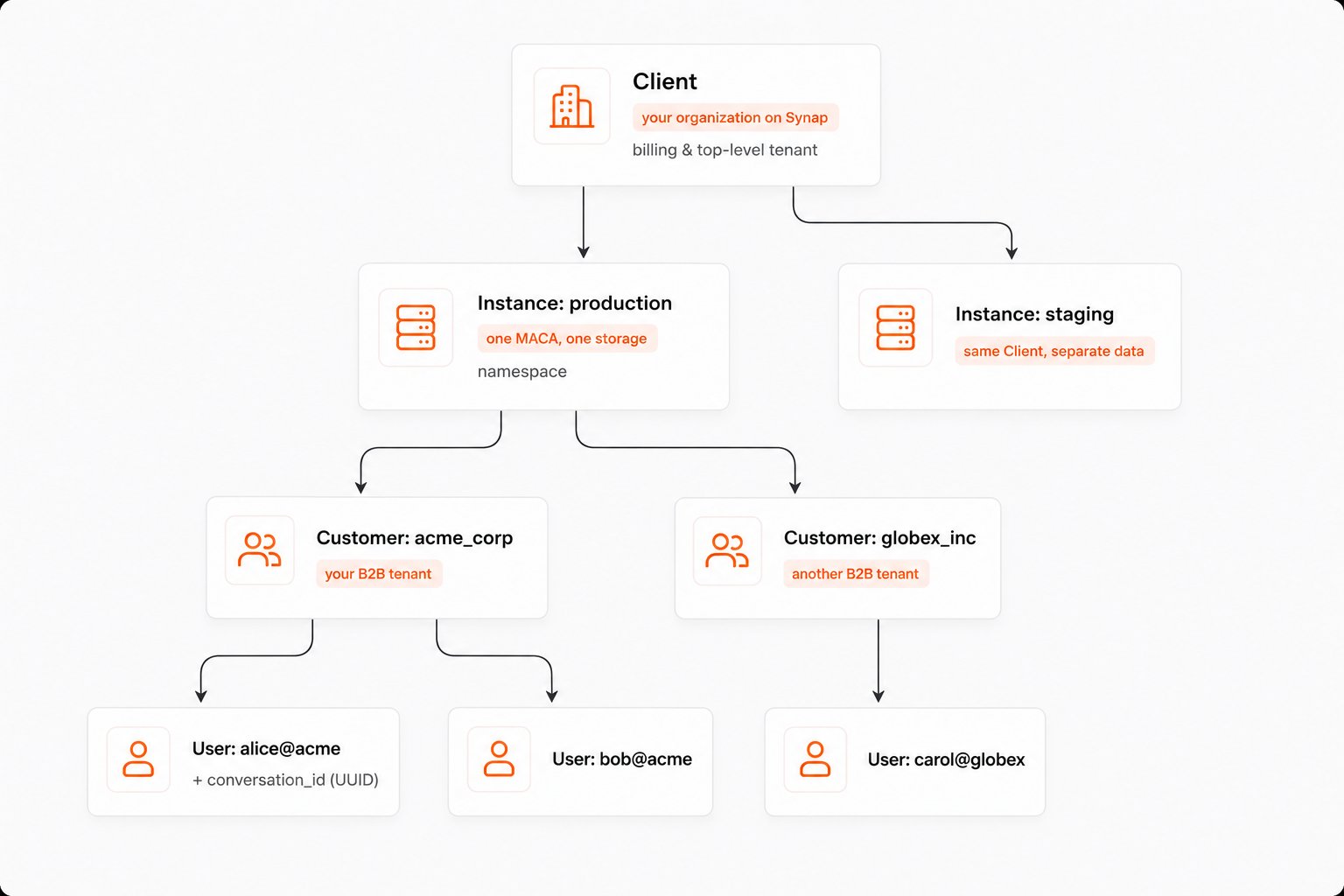
See Clients & Instances and Customers & Users for the full breakdown.
Key capabilities
Memory Extraction
Automatically extract structured knowledge from raw conversations and documents. Synap identifies and categorizes facts, preferences, episodes, emotions, and temporal events without any manual annotation.
Multi-Scope Memory
Isolate memories at the right boundary. Synap supports a hierarchical scope chain (User, Customer, Client, and World) so personal preferences stay personal while shared knowledge is accessible to everyone who needs it.
Configurable Storage
Memories are stored in both vector and graph storage engines. Vector storage powers semantic similarity search. Graph storage captures relationships between entities. You configure the balance through the Memory Architecture Config.
Context Compaction
Long conversations don’t need to be sent in full every time. Synap compacts conversation context into structured summaries, reducing token usage while preserving the information your agent actually needs.
Entity Resolution
References to the same person, place, or thing across different conversations are automatically resolved. “John”, “John Smith”, and “my manager” all map to a single canonical entity, building a coherent knowledge graph over time.
Real-Time Streaming
For latency-sensitive applications, the SDK supports low-latency streaming. Stream memories in and context out without waiting for full round-trips.
Architecture at a glance
Synap follows a clean separation of concerns across three layers: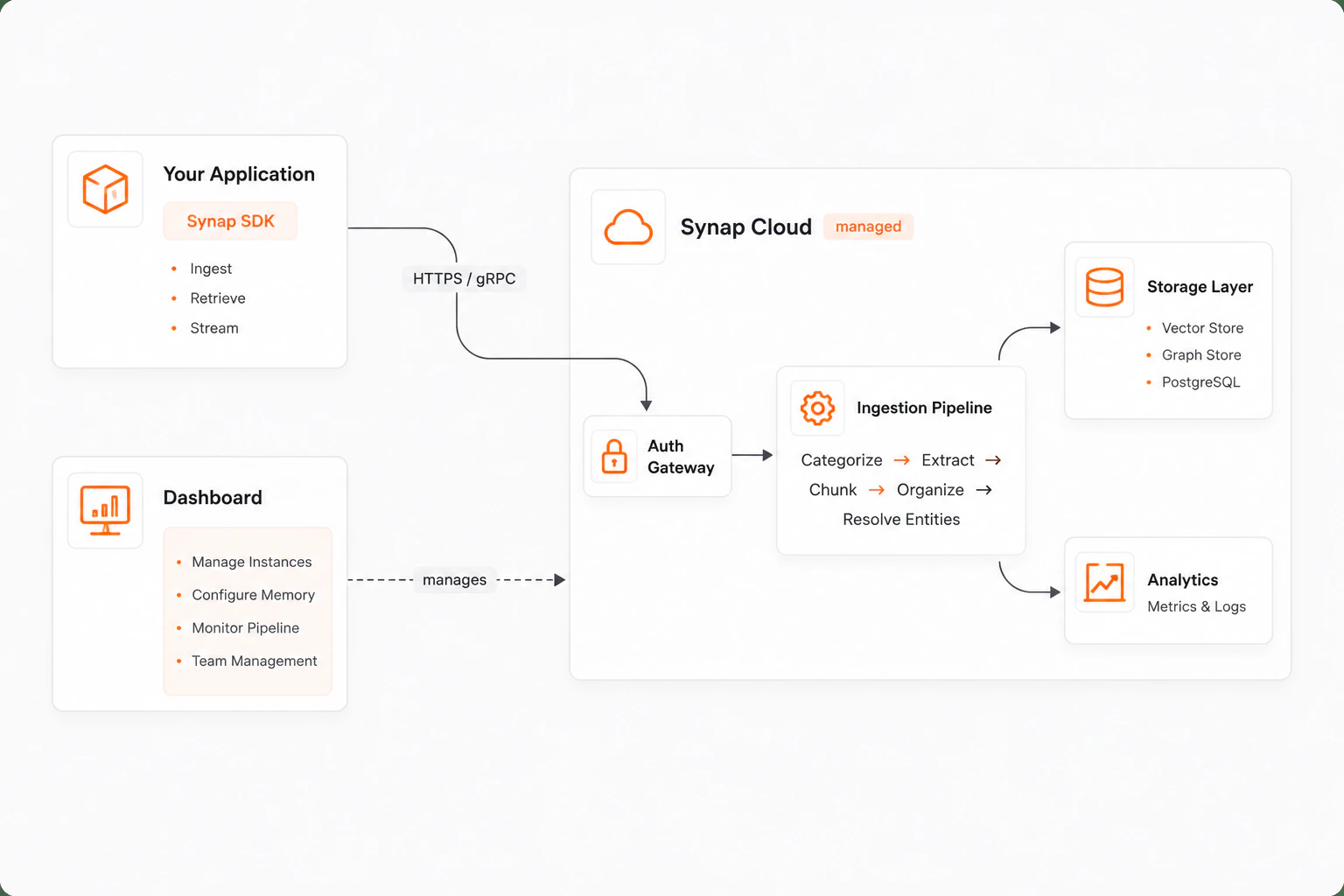
Key components
The memory lifecycle
Every piece of content that enters Synap follows a structured pipeline:1
Ingestion
Raw content (conversations, documents, notes) is submitted through the SDK. Each ingestion is tagged with a scope (user, customer, etc.) and document type.
2
Categorization
The pipeline classifies the content type and determines which extraction strategies to apply based on the Memory Architecture Config.
3
Extraction
Structured knowledge is extracted: facts (“User lives in San Francisco”), preferences (“User prefers dark mode”), episodes (“User signed up last Tuesday”), emotions (“User was frustrated with billing”), and temporal events.
4
Entity Resolution
Extracted entities are resolved against the existing knowledge graph. New entities are auto-registered at the appropriate scope. The resolution follows the scope chain: User > Customer > Client > World.
5
Storage
Resolved memories are stored in both vector storage (for semantic search) and graph storage (for relationship traversal). Storage configuration is driven by MACA.
6
Retrieval
When your agent needs context, Synap retrieves and ranks relevant memories from both storage engines, respecting scope boundaries and applying the configured retrieval strategy.
The entire pipeline runs asynchronously. When you call
sdk.memories.create(), the SDK returns immediately with an ingestion ID. You can track ingestion status through the SDK or Dashboard.Next steps
Quickstart
Get up and running with Synap in under 10 minutes.
Installation
Detailed installation instructions, environment configuration, and dependency options.
Authentication
Understand Synap’s zero-trust authentication model, API keys, and credential management.
Core Concepts: Scopes
Deep dive into memory scoping and isolation boundaries.
Migrating from another tool?
Moving from Mem0, Zep, Letta, or Supermemory? Map your existing memory onto Synap and backfill cleanly.