

Where to start, depending on what you’re trying to do
- “I just want to try Synap without installing anything”: open the live playground and exercise the SDK from your browser.
- “I want to see Synap working in 10 minutes”: you’re on the right page. Stay here.
- “I want to wire Synap into a real FastAPI / Flask / Next.js / Django app”: head to Setup & Integration after you finish this page.
- “I want a complete end-to-end tutorial with an LLM, conversation routing, and graceful degradation”: go to First Integration. That tutorial assumes you’ve finished this Quickstart.
- “I use a framework (LangChain, LangGraph, Vercel AI SDK, CrewAI, LiveKit, Claude Agent SDK, Pipecat…)”: you won’t call most of these APIs directly. Skim this page for the mental model, then jump to your integration.
- “I’m moving from another memory layer (Mem0, Zep, Letta, Supermemory)”: skim this page for the mental model, then follow Migrate to Synap to map and backfill your existing data.
The five identifiers, at a glance
Everything in Synap is scoped by these. You’ll see them throughout this page:
For the full model, see Identifiers & Scopes.
TL;DR: Hello World
If you already have an API key, this is everything you need to ingest one memory and read it back. This default is for a B2C app: one user (you), identified byuser_id alone:
Two things to know if you are reading the JavaScript tab. Method names keep
Python’s spelling, so it is
wait_for_completion, not waitForCompletion,
which is undefined and fails at the call site. Arguments are the opposite:
{ user_id } and { userId } both work everywhere. Full list of differences:
How it differs from the Python SDK.Building a multi-tenant B2B app? add customer_id
Building a multi-tenant B2B app? add customer_id
On a B2B instance, every user lives under a tenant, so each call also carries a See B2C vs B2B below to tell which kind of instance you have.
customer_id. Pass it on both ingestion and retrieval:B2C vs B2B: which one are you?
Synap supports two tenancy shapes, and your Instance is set to exactly one of them via the User Relationship setting in the Dashboard (Instance Settings). This single choice decides whethercustomer_id is required on every call or refused on every call.
- B2C (personal app): one tier of users, no tenant above them. You identify each user by
user_idonly.customer_idis not accepted: send it and the call fails with HTTP 400. The customer-scope fetch (sdk.customer.context.fetch) is not available on a B2C instance either. This is the right model when your agent’s users are individuals (a companion app, a personal assistant, your first hobby agent, one user: you). - B2B (multi-tenant): your customers are organizations, each containing many users. Every user is scoped under a
customer_id, so you pass bothuser_idandcustomer_idon every call. Memories tagged at customer scope are shared across that tenant’s users; user-scoped memories stay private to the user.
GET /api/v1/auth/whoami, which returns user_context_isolation: equals_customer means B2C, strict means B2B. If it’s a personal/B2C relationship, send user_id alone and never customer_id (the examples in the main flow below). If it’s a B2B relationship, add customer_id to every call (the B2B accordions). When in doubt, the default for a brand-new personal agent is B2C.
This page’s main walkthrough uses the B2C shape. Each step includes a B2B accordion showing the extra customer_id.
Prerequisites
- Python: 3.11 or later, with
piporpoetry - JavaScript / TypeScript: Node 20 or later, with
npm,pnpm, oryarn - A Synap account (sign up at synap.maximem.ai)
1
Set Up Your Client
A Client is your organization’s top-level account in Synap. Every instance belongs to a Client. You have two options:Create a new Client
- Log in to the Synap Dashboard
- Click Create Client, enter your organization name, and confirm
Skipping this step is not possible: every instance must belong to a Client. If you are unsure whether your organization already has one, check with your team before creating a new Client.
2
Create an Instance
An instance is an isolated memory environment for your agent. Each instance has its own storage, configuration, and scope hierarchy.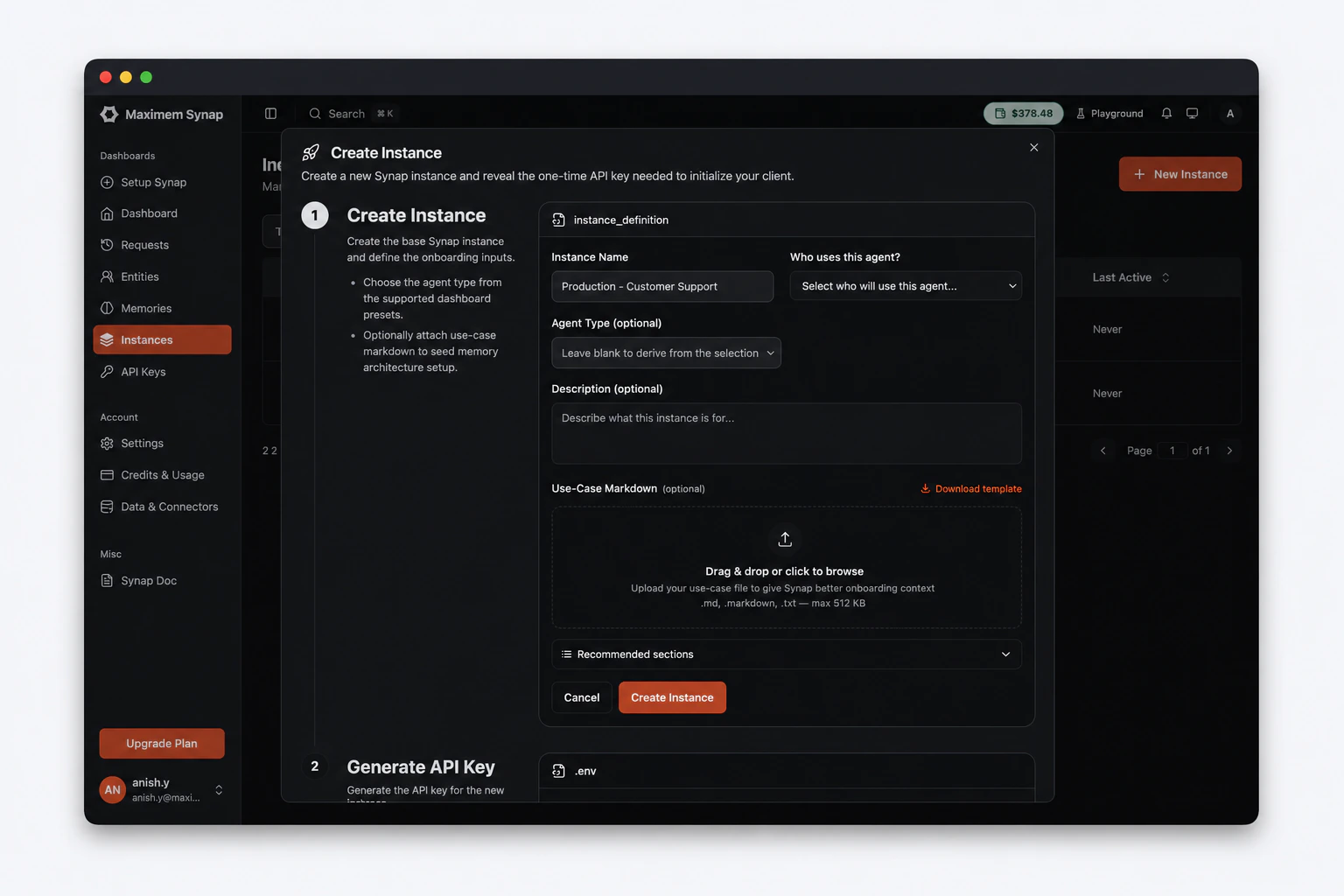
- In the Dashboard, navigate to Instances in the sidebar
- Click Create Instance
- Fill in the instance form:
- Name (required): A human-readable label, e.g.
"My First Agent" - Agent Type (optional): The kind of agent you’re building (e.g.
B2B Customer Support,B2C Companion,Workflow Agent). It seeds a sensible starting memory configuration for that use case. Skip it and Synap applies a default; you shape memory more precisely with the Use-Case Markdown file below. - Use-Case Markdown (required): Upload a
.mdfile describing your agent’s use case (see below). It cannot be replaced after the instance is created.
- Name (required): A human-readable label, e.g.
Use-Case Markdown
The Use-Case Markdown file tells Synap what your agent does, who it serves, and what it should remember. Synap uses it to generate an optimized Memory Architecture Configuration (MACA) for your instance, so the more detail you provide, the better your memory extraction and retrieval will be from day one.Click Download Template in the Create Instance form, fill in at least the three required sections (Agent Objective, Target Users, Task Examples), and upload the file (.md, .markdown, or .txt, max 512 KB) before clicking Create.For the full template and section-by-section guidance, see Writing a Use-Case Markdown File.3
Generate an API Key
- In the Dashboard, go to your newly created instance
- Open the API Keys section on the instance detail page
- Click Generate API Key
- Give it a label (e.g., “development”) and click Generate
- Copy the key immediately: it starts with
synap_
4
Install the SDK
Now that you have a key, install the Synap SDK.Verify the installation:
Streaming is enabled by default in Python: no extra install needed. In
JavaScript the gRPC stream is opt-in and needs two optional peers, which
you can add later: see Installation.
5
Initialize the SDK
Set your API key and instance id as environment variables. The Dashboard shows both together:That’s it. The SDK reads You should see
SYNAP_INSTANCE_ID is optional: initialize() resolves the instance from your API key either way. Set it as an environment variable rather than passing instance_id= to the constructor, which makes the id the identity and breaks key rotation. See Authentication.Create a new file:SYNAP_API_KEY from your environment automatically.Run the script:Synap SDK initialized successfully!On Windows,
python is sometimes intercepted by the Microsoft Store app execution alias and fails with "Python was not found". Use py (the Windows Python launcher) instead: it ships with every official Python installer. The same applies to pip: py -m pip install maximem-synap always works regardless of PATH configuration.6
Ingest Your First Memory
Now let’s send a conversation to Synap. The ingestion pipeline will automatically extract structured knowledge: facts, preferences, entities, and more.
The SDK returns immediately with an ingestion ID. The pipeline processes the content asynchronously, extracting:
Building a multi-tenant B2B app? add customer_id
Building a multi-tenant B2B app? add customer_id
On a B2B instance, add
customer_id to scope this user under a tenant:- Fact: User is located in San Francisco
- Preference: User loves warm weather
- Temporal event: User is planning a trip to Japan next month
- Entities: San Francisco, Japan (resolved and linked in the knowledge graph)
Ingestion is asynchronous by design. The
memories.create() call returns as soon as the content is accepted by Synap Cloud. Processing typically completes within a few seconds, but complex documents may take longer.7
Retrieve Context
Once memories are ingested and processed, you can retrieve relevant context. Synap searches across both vector and graph storage, ranks results by relevance, and respects scope boundaries.The ingestion above used
Example output:You can now inject this context into your LLM’s system prompt or conversation history to create a personalized, context-aware experience.
Match the retrieval interface to the scope you ingested at. Synap has three scope-specific retrieval methods, and a memory is only returned through the one that matches how it was tagged:
A memory tagged with multiple identifiers is retrievable through any matching interface. A conversation is registered only by
record_message(...); passing a conversation_id in memories.create(metadata=...) does not register it, because metadata is stored alongside the memory but is not indexed for scope resolution. Calling conversation.context.fetch with a brand-new, unregistered conversation_id returns empty results by design: there is no conversation row to anchor scope resolution. See Context Fetch for the full reference.B2C vs B2B scoping. On B2C instances there is no customer dimension, so you send
user_id alone; passing customer_id is rejected with HTTP 400. That’s the example below. On B2B instances, memory is scoped to a (user_id, customer_id) pair, so when you fetch at user scope you must pass both identifiers; omitting customer_id raises an error.user_id="user_123", so retrieve at user scope (B2C, user_id only):JavaScript returns the raw response, where a collection the server
omitted is
undefined rather than an empty list. Python’s Pydantic model
always gives you a list. That is why the JavaScript tab writes
context.facts ?? []: reading context.facts.length on a response with no
facts throws.Building a multi-tenant B2B app? add customer_id
Building a multi-tenant B2B app? add customer_id
On a B2B instance you ingested with
customer_id="acme_corp", so pass both identifiers at user scope:8
Clean Up
Always shut down the SDK cleanly to flush any pending operations and release resources:The complete script looks like this:
The JavaScript cache does not survive the restart. Python caches to
SQLite, so the next run reuses it; JavaScript caches in memory. A cache
miss is a metered retrieval, so short-lived processes and serverless
functions make more billed fetches than the equivalent Python deployment.
9
Close the loop: retrieve → generate → ingest
A real agent doesn’t ingest in isolation. It fetches relevant context, calls the LLM with that context, and ingests the resulting turn back into memory. That is the atomic unit of using Synap. Here’s the minimum-viable version with OpenAI (B2C,
For a fully-worked FastAPI + OpenAI app (including error handling, graceful degradation, and conversation routing), continue to the First Integration guide.
user_id only):conversation_id must be a valid UUID: the server rejects non-UUID strings. Generate one per chat thread (uuid.uuid4() in Python, crypto.randomUUID() in JavaScript) and reuse it across that thread’s turns.The
metadata={"conversation_id": ...} on memories.create is for your own bookkeeping: it travels with the memory but is not indexed, so it does not register the conversation or affect scope resolution. The conversation is registered solely by record_message(...) in step 1.Building a multi-tenant B2B app? add customer_id
Building a multi-tenant B2B app? add customer_id
On a B2B instance, thread
customer_id through every call alongside user_id:What’s next?
You’ve successfully ingested your first memory and retrieved context. Here’s where to go from here:Core Concepts
Understand the full Synap architecture: scopes, memory types, entity resolution, and the ingestion pipeline.
SDK Configuration
Configure the SDK for your production environment: timeouts, retries, logging, and credential management.
Memory Architecture
Learn how to configure what gets extracted, how it’s stored, and how retrieval ranking works.
Production Checklist
Security, performance, monitoring, and reliability best practices before going live.