

Overview
Before your application can ingest memories or retrieve context, you must initialize the Synap SDK. Initialization validates your API key, establishes a secure connection, and prepares local caching. The SDK follows a strict initialize, use, shutdown lifecycle.Basic Initialization
The simplest way to get started requires only yourSYNAP_API_KEY environment variable. Generate an API key from the Synap Dashboard and set it in your environment.
What initialize() Does
When you call initialize(), the SDK performs the following steps in order:
1
Resolve API Key
The SDK picks up the API key from the
api_key= argument (if passed) or the SYNAP_API_KEY environment variable.2
Resolve Identity
The SDK asks Synap who the key belongs to. Your API key is the authoritative identity: this is why you never have to plumb an instance or client ID through your application yourself.
3
Connection Establishment
The SDK opens an authenticated connection to Synap and, if real-time streaming is enabled, an additional streaming channel.
4
Cache Initialization
If a
cache_backend is configured (default: sqlite), the SDK sets up the local cache database at the storage path, namespaced to the client the key resolved to.Identity is resolved here, at
initialize(), not when you construct the SDK. Construction only records which API key this SDK will use, and that key is what decides whether you get a new SDK or the existing one for that credential (see Singleton Pattern).Initialization with Custom Configuration
Pass anSDKConfig object to customize SDK behavior at construction time.
initialize() signature and parameters, see the API Reference.
Singleton Pattern
The SDK keeps one live instance per API key. Construct it twice with the same key (from two modules, or on every request) and the second construction hands you the SDK that already exists instead of opening a second set of connections and caches.sdk_a is sdk_b evaluates to False. The two objects share their internal state; they are not literally the same object. Use the SDK, don’t identity-check it.SYNAP_INSTANCE_ID in the environment is fine. instance_id= in the constructor is not. They behave differently on purpose.The environment variable records which instance you are on and leaves the SDK keyed on your credential, so two keys stay independent. The constructor argument makes the id the identity: a second key used under it is silently discarded, and rotating a key that way has no effect. The dashboard gives you both variables to paste, and your API key already determines which instance you reach either way, so there is nothing to gain from the constructor form.Running multiple API keys in one process
Construct the SDK with different API keys and you get independent SDKs, each with its own credentials, connections, caches and short-term stores. This is the supported pattern for a backend serving several tenants, and for pointing one SDK at staging and another at production inside a single process.initialize() resolves the instance from your API key, and the SDK answers to that instance ID from then on, so constructing with it returns the same live SDK rather than standing up a second set of connections, caches and streams for one instance.
Two keys, one instance
The one case that gives you duplication rather than reuse is two different API keys issued against the same instance. Each key is its own identity, so each gets its own SDK: two Listen streams, two anticipation caches and two short-term stores, all for one instance. That is deliberate. Merging them would mean one caller transacting on the other’s credential, which would make key rotation, revocation and per-key attribution all silently wrong. The cost is that short-term context recorded through one SDK is not visible to the other until the server round-trips it, and that the pair consumes two of the instance’s concurrent streams.initialize() logs a warning when it detects this, naming the instance, so it does not stay invisible. Unless you specifically want two separately-authenticated SDKs, use one API key per instance per process.
Rotating a key in a long-running process
An SDK keeps the credential it was constructed with for its whole life, so rolling a new key into your secrets manager does not by itself change what a running process authenticates as. What happens next depends on how you construct:
If you construct by
instance_id, call await sdk.shutdown() before reconstructing (that releases the slot, so the next construction builds a fresh SDK on the new key), or restart the worker. Do it before revoking the old key, or in-flight requests start failing authentication.
Two keys issued against the same instance are one identity only on the
instance_id path. Constructed the usual way, with api_key=, each key gets its own SDK authenticating as itself, which is why rotation on that path needs nothing special.Overriding the Singleton for Testing
In test environments, use_force_new=True to bypass the singleton entirely and build a fresh SDK on every construction, even for a key that already has one.
_force_new is intended for tests and for framework adapters that manage SDK lifetime themselves. You do not need it to run several tenants in one process, because different API keys already give you separate SDKs. Reaching for it in application code means opting out of connection and cache reuse, so each extra SDK pays for its own connections, its own streaming channel, and its own cache handles.Environment Variable Initialization
For CI/CD, containers, serverless, and production, just set the environment variable:SYNAP_API_KEY automatically and resolves the instance ID from the server.
The configure() Method
If you need to adjust configuration after constructing the SDK but before calling initialize(), use the configure() method.
SDK Lifecycle
The SDK follows a strict three-phase lifecycle: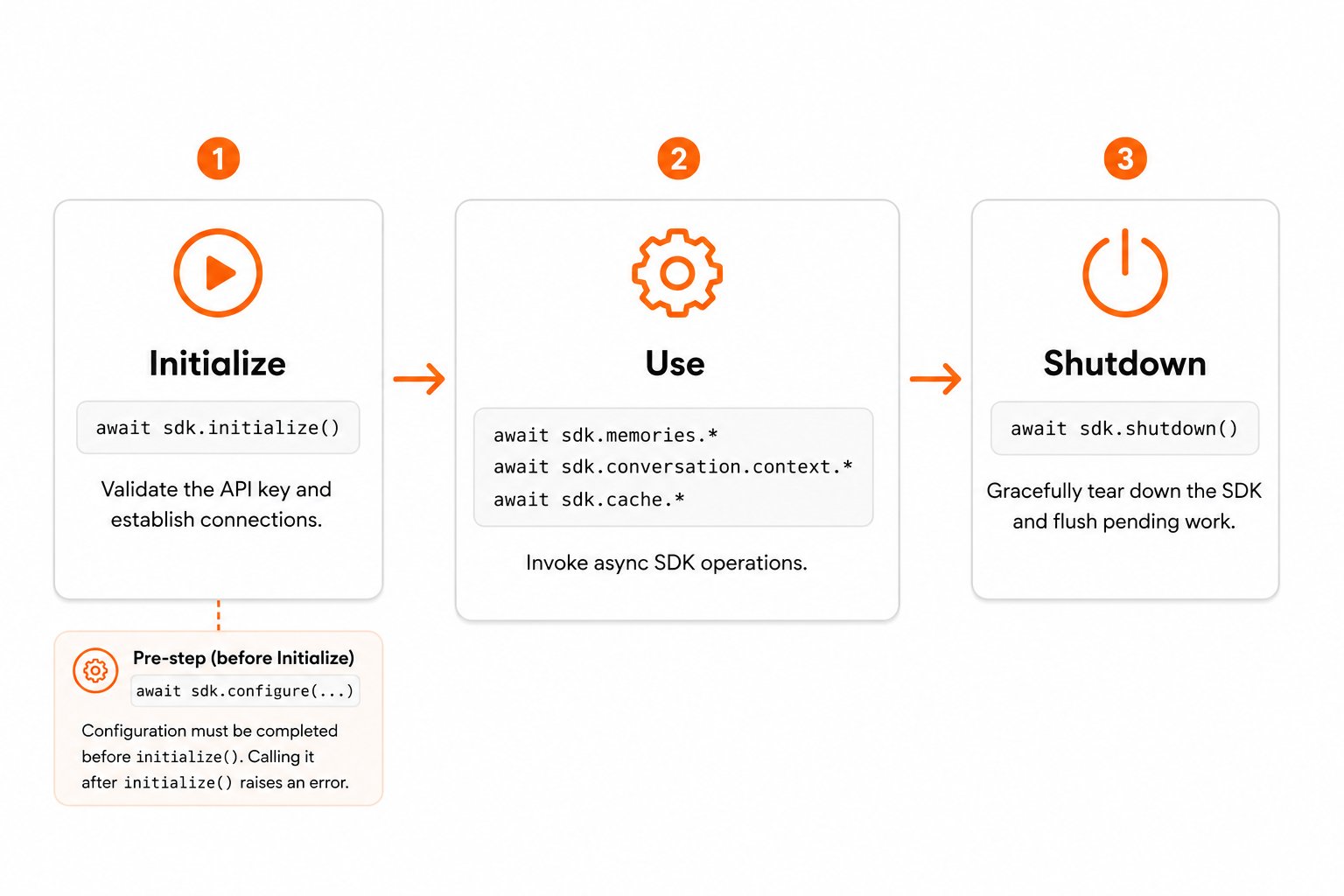
1. Initialize
Callawait sdk.initialize() to validate the API key and establish connections.
2. Use
Invoke SDK operations:sdk.memories.*, sdk.conversation.context.*, sdk.cache.*, etc. All operations are async and must be awaited.
3. Shutdown
Callawait sdk.shutdown() to gracefully tear down the SDK.
Initialize and Shut Down Cleanly
For cleaner lifecycle management, wrap your application logic in atry/finally so shutdown() always runs, even if an error is raised mid-flight.
Full Example with Error Handling
The following example demonstrates a production-ready initialization pattern with comprehensive error handling.Next Steps
Ingesting Memories
Send conversations and documents into Synap’s memory system.
Retrieving Memories
Query contextual memories for your AI agent.
SDK Configuration
Explore all configuration options in detail.
JavaScript: namespaced and flat surfaces
The client exposes two call styles against the same instance. Namespaced methods mirror the Python SDK one to one, so the same call shapes work in both languages. They return the raw snake_case response.customer_id depends on your instance. On a B2B instance
(user_context_isolation = strict) it is required. On a B2C instance
(equals_customer) it is not accepted: the user_id is the whole
identity, and a call carrying a customer_id is rejected. The SDK checks this
at the call site once initialize() has learned which mode you are on, so the
mistake surfaces immediately rather than as a silently empty fetch. See
B2C vs B2B.How it differs from the Python SDK
The two SDKs share one behaviour contract and the same method set, so a Python example translates call for call. Seven things still differ, and every one of them has bitten someone.Method names stay snake_case. There are no camelCase aliases.
Method names stay snake_case. There are no camelCase aliases.
wait_for_completion, record_message, stop_listening, batch_create,
get_context_for_prompt, create_from_file. All of them keep Python’s
spelling so a snippet ports without renaming.memories.waitForCompletion is undefined, not an alias, so the mistake
surfaces as is not a function at the call site rather than at import.{ user_id } and { userId } are equally valid.Context collections can be absent, so default them before reading
Context collections can be absent, so default them before reading
Python returns a Pydantic model whose Reading
facts, preferences, episodes,
emotions and temporal_events always exist, empty at worst. The
namespaced JavaScript surface returns the raw JSON, where a collection the
server omitted is undefined.context.facts.length on a response with no facts throws.The local cache does not survive a restart
The local cache does not survive a restart
Python caches to SQLite (
cache_backend defaults to "sqlite"), so a
restarted process keeps its cache. JavaScript caches in memory.This is a billing difference, not only a latency one: a cache miss is a
metered retrieval. Long-lived servers are barely affected. Short-lived
processes and serverless functions will see more cloud fetches than the
equivalent Python deployment.Branch on error.code, not instanceof
Branch on error.code, not instanceof
Every error carries a stable
.code. With a dual ESM/CJS dependency graph a
consumer can end up holding two copies of the same error class, and
instanceof then fails against the copy it was not built from.instanceof is made to work across copies as well, but .code is the
documented contract and the one to rely on at a package boundary.Five configure() options are accepted and ignored
Five configure() options are accepted and ignored
storage_path, cache_backend, session_timeout_minutes, log_level and
logger exist in ConfigureOptions so a config object can be shared
between the two SDKs without a type error. They do nothing here: there is no
SQLite backend and no global logger to replace.Timeouts and the retry policy are real, and their defaults match Python
exactly: connect 5s, read 30s, write 10s, 3 attempts, backoff base 1s
capped at 10s.flattenContextItems normalises the text field
flattenContextItems normalises the text field
Each memory type names its text differently: facts, preferences and
temporal events use Python has no free-function equivalent. Its
content, episodes use summary, emotions use
context. Concatenating the collections and reading .content across
them is wrong in both languages.JavaScript ships a helper that flattens every collection and normalises the
text into .memory:format_for_prompt is a method
on the cross-scope sdk.fetch() result, not on a scoped fetch.Only the anticipation stream is Node-only
Only the anticipation stream is Node-only
Every HTTP path (ingestion, retrieval, profiles, credits) runs on Edge,
Workers and in the browser.
listen() is gRPC, so it needs Node and the two
optional peers. Importing the SDK in an Edge route stays safe; only the
stream is unavailable there. See
Where it runs.